TN Board 12th Computer Applications Important Questions Chapter 3 Introduction to Database Management System

TN State Board 12th Computer Applications Important Questions Chapter 3 Introduction to Database Management System

Question 1.
Write a any two notable features of good DBMS.
Answer:

  • Giving protection to data.
  • User-friendly for users are notable features of good DBMS.

Question 2.
What will be provides by DBMS?
Answer:
The DBMS provides users and programmers with a systematic way to create, retrieve, update and manage data.

Question 3.
What are various access methods in file system?
Answer:
The various access methods in file system were indexed, Random and sequential access.

Samacheer Kalvi TN State Board 12th Computer Applications Important Questions Chapter 3 Introduction to Database Management System

Question 4.
What is mean by Data Duplication?
Answer:
Data Duplication mean, same data is used by multiple resources for processing, thus created copies of same data wasting the spaces.

Question 5.
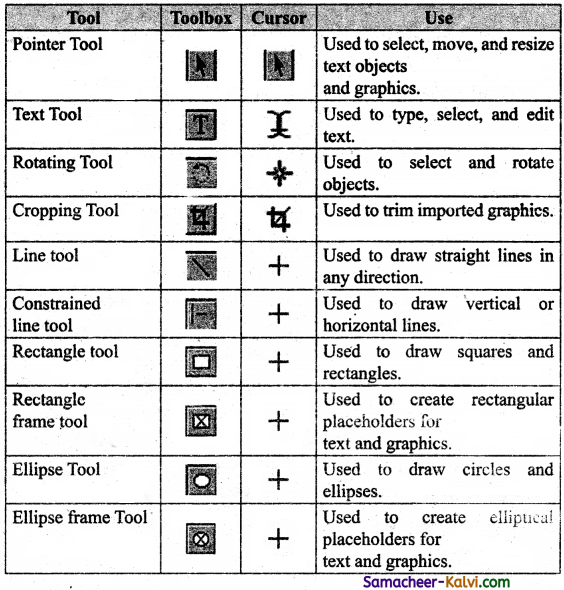
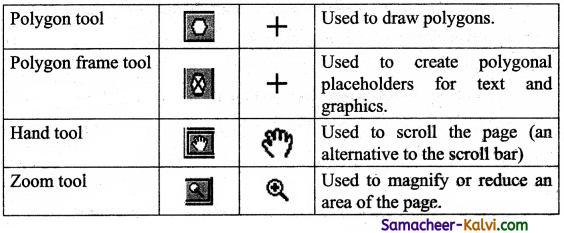
What is Atomicity?
Answer:
An Atomicity follows the thumb rule “All or Nothing”, while updating the data in database for the user performing the update operation.

Question 6.
What is called update operation?
Answer:
The update operation is called as transaction and it either commits or aborts.

Question 7.
What is consistency?
Answer:
Consistency ensures that the changes in data value to be constant at any given instance. This property helps in the successful transaction.

Samacheer Kalvi TN State Board 12th Computer Applications Important Questions Chapter 3 Introduction to Database Management System

Question 8.
What is known as concurrent Transactions?
Answer:
When multiple users do the transactions by accessing same object at the same time, the transaction is known as concurrent transaction.

Question 9.
What is Durability?
Answer:
Durability is defined as the system’s ability to recover all committed transactions during the failure of storage or the system.

Question 10.
What is Hierarchical Database Model?
Answer:
The Hierarchical Database Model was IMS (Information Management System), In this model each record has information in parent/child relationship like a tree structure.

Question 11.
What is advantage and Disadvantage of Hierarchical Database Model?
Answer:
Hierarchical Database Model have many advantages like less redundant data, efficient search, data integrity and security.
Disadvantage of this model has few limitations like complex to implement and difficultly in handling many to many relationships.

Samacheer Kalvi TN State Board 12th Computer Applications Important Questions Chapter 3 Introduction to Database Management System

Question 12.
What is Network database Model?
Answer:
Network database model is similar to Hierarchical model except that in this model each member can have more than one owner. The many to many relationship are handled in a better way.

Question 13.
What are three database components identified by Network model?
Answer:
Network model identified the three database components, Network schema, Sub schema, and Language for data management.

Question 14.
What is major advantage and limitation of Network Model?
Answer:
The Major advantages of this model is the ability to handle more relationship types, easy data access, data integrity and Independence.
The limitation of network model is difficulty in design and maintenance.

Question 15.
Define Relational Model.
Answer:
Relational model is defined with two terminologies Instance and schema.

Samacheer Kalvi TN State Board 12th Computer Applications Important Questions Chapter 3 Introduction to Database Management System

Question 16.
What are incorporates the object-oriented database model?
Answer:
The Object-oriented database model incorporates the combination of Object Oriented Programming (OOP’s) concepts and database technologies.

Question 17.
Define two terminologies of Relational Model.
Answer:
The two terminologies of Relational Model are

  • Instance – A table consisting of rows and columns.
  • Schema – Specifies the structure including name and type of each column.

Question 18.
What are advantage of object – oriented database model?
Answer:

  • The object-oriented database model efficiently manages large number of different data types.
  • Moreover complex behaviours are handled efficiently using OOP’s concepts.

Samacheer Kalvi TN State Board 12th Computer Applications Important Questions Chapter 3 Introduction to Database Management System

Question 19.
What is known as Relational Database?
Answer:
Any database whose logical organization is based on relational data model is known as relational database.

Question 20.
What are basic RDBMS concept?
Answer:
The basic RDBMS concept includes Database, Tables, Tuple, Attribute, Schema, and Key.

Question 21.
What is a Table?
Answer:
A table is the simple representation of relations. The true relations cannot have duplicate rows where as the table can have.

Question 22.
What is a Column?
Answer:
Table can be divided into smaller parts, in terms of column. Each column is known a.s Attributes.

Samacheer Kalvi TN State Board 12th Computer Applications Important Questions Chapter 3 Introduction to Database Management System

Question 23.
What is a Row?
Answer:

  • A single entry in a table is called as Row. Set of related data’s are represented in a row or tuple.
  • The Horizontal entity in a table is known as row or Record.

Question 24.
What is a primary key?
Answer:
A primary key is a special relational database table column designated to uniquely identify all table records.

Question 25.
What is a secondary key?
Answer:
An entity may have one or more choices for the primary key. One is selected as the primary key.
Those not selected are known as secondary keys.

Question 26.
What is composite Primary Key?
Answer:
A Primary Key which is a combination of more than one attribute is called a Composite Primary Key.

Samacheer Kalvi TN State Board 12th Computer Applications Important Questions Chapter 3 Introduction to Database Management System

Question 27.
What is Foreign Key?
Answer:
A Foreign Key is a copy of the whole of its parent primary key.
Foreign Key values do not have to be unique. Foreign Keys can also be null.

Question 28.
What is super key?
Answer:
An attribute or group of attributes, which is sufficient to distinguish every tuple in the relation from every other one is known as super key.

Question 29.
What is Composite or Compound Key?
Answer:
A Key with more than one attribute to identify rows uniquely in a table is called composite key. This is also known as compound key.

Samacheer Kalvi TN State Board 12th Computer Applications Important Questions Chapter 3 Introduction to Database Management System

Question 30.
What are basic concepts of ER Model?
Answer:

  • Entity or Entity type
  • Attributes
  • Relationship

Question 31.
What is an Entity?
Answer:
An Entity can be anything a real-world object or animation which is easily identifiable by anyone even by a common man.

Question 32.
What are types of Entity?
Answer:

  • Strong Entity,
  • Weak Entity,
  • Entity Instance.

Question 33.
What is strong Entity?
Answer:
A strong entity is the one which does not depend on any other entity on the schema or database and a strong entity will have a primary key with it.

Samacheer Kalvi TN State Board 12th Computer Applications Important Questions Chapter 3 Introduction to Database Management System

Question 34.
What is Weak Entity?
Answer:
A Weak Entity is dependent on other entities and it does not have any primary key.

Question 35.
What is Instance?
Instance are the values for the entity.

Question 36.
What is Attribute?
Answer:
An attribute is the information about that entity and it will describe, quantify, qualify, classify, and specify and entity.

Question 37.
What is key Attribute?
Answer:
A key attribute describes a unique characteristic of an entity.

Samacheer Kalvi TN State Board 12th Computer Applications Important Questions Chapter 3 Introduction to Database Management System

Question 38.
What is Simple Attribute?
Answer:
The simple attributes cannot be separated it will be having a single value for their entity.

Question 39.
What is Composite Attributes?
Answer:
The Composite Attributes can be sub divided into simple attributes without change in the meaning of that attribute.

Question 40.
What is single valued Attributes?
Answer:
A single valued attribute contains only one value for the attribute and they don’t have multiple numbers of values.

Question 41.
What is Multi valued Attributes?
Answer:
A Multivalued attribute has more than one value for that particular attribute.

Samacheer Kalvi TN State Board 12th Computer Applications Important Questions Chapter 3 Introduction to Database Management System

Question 42.
What are components of ER Diagram?
Answer:
The components of ER Diagram are Entities, Attributes and Relationship.

Question 43.
Who was founded MySQL?
Answer:
MySQL is a database management system founded by Monty Widenius and is named after his daughter name My.

Question 44.
What are responsible have Database Administrator?
Answer:
Database Administrator (DBA), who takes care of Configuration, Installation, Performance, Security and Data Backup.

Question 45.
What are the skills needed by Database Administrator (DBA’s)?
Answer:
DBA’s posses the skills’on database design, database queries, RDMS, SQL and networking.

Samacheer Kalvi TN State Board 12th Computer Applications Important Questions Chapter 3 Introduction to Database Management System

Question 46.
Write the types of software tools in the market to design the database.
Answer:
Many open source tools are available in the market to design the database in a better and efficient manner.
PhPMyAdmin is a most popular for web Administration. The Popular Desktop Application tools are MySQL workbench and HeidiSQL.

Question 47.
What is known as Designing of databases?
Answer:
The process of creating, implementing and maintaining the enterprise data in a system is known as Designing of databases.

Question 48.
Write the SQL DCL commands.
Answer:

  • Grant – Used to give permission to specific users on specific databases.
  • Revoke – Used to take out permission from specific users on specific databases.

Question 49.
Write the syntax and example for sort the records in SQL.
Answer:
Syntax:
SELECT*FROM tablename ORDER BY columnname ASC/DESC;
Eg: SELECT*FROM studentdb ORDER ‘EY stadName ASC;

Samacheer Kalvi TN State Board 12th Computer Applications Important Questions Chapter 3 Introduction to Database Management System

Question 50.
Write the example for subquery in SELECT statement.
Answer:
Eg: SELECT*FROM studentdb WHERE studID
IN (SELECT studID FROM studentdb WHERE class = 12) ;

Question 51.
What is the DBMS mechanism used for data sharing?
Answer:

  • Concurrency control and Locking is the DBMS’s mechanism used for data sharing.
  • When the same data is shared among multiple users, proper access control is needed and privilege of changing the application data item is controlled through locking.

Question 52.
List the types of Attributes.
Answer:

  1. Key Attribute
  2. Simple Attribute
  3. Composite Attribute
  4. Single Valued Attribute
  5. Multi Valued Attribute

Question 53.
Write the attributes of Few entity an example of ER diagram.
Answer:
The attributes of few entity of parent, student and Teacher are
Parent – Name, Id, FName, LName
Student – Id, Name, FName, LName
Teacher – Name, Id, Phone, Address

Samacheer Kalvi TN State Board 12th Computer Applications Important Questions Chapter 3 Introduction to Database Management System

Question 54.
List the some commonly used Databases.
Answer:

  1. DB2
  2. MySQL
  3. Oracle
  4. PostgreSQL
  5. SQLite
  6. SQLServer
  7. Sybase

Question 55.
Write short note on create conceptual Design.
Answer:

  1. Create conceptual Design is the primary in database design, where detailed discussion about the creation of databases, tables, columns and data types is discussed based on the requirement of the application.
  2. As an end result the model is framed to attain the expectation of the application’s end user.
  3. MySQL provides performance dashboard, reports nad statistics regarding the design of database.

Question 56.
Explain the three major parts that create databases.
Answer:
The three major parts that forms a database are Tables, Queries and views.

  1. Tables: It Similar to an excel sheet containing multiple rows and columns.
  2. Queries: It is a question with multiple conditions posted to the database.
  3. Views: A set of stored queries.

Samacheer Kalvi TN State Board 12th Computer Applications Important Questions Chapter 3 Introduction to Database Management System

Question 57.
Write the SQL DDL commands.
Answer:
The SQL DDL (Data Definition Language) commands are:

  • CREATE – Used to create database or table.
  • ALTER – Modifies the existing structure of database or table.
  • DROP – Deletes a database or table.
  • RENAME – Used to rename an existing object in the database.
  • TRUNCATE – Used to delete all table records.

Question 58.
Write the SQL DML commands.
Answer:
The SQL DML (Data Manipulation Language) commands are

  • INSERT – Add new rows into database table.
  • UPDATE – Modifies existing data with newdata within a table.
  • DELETE – Deletes the records from the table.

Question 59.
Write the SQL TCL commands.
Answer:
The SQL TCL (Transaction Control Language) commands are

  • COMMIT – Permanent save into database
  • ROLLBACK – Restores database to original form.
  • SET TRANSACTION – Set the transaction properties such as read-write or read only access.
  • SAVE POINT – Used to temporarily save a transaction.

Samacheer Kalvi TN State Board 12th Computer Applications Important Questions Chapter 3 Introduction to Database Management System

Question 60.
Write a syntax and example to delete a existing record from the table using delete command with where condition.
Answer:
Syntax:
DELETE FROM tablename WHERE columnname = “Value”;
Eg 1:DELETE FROM’ studentdb WHERE’Rollno = “121008”;
Eg 2:DELETE FROM studentdb;
Eg 1: is to delete a record with rollno 121008 only
Eg 2 :is to delete a table as studentdb

Question 61.
Write the MySQL operators.
Answer:

  • Arithmetic Operators: +, -, *, /, ÷
  • Comparison Operators: =, !=, <, >, < >, >=, <=
  • Logical Operators: AND, ANY, BETWEEN, EXISTS, IN, LIKE, NOT, OR, UNIQUE

Question 62.
What are the rules should follow in sub Queries.
Answer:

  1. Sub Queries are always written within the parantheses.
  2. Always place the subquery on the right side of the comparison operator.
  3. ORDER BY clause is not used in subquery, since subqueries cannot manipulate the results internally.

Question 63.
Write the three database components of network model.
Answer:
The three database components of network model are

  • Network schema: This schema defines all about the structure of the database
  • Sub schema: It controls on views of the database for the user
  • Language: Basic procedure for accessing the database

Samacheer Kalvi TN State Board 12th Computer Applications Important Questions Chapter 3 Introduction to Database Management System

Question 64.
Write the features of RDBMS.
Answer:

  1. High availability
  2. High performance
  3. Robust Transactions and support
  4. Ease of management
  5. Less cost

Question 65.
Explain ER model relationship type.
Answer:
Three types of relationships are available and the Entity-Relationship(ER) diagram is based on the three types listed below.

One-to-One relationship:
Consider two entities A and B. One-to-one (1:1) relationship is said to exist in a relational database design, if 0 or 1 instance of entity A is associated with 0 or 1 instance of entity B, and 0 or 1 instance of entity B is associated with 0 or 1 instance of entity A.

One-to-Many relationship:
Consider two entities A and B. One-to-many (1 :N) relationship is said to exist in a relational database design, for 1 instance of entity A there exists 0 or 1 or many instances of entity B, but for 1 instance of entity B there exists 0 or 1 instance of entity A.

Many-to-Many relationship:
Consider two entities A and B. Many-to- many (M:N) relationship is said to exist in a relational database design, for 1 instance of entity A there exists 0 or 1 or many instances of entity B, and for 1 instance of entity B there exists 0 or 1 or many instance of entity A.

In reality one-to-one are in less usage, where as one-to-many and many-to- many are commonly used. However in relational databases, many-to-many are converted into one-to-many relationships.

Samacheer Kalvi TN State Board 12th Computer Applications Important Questions Chapter 3 Introduction to Database Management System

Question 66.
Write the ER diagram Notations.
Answer:
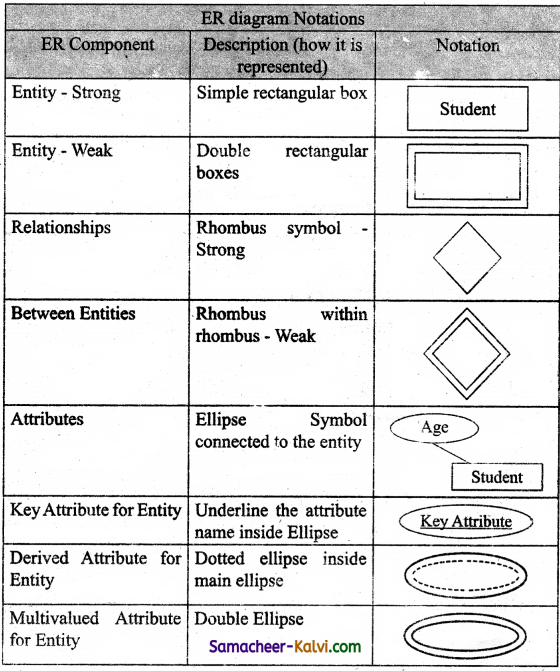
TN State Board 12th Computer Applications Important Questions Chapter 3 Introduction to Database Management System 1

Question 67.
Write about MySQL.
Answer:

  1. MySQL is a database management system founded by Monty Widenius and named after his daughter name My.
  2. Definition of database and SQL is mandatory to understand MvSOL.
  3. A database is defined as the structured collection of data. Eg: Photo gallery is a database which has collection of photos (data).
  4. SQL – Structured Query Language is not a database. It is a standardized language used to access the database and the data’s are processed to turn into efficient information.
  5. MySQL is open source software that allows managing relational databases.
  6. MySQL also provides the flexibility of changing the source code as per the needs.
  7. MySQL runs on multiple platforms like windows, Linux and is scalable, reliable and fast.
  8. MySQL is the most commonly used database in the world due to its ease of use.

Samacheer Kalvi TN State Board 12th Computer Applications Important Questions Chapter 3 Introduction to Database Management System

Question 68.
Draw a ER – diagram by parent, student and teacher.
Answer:
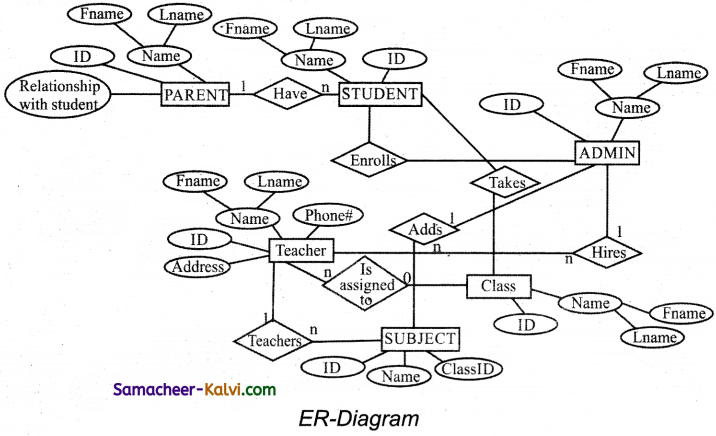
TN State Board 12th Computer Applications Important Questions Chapter 3 Introduction to Database Management System 2

Question 69.
Explain the newly create user account to MySQL.
Answer:

  1. In MySQL database, there exists a table named user. The newly created account must have an entity in this user table.
  2. The Admin creates an account with username and password.
  3. The user account is activated with various access rights like INSERT, SELECT and UPDATE.
  4. The user table has the following fields host, name, password, select_ priv, insert_priv and update_priv.
  5. A new user account is added with values to the user table using.
    MySQL> INSERT INTO user (host, name, password,
    select_priv, insert_priv, update_priv) VALUES (‘localhost’, ‘guest’, PASSWORD (‘abcl23’), ‘Y’, ‘Y’, ‘Y’);
    then, mysql>FLUSH PRIVILEGES; This command is executed after every new account creation. This command is similar to rebooting the server, so that newly created account and the access privilege are updated in this server.

Samacheer Kalvi TN State Board 12th Computer Applications Important Questions Chapter 3 Introduction to Database Management System

Question 70.
How can you install in MySQL in your computer?
Answer:
(i) Download and install XAMPP server software from Internet. Click the welcome page next button.
(ii) Select the required component along with MySQL component and click next button. Choose, the installation folder and click next button.
(iii) Click Next button in setup ready page. Installation get started.
(iv) After Installing click finish button and open the XAMMP control panel.
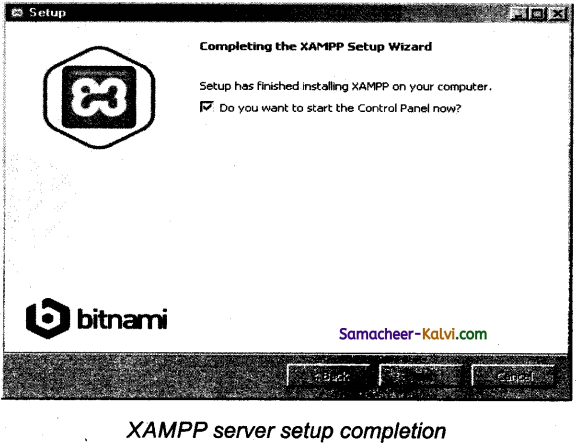
TN State Board 12th Computer Applications Important Questions Chapter 3 Introduction to Database Management System 3

(v) In the control panel start the Apache and MySQL services one by one.
(vi) Now open URL http: //local host/PhPMyAdmin URL in a browser to access MySQL database.

Samacheer Kalvi TN State Board 12th Computer Applications Important Questions Chapter 3 Introduction to Database Management System

Question 71.
Define Data Model and list the types of data model used.
Answer:

  1. A data model is an abstract model that organizes elements of data and standardizes how they relate to one another and to properties of the real world entities.
  2. The types of data model are Hierarchical database model, Network model, Relational model, object – Oriented database model.

Question 72.
List few disadvantages of file processing system.
Answer:

  1. Duplicate data
  2. Inconsistency
  3. Accessing anomalies
  4. Poor data integrity
  5. Poor data security
  6. Atomicity problem
  7. Wastage of labor and space
  8. Data isolation

Question 73.
Define Single and multi valued attributes.
Answer:

  • A single valued attribute contains only one value for the attribute.
    Eg: Age – It is a single value for a person.
  • A multi valued attribute has more than one value for that particular attribute.
    Eg: Degree – A person can hold number of degrees.

Samacheer Kalvi TN State Board 12th Computer Applications Important Questions Chapter 3 Introduction to Database Management System

Question 74.
List any two DDL and DML commands with its Syntax.
Answer:
Two DDL (Data Definition Language) commands.
(i) CREATE:
Syntax:
Create database databasename;

(ii) DROP
Syntax:
Drop database database name;

Two DML (Data Manipulation Language) command.
(i) INSERT:
Syntax:
INSERT INTO tablename (columnl, column2, column3)
VALUES (valuel, value2, value3);

(ii) DELETE:
Syntax:
DELETE from tablename WHERE columnname = “value”;

Question 75.
What are the ACID properties?
Answer:
ACID properties are Atomicity, Consistency, Isolation and Durability.

Samacheer Kalvi TN State Board 12th Computer Applications Important Questions Chapter 3 Introduction to Database Management System

Question 76.
Which command is used to make permanent changes done by a transaction?
Answer:

  • The SQL commands manage the transactions in SQL databases.
  • It also help to save the change into database permanently.
  • COMMIT, ROLLBACK, SET TRANSACTION and SAVEPOINT commands belongs to this category.

Question 77.
What is view in SQL?
Answer:

  • View in SQL can be described as virtual table which derived its data from one or more than one table columns.
  • It is stored in the database.
  • View can be created using tables of same database or different database.

Question 78.
Write the difference between SQL and MySQL.
Answer:

SQL

 MySQL

SQL – Structured Query Language is not a database.  MySQL is open source software that allows managing relational databases.
It is a standardized language used to access the database and the data’s are processed to turn into efficient information.  It also provides the flexiblility of changing the source code as per the needs. It runs on multiple platforms like windows, linux and is scalable, reliable and fast.

Samacheer Kalvi TN State Board 12th Computer Applications Important Questions Chapter 3 Introduction to Database Management System

Question 79.
What is Relationship and List its types.
Answer:

  1. Relationships are very similar in that they are associations between tables.
  2. There exists a relationship between two tables when the foreign key of one table references primary key of other table.
  3. Its types are one-one-relationship, One-to-many relationship and many- to-many relationship.

Question 80.
State few advantages of Relational databases.
Answer:

  1. High Availability
  2. High Performance
  3. Robust Transactions and Support
  4. Ease of Management
  5. Less Cost

Question 81.
Explain on Evolution of DBMS.
Answer:

  1. Data Base Management System (DBMS) is system software for creating and managing databases.
  2. The concept of storing the data started before 40 years in various formats.
  3. In earlydays they have used punched card technology to store the data. Then files were used. The file systems were known as predecessor of database system.
  4. Various access methods in file system were indexed, random and sequential access.
  5. The file system had more limitations like data duplication, high maintenance and security.

Samacheer Kalvi TN State Board 12th Computer Applications Important Questions Chapter 3 Introduction to Database Management System

Question 82.
What is relationship in databases? List its types.
Answer:

  1. Relationships are very similar in that they are associations between tables in database.
  2. There exists a relationship between two tables when the foreign key of one table references primary key of other table.
  3. List of the database types are one-one-relationship, One-to-many relationship and Many-to-many relationship.

Question 83.
Discuss on cardinality in DBMS.
Answer:
Cardinality is defined as the number of items that must be included in a relationship. That is number of entities in one set mapped with the number of entities of another set via relationship. Three caissifications in cardinality are One-to-one, One-to-many and Many-to-many.

Eg 1:

TN State Board 12th Computer Applications Important Questions Chapter 3 Introduction to Database Management System 4

This cardinality is one-to-one re1atinship between person and vehicle.

Eg 2:

TN State Board 12th Computer Applications Important Questions Chapter 3 Introduction to Database Management System 5

This cardinality relation is a one-to-many

Eg 3:

TN State Board 12th Computer Applications Important Questions Chapter 3 Introduction to Database Management System 5

This cardinality relation is a n to n i.e., Many-to-many relationship.
A student can register many courses, A course can be registered by many students.

Samacheer Kalvi TN State Board 12th Computer Applications Important Questions Chapter 3 Introduction to Database Management System

Question 84.
List any 5 privileges available in MySQL for the User.
Answer:
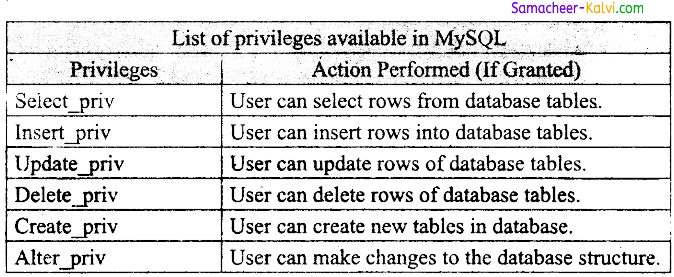
TN State Board 12th Computer Applications Important Questions Chapter 3 Introduction to Database Management System 7

Question 85.
Write few commands used by DBA to control the entire database.
Answer:
The Database Administrator (DBA) frequently uses few commands to control the entire database. Such commands are.
(i) Use Database:
This commands is used to select the database in MySQL for working.
Syntax: Mysql > Use Student;

(ii) Show Databases:
Lists all the databases available in the database server.
Syntax: Mysql > Show databases;

(iii) Show columns from tablename:
List all the attributes, attribute type, IS NULL value permitted, key information for the given table.
Syntax: Mysql > Show columns from Rollnumber;

(iv) Show tables:
List all the tables available in the current database.
Syntax: Mysql > Show tables;

(v) Show index from tablename:
The query shows all the indexes for the given table.
Syntax: Mysql > Show indexes from student;

Samacheer Kalvi TN State Board 12th Computer Applications Important Questions Chapter 3 Introduction to Database Management System

Question 86.
Discuss on various database models available in DBMS.
Answer:
The various database models in DBMS are Hierarchical Database Model, Network Model, Relational Model, and Object-oriented database Model.
(i) Hierarchical Database Model:
The Hierarchical database model was IMS (Information Management System), and IBM’s First DBMS.
In this model each record has information in parent/child relationship like a tree structure.

(ii) Network Model:
The first developed network data model was IDS (Integrated Data Store) at Honeywell.
Network model is similar to Hierarchical model except that in this , model each member can have more than one owner. The many to many relationships are handled in a better way.
This model identified the three database components Network schema, Sub schema and language for data management.

(iii) Relational Model:
Oracle and DB2 are few commercial relational model in use.
Relational model is identified with two terminologies Instance and schema.

(iv) Object-Oriented database model:
This model incorporates the combination of object oriented programming (OOP’s) concepts and database technologies.
This Model efficiently manages large number of different data types. Moreover complex behaviours are handled efficiently using OOP’s concepts.

Samacheer Kalvi TN State Board 12th Computer Applications Important Questions Chapter 3 Introduction to Database Management System

Question 87.
List the basic concepts of ER Model with suitable example.
Answer:
The basic concepts of ER model consists of
(i) Entity or Entity type
(ii) Attributes
(iii) Relationship

(i) Entity or Entity type:
An Entity can be anything a real-world object or animation which is easily identifiable by anyone even by a common man.
Eg: In a company’s database Employee, HR, Manager are considered as entities, where each of these entity will be having their own attributes. An entity is represented by a rectangular box

TN State Board 12th Computer Applications Important Questions Chapter 3 Introduction to Database Management System 8

The types of Entity are strong entity, weak entity, and Entity instance.

(ii) Attributes:
An attribute is the information about that entity and it will describe, quantity, qualify, classify, and specify an entity.
Types of attributes:
(a) Key Attribute – Eg: A key
(b) Simple Attribute – Eg: Employee
(c) Composite Attribute – Eg: Name
(d) Single Valued Attribute – Eg: Age
(e) Multi Valued Attribute – Eg: Degree

(iii) Relationship:
Three types of relationships are available, they are One- to-one relationship, One-to-many relationship and Many-to-many relationship.
Three classifications in cardinality are One-to-one, One-to-many and Many-to-many.
Eg: A driver drives a vehicle, this is One-to-one relationship between person and vehicle.
Eg: A customer places the order of many items, this is a One-to-many relationship.
Eg: Courses can be registered by many students, this is a many-to-many relationship.

Samacheer Kalvi TN State Board 12th Computer Applications Important Questions Chapter 3 Introduction to Database Management System

Question 88.
Discuss in detail on various types of attributes in DBMS.
Answer:
The various types of attributes in DBMS are:
(i) Key Attribute
(ii) Simple Attribute
(iii) Composite Attribute
(iv) Single valued Attribute
(v) Multivalued Attribute

(i) Key Attribute:
A key attribute describes a unique characteristic of an entity.

(ii) Simple Attribute:
The Simple attributes cannot be separated it will be having a single value for their entity.
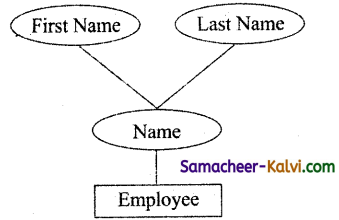
TN State Board 12th Computer Applications Important Questions Chapter 3 Introduction to Database Management System 9

Eg: Here, the name as the attribute for the entity employee and here value for that attribute is a single value.

(iii) Composite Attribute:
The composite attributes can be sub divided into simple attributes without change in the meaning of that attribute.
Eg: In the above diagram, the composite attribute name which are sub¬divided into two simple attributes first and last name.

(iv) Single valued Attributes:
A single valued attribute contains only one value for the attribute and they don’t have multiple numbers of values.
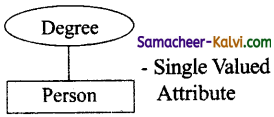
TN State Board 12th Computer Applications Important Questions Chapter 3 Introduction to Database Management System 10

Eg: Age – It is single value for a person.

(v) Multivalued Attributes:
A multi valued attribute has more than one value for that particular attribute.
Eg: Degree – A person can hold number of degrees, so it is multivalued attribute.

Samacheer Kalvi TN State Board 12th Computer Applications Important Questions Chapter 3 Introduction to Database Management System

Question 89.
Write a note on open source software tools available in MySQL Administration.
Answer:
Many open source tools are available in the market to design the database in a better and efficient manner.
PhpMy Admin is most popular for web administration.
The popular desktop application tools are MySQL workbench and HeidiSQL.

PHPMYADMIN (Web Admin):
This Administrative tool of MySQL is a web application written in PHP. They are used predominantly in web hosting. The main feature is providing web interface, importing data from CSV and exporting data to various formats.

MySQL workbench (Desktop Application):
This is a database tool used by developers and DBA’s mainly for visualization.
This tool helps in data modeling, development of SQL, server configuration and backup for MySQL in a better way.
The SQL editor of this tool is very flexible and comfortable in dealing multiple results set.

HeidiSQL (Desktop Application):
This is open source tools helps in the administration of better database systems.
It supports GUI (Graphical User Interface) features for monitoring server host, server connection, Databases, Tables, Views, Triggers ami Events.

Question 90.
Explain in detail on Sub Queries with suitable examples.
Answer:
The SQL query is written within a main query. This is called as nested inner/ subquery. The subquery is executed first and the results of sub query are used as the condition for main query.
The sub query must follow the below rules:
(i) Subqueries are always written within the parantheses.
(ii) Always place the subquery on the rightside of the comparison operator. (Hi) Order by clause is not used in subqueiy, since subqueries cannot manipulate the results internally.
Eg: We use subquery in an SELECT statement
SELECT * FROM employee WHERE EMPID IN (SELECT EMPID
FROM employee WHERE salary < 40000);
First, the inner query is executed, then the external or outer query is executed.
similarly the subqueries are used with INSERT, UPDATE and DELETE commands.

Samacheer Kalvi TN State Board 12th Computer Applications Important Questions Chapter 3 Introduction to Database Management System

Choose the correct answer:

Question 1.
Which systems were known as predecessor of database system?
(a) Management
(b) file
(c) create
(d) update
Answer:
(b) file

Question 2.
What is called, same data is used by multiple resources for processing, thus created multiple copies of same data?
(a) Data Duplication
(b) Maintenance
(c) Security
(d) Management
Answer:
(a) Data Duplication

Question 3.
ACID Stands for:
(a) Atomicity, Consistency, Isolation, Durability
(b) Accessing, Consistency, Isolation, Durability
(c) Atomicity, Concurrency, Isolation, Differently
(d) Accessing, Consistency, Isolation, Differently
Answer:
(a) Atomicity, Consistency, Isolation, Durability

Samacheer Kalvi TN State Board 12th Computer Applications Important Questions Chapter 3 Introduction to Database Management System

Question 4.
When multiple users do the transact! ons by accessing same object at the same time, the transaction is known as:
(a) Atomicity
(b) Consistency
(c) Concurrent
(d) Isolation
Answer:
(c) Concurrent

Question 5.
IMS stands for:
(a) International Machine Service
(b) Information Management System
(c) International Management System
(d) Information Management Service
Answer:
(b) Information Management System

Question 6.
IDS Stands for:
(a) Integrated Data save
(b) International Data store
(c) Integrated Data store
(d) Information Data store
Answer:
(c) Integrated Data store

Samacheer Kalvi TN State Board 12th Computer Applications Important Questions Chapter 3 Introduction to Database Management System

Question 7.
Which schema defines all about the structure of the database?
(a) Network schema
(b) Sub schema
(c) Language
(d) Instance
Answer:
(a) Network schema

Question 8.
Which schema controls on views of the database for the user?
(a) Network schema
(b) Sub schema
(c) Language
(d) Instance
Answer:
(b) Sub schema

Question 9.
Which is basic procedural for accessing the database?
(a) Network schema
(b) Sub schema
(c) Language
(d) Instance
Answer:
(c) Language

Question 10.
What is called a table consisting of rows and columns?
(a) Network schema
(b) Sub schema
(c) Language
(d) Instance
Answer:
(d) Instance

Samacheer Kalvi TN State Board 12th Computer Applications Important Questions Chapter 3 Introduction to Database Management System

Question 11.
Which is specifies the structure including name and type of each column?
(a) Language
(b) Instance
(c) Schema
(d) relation
Answer:
(c) Schema

Question 12.
A relation also known as:
(a) table
(b) columns
(c) rows
(d) files
Answer:
(a) table

Question 13.
A attribute also called as:
(a) table
(b) columns
(c) rows
(d) files
Answer:
(b) columns

Question 14.
A tuples also called as:
(a) table
(b) columns
(c) rows
(d) files
Answer:
(c) rows

Samacheer Kalvi TN State Board 12th Computer Applications Important Questions Chapter 3 Introduction to Database Management System

Question 15.
OOP stands for:
(a) Object Oriented Programming
(b) Oracle Oriented Programming
(c) Objective Oriented Programming
(d) Obstacle Oriented Programming
Answer:
(a) Object Oriented Programming

Question 16.
Which software known as object oriented model uses small and reusable?
(a) Object
(b) Entity
(c) Attributes
(d) Relationship
Answer:
(a) Object

Question 17.
Which is used the most popular relational database?
(a) MSSQL
(b) MySQL
(c) Oracle
(d) MS Access
Answer:
(b) MySQL

Question 18.
Which is defined as the collection of data organized in terms of rows and columns?
(a) Rows
(b) Column
(c) Table
(d) File
Answer:
(c) Table

Samacheer Kalvi TN State Board 12th Computer Applications Important Questions Chapter 3 Introduction to Database Management System

Question 19.
Which is defined in a table to hold values of same type?
(a) Row
(b) Column
(c) Table
(d) Attribute
Answer:
(d) Attribute

Question 20.
The vertical entity in a table is known as attribute or:
(a) Model
(b) Row
(c) Column
(d) compound
Answer:
(c) Column

Question 21.
A single entry in a table is called as row or record or:
(a) Tuple
(b) Model
(c) Compound
(d) Field
Answer:
(a) Tuple

Question 22.
Set of related data’s are represented in a row or:
(a) Column
(b) Tuple
(c) Field
(d) (a) and (b)
Answer:
(b) Tuple

Samacheer Kalvi TN State Board 12th Computer Applications Important Questions Chapter 3 Introduction to Database Management System

Question 23.
The horizontal entity in a table is known as Record or:
(a) Column
(b) Row
(c) Field
(d) (a) and (b)
Answer:
(b) Row

Question 24.
Which type of key is perform the identification task?
(a) Primary key
(b) Super key
(c) Composite key
(d) Compound key
Answer:
(a) Primary key

Question 25.
Every tuple must have, by definition, a unique value for its:
(a) primary key
(b) super key
(c) composition key
(d) compound key
Answer:
(a) primary key

Question 26.
A primary key which is a combination of more than one attribute is called a:
(a) primary key
(b) foreign Key
(c) composite primary key
(d) super key
Answer:
(c) composite primary key

Samacheer Kalvi TN State Board 12th Computer Applications Important Questions Chapter 3 Introduction to Database Management System

Question 27.
A foreign key is a copy of a:
(a) primary key
(b) foreign key
(c) composite primary key
(d) super key
Answer:
(a) primary key

Question 28.
Foreign keys can also be:
(a) zero
(b) null
(c) one
(d) negative
Answer:
(b) null

Question 29.
An attribute or group of attributes, which is sufficient to distinguish every • tuple in the relation from every other one is known as:
(a) primary key
(b) secondary key
(c) super key
(d) foreign key
Answer:
(c) super key

Question 30.
A key with more than one attribute to identify rows in a table is called:
(a) primary key
(b) secondary key
(c) super key
(d) composite key
Answer:
(d) composite key

Samacheer Kalvi TN State Board 12th Computer Applications Important Questions Chapter 3 Introduction to Database Management System

Question 31.
Composite key is also known as:
(a) primary key
(b) super key
(c) composite key
(d) compound key
Answer:
(d) compound key

Question 32.
An _________ can be anything a real-world object or animation.
(a) object
(b) entity
(c) attribute
(d) isolate
Answer:
(b) entity

Question 33.
Which wilt always have a single value, that value can be a number or character or string?
(a) object
(b) entity
(c) attribute
(d) isolate
Answer:
(c) attribute

Question 34.
A person can hold n number of degrees” – Say which type of Attribute?
(a) Key Attribute
(b) Simple Attribute
(c) Composite Attribute
(d) Multi valued Attribute
Answer:
(d) Multi valued Attribute

Samacheer Kalvi TN State Board 12th Computer Applications Important Questions Chapter 3 Introduction to Database Management System

Question 35.
Which is defined as the number of items that must be included in a relationship?
(a) Cardinality
(b) Entity
(c) Key
(b) Simple
Answer:
(a) Cardinality

Question 36.
Which database is founded by Monty Widenius and is named after his daughter name?
(a) MS Access
(b) SQL
(c) MySQL
(d) Oracle
Answer:
(c) MySQL

Question 37.
Which of the following is not a database?
(a) MySQL
(b) SQL
(c) Oracle
(d) Foxpro
Answer:
(b) SQL

Question 38.
Which of the following is open source database software?
(a) MySQL
(b) Oracle
(c) Foxpro
(d) MS Access
Answer:
(a) MySQL

Samacheer Kalvi TN State Board 12th Computer Applications Important Questions Chapter 3 Introduction to Database Management System

Question 39.
In the MySQL database, there exists a table named:
(a) key
(b) host
(c) user
(d) password
Answer:
(c) user

Question 40.
Which command is similar to rebooting the server in MySQL?
(a) Flush privileges;
(b) select_priv;
(c) Insert_priv;
(d) Update_priv;
Answer:
(a) Flush privileges;

Question 41.
Which one of the following is most popular for web Administration?
(a) MySQL
(b) Work bench
(c) HeidiSQL
(d) PhPMYAdmin
Answer:
(d) PhPMYAdmin

Question 42.
Which database tool used by developers and DBA’s mainly for visualization?
(a) PhPMYAdmin
(b) MYSQL Workbench
(c) HeidiSQL
(d) MySQL
Answer:
(b) MYSQL Workbench

Samacheer Kalvi TN State Board 12th Computer Applications Important Questions Chapter 3 Introduction to Database Management System

Question 43.
Which is open source tools helps in the administration of better database systems and GUI supports?
(a) PhPMYAdmin
(b) MYSQL Workbench
(c) HeidiSQL
(d) MySQL
Answer:
(c) HeidiSQL

Question 44.
How many major parts are needed that form a database?
(a) 2
(b) 3
(c) 4
(d) 5
Answer:
(b) 3

Question 45.
Which is a similar to an excel sheet containing multiple rows and columns?
(a) Rows
(b) Records
(c) Fields
(d) Tables
Answer:
(d) Tables

Question 46.
Which is standard Language used for accessing and manipulating databases?
(a) SQL
(b) Foxpro
(c) MS Access
(d) Oracle
Answer:
(a) SQL

Samacheer Kalvi TN State Board 12th Computer Applications Important Questions Chapter 3 Introduction to Database Management System

Question 47.
Which SQL command are used to define database schema?
(a) DDL
(b)DML
(c)DQL
(d) DCL
Answer:
(a) DDL

Question 48.
Which SQL command deals with the manipulation of data present in the data base?
(a) DDL
(b) DML
(c) DQL
(d) DCL
Answer:
(b) DML

Question 49.
Which of the following command is data query language?
(a) INSERT
(b) UPDATE
(c) DELETE
(d) SELECT
Answer:
(d) SELECT

Question 50.
Which commands are manage the transactions in SQL databases?
(a) DDL
(b) DML
(c) TCL
(d) DCL
Answer:
(c) TCL

Samacheer Kalvi TN State Board 12th Computer Applications Important Questions Chapter 3 Introduction to Database Management System

Question 51.
Which commands are that implement security on database objects?
(a) DDL
(b) DML
(c) TCL
(d) DCL
Answer:
(d) DCL

Question 52.
Which command is used to create new SQL database?
(a) New
(b) Select
(c) Create
(d) Insert
Answer:
(c) Create

Question 53.
Which command is used to remove any of the existing SQL Database?
(a) remove
(b) delete
(c) erase
(d) drop
Answer:
(d) drop

Question 54.
Which command is used to select suitable database for accessing?
(a) Open
(b) Use
(c) Select
(d) New
Answer:
(b) Use

Samacheer Kalvi TN State Board 12th Computer Applications Important Questions Chapter 3 Introduction to Database Management System

Question 55.
Which command is used to add new row to the table?
(a) Add
(b) Update
(c) Insert
(d) New
Answer:
(c) Insert

Question 56.
Which command is used to remove an existing record in a table?
(a) Remove
(b) Delete
(c) Erase
(d) Drop
Answer:
(b) Delete

Question 57.
Which condition is specified to delete entire column data?
(a) INTO
(b) FROM
(c) ORDERBY
(d) WHERE
Answer:
(d) WHERE

Question 58.
Which command is used to modifying and updating the existing record in a table?
(a) Add
(b) Update
(c) Insert
(d) Modify
Answer:
(b) Update

Samacheer Kalvi TN State Board 12th Computer Applications Important Questions Chapter 3 Introduction to Database Management System

Question 59.
Which command is used to sort the record in a table?
(a) WHERE
(b) MODIFY
(c) INTO
(d) ORDER BY
Answer:
(d) ORDER BY

Question 60.
Which clause is used to select data from more than two tables?
(a) FROM
(b) INTO
(c) JOIN
(d) COMBINE
Answer:
(c) JOIN

Question 61.
Sub queries are always written within the:
(a) file
(b) record
(c) field
(d) Parantheses
Answer:
(d) Parantheses

Question 62.
Which clause is not used in sub query?
(a) WHERE
(b) ORDER BY
(c) SELECT
(d) INSERT
Answer:
(b) ORDER BY

Samacheer Kalvi TN State Board 12th Computer Applications Important Questions Chapter 3 Introduction to Database Management System

Question 63.
Match the following:

(A) MySQL  (i) DBMS
(B) WINDOWS  (ii) Spreadsheet
(C) SQL  (iii) RDBMS
(D) MS Excel  (iv) OS

(a) (A) – (iii); (B) – (iv); (C) – (i); (D) – (ii)
(b) (A) – (iii); (B) – (i); (C) – (ii); (D) – (iv)
(c) (A) – (ii); (B) – (iv); (C) – (i); (D) – (iii)
(d) (A) – (ii); (B) – (i); (C) – (iii); (D) – (iv)
Answer:
(a) (A) – (iii); (B) – (iv); (C) – (i); (D) – (ii)

Question 64.
ODBMS Stands for:
(a) Objective Data Base Management System
(b) Object Data Base Management System
(c) Observe Data Base Management System
(d) Obstacle Data Base Management System
Answer:
(b) Object Data Base Management System

Question 65.
Which is called process of copying table contents into a file for future use? .
(a) Backup
(b) Save
(c) Store
(d) Copy
Answer:
(a) Backup

Samacheer Kalvi TN State Board 12th Computer Applications Important Questions Chapter 3 Introduction to Database Management System

Question 66.
Match the following.

(A) Table  (i) Horizontal entity
(B) Column  (ii) Single entry
(C) Row  (iii) Attribute
(D) Record  (iv) Rows and Columns

(a) (A) – (iii); (B) -;(ii); (C) – (i); (D) – (iv)
(b) (A) – (iv); (B) – (iii); (C) – (ii); (D) – (i)
(c) (A) – (iii); (B) – (i); (C) – (iv); (D) – (ii)
(d) (A) – (iv); (B) – (ii); (C) – (iii)- (D) – (i)
Answer:
(b) (A) – (iv); (B) – (iii); (C) – (ii); (D) – (i)

Question 67.
Match the following.

(A) Primary Key  (i) Copy
(B) Foreign Key  (ii) Unique value
(C) Super Key  (iii) Compound Key
(D) Composite Key  (iv) Group of Attribute

(a) (A) – (ii); (B) – (i); (C) – (iv); (D) – (iii)
(b) (A) – (ii); (B) – (iii); (C) – (iv); (D) – (i)
(c) (A) – (iii); (B) – (i); (C) – (iv); (D) – (ii)
(d) (A) – (iv); (B) – (i); (C) – (ii); (D) – (iii)
Answer:
(a) (A) – (ii); (B) – (i); (C) – (iv); (D) – (iii)

Question 68.
Match the following.

(A) Entity Strong  (i) Double Rectangular Box
(B) Entity Weak  (ii) Rhombus within rhombus
(C) Relationships  (iii) Rectangular Box
(D) Between Entities  (iv) Rhombus

(a) (A) – (iii); (B) – (ii); (C) – (iv); (D) – (i)
(b) (A) – (ii); (B) – (iv); (C) – (i); (D) – (iii)
(c) (A) – (ii); (B) – (i); (C) – (iii); (D) – (iv)
(d) (A) – (iii); (B) – (i); (C) – (iv); (D) – (ii)
Answer:
(d) (A) – (iii); (B) – (i); (C) – (iv); (D) – (ii)

Samacheer Kalvi TN State Board 12th Computer Applications Important Questions Chapter 3 Introduction to Database Management System

Question 69.
Match the following:

(A) Attribute  (i) Double Ellipse
(B) Key Attribute  (ii) Dotted Ellipse inside
(C) Derived Attribute  (iii) Underline inside Ellipse
(D) Multivalued Attribute  (iv) Ellipse

(a) (A) – (ii); (B) – (iii); (C) – (i); (D) – (iv)
(b) (A) – (ii); (B) – (i); (C) – (iv); (D) – (iii)
(c) (A) – (iv); (B) – (iii); (C) – (ii); (D) – (i)
(d) (A) – (iv); (B) – (i); (C) – (iii); (D) – (ii)
Answer:
(c) (A) – (iv); (B) – (iii); (C) – (ii); (D) – (i)

Question 70.
Match the following:

(A) PhPMyAdmin  (i) Desktop App
(B) HeidiSQL  (ii) Server Software
(C) Schema  (iii) Web Admin
(D) XAMPP  (iv) Structure

(a) (A) – (iii); (B) – (i); (C) – (iv); (D) – (ii)
(b) (A) – (iii); (B) – (ii); (C) – (iv); (D) – (i)
(c) (A) – (ii); (B) – (iv); (C) – (i); (D) – (iii)
(d) (A) – (ii); (B) – (i); (C) – (iii); (D) – (iv)
Answer:
(a) (A) – (iii); (B) – (i); (C) – (iv); (D) – (ii)

Question 71.

Choose the incorrect pair:
(a) Table – Excel sheet
(b) Queries – Views
(c) MySQL – Desktop App Tool
(d) CSV – Operating system
Answer:
(d) CSV – Operating system

Samacheer Kalvi TN State Board 12th Computer Applications Important Questions Chapter 3 Introduction to Database Management System

Question 72.
Choose the incorrect pair:
(a) Alter -. Modify
(b) Drop – Delete a Table
(c) Truncate – Delete all Table
(d) Delete – Delete a database
Answer:
(d) Delete – Delete a database

Question 73.
Choose the incorrect pair:
(a) INSERT – Add new rows
(b) UPDATE – Rename
(c) SELECT – Retrieve
(d) ROLLBACK – Restore
Answer:
(b) UPDATE – Rename

Question 74.
Choose the incorrect pair:
(a) COMMIT – Permanent Save
(b) ROLLBACK – Restore database
(c) SAVE POINT – Save Temporarily
(d) SETTRANSACTION – Save in Hard disk
Answer:
(d) SETTRANSACTION – Save in Hard disk

Question 75.
Choose the incorrect pair:
(a) JOIN – Update
(b) Grant – Give permission
(c) Revoke – Out permission
(d) Drop – Remove
Answer:
(a) JOIN – Update

Samacheer Kalvi TN State Board 12th Computer Applications Important Questions Chapter 3 Introduction to Database Management System

Question 76.
Choose the correct pair:
(a) WHERE – Query
(b) ORDER BY – Sorting
(c) GROUP BY – File
(d) SELECT – Database
Answer:
(b) ORDER BY – Sorting

Question 77.
Choose the correct pair:
(a) MySQL – Compiler
(b) Oracle – Operating system
(c) MS Access – RDBMS
(d) SQL – Objects
Answer:
(c) MS Access – RDBMS

Question 78.
Choose the correct pair:
(a) Atomicity – Changes
(b) Consistency – thumb rule
(c) Isolation – Concurrent
(d) Durability – Transaction
Answer:
(c) Isolation – Concurrent

Question 79.
Choose the correct pair:
(a) Table – Tuple
(b) Row – Record
(c) Column – Data
(d) Attribute – Row
Answer:
(b) Row – Record

Samacheer Kalvi TN State Board 12th Computer Applications Important Questions Chapter 3 Introduction to Database Management System

Question 80.
Choose the correct pair.
(a) Primary Key – Rows –
(b) Secondary Key – Columns
(c) Foreign Key – Copy of Primary Key
(d) Composite Key – Super Key
Answer:
(c) Foreign Key – Copy of Primary Key

Question 81.
Choose the incorrect statement:
(a) The famous Hierarchical database model was IMS.
(b) Hierarchical database model each record has a tree structure.
(c) The collection of record was called fields.
(d) The individual records are equal to rows.
Answer:
(c) The collection of record was called fields.

Question 82.
Choose the incorrect statement:
(a) The first developed network data model was IDS.
(b) Network model is similar to relational model.
(c) The Network model are handled many to many relationship.
(d) The limitation of network model is difficulty in design and maintenance.
Answer:
(b) Network model is similar to relational model.

Samacheer Kalvi TN State Board 12th Computer Applications Important Questions Chapter 3 Introduction to Database Management System

Question 83.
Choose the incorrect statement:
(a) The most popular relational database is Foxpro.
(b) MySQL is an open source database.
(c) MySQL supports different platforms like windows, Linux and MAC operating systems.
(d) The features of RDBMS are high availability and high performance.
Answer:
(a) The most popular relational database is Foxpro.

Question 84.
Choose the correct statement:
(a) A single entry in a table is called as column.
(b) The horizontal entity in a table is known as Record or Row.
(c) Each row is known as Attributes.
(d) The vertical entity in a table is known as Tuple.
Answer:
(b) The horizontal entity in a table is known as Record or Row.

Question 85.
Choose the correct statement:
(a) SQL is a Standard Query Language is a standard language used for accessing and manipulating databases.
(b) The CREATE command is used to draw a Animation. .
(c) DROP command is used to delete the record in a Table.
(d) TRUNCATE command is used to delete a structure of the Table.
Answer:
(a) SQL is a Standard Query Language is a standard language used for accessing and manipulating databases.

Samacheer Kalvi TN State Board 12th Computer Applications Important Questions Chapter 3 Introduction to Database Management System

Question 86.
Assertion (A):
A Database Management System (DBMS) is system software for creating and managing databases.
Reason (R):
The DBMS provides users and programmers with a systematic way to create, retrieve, update and manage data.
(a) Both A and R are true, and R is the correct explanation for A.
(b) Both A and R are true, but R is not the correct explanation for A.
(c) A is true, But R is false.
(d) A is false, But R is true.
Answer:
(a) Both A and R are true, and R is the correct explanation for A.

Question 87.
Assertion (A):
The table consists of several files.
Reason (R):
Table can be divide into smaller parts, in terms of column.
(a) Both A and R are true, and R is the correct explanation for A.
(b) Both A and R are true, but R is not the correct explanation for A.
(c) A is true, But R is false.
(d) A is false, But R is true.
Answer:
(d) A is false, But R is true.

Question 88.
Assertion (A):
A foreign key is a copy of the whole of its parent primary key.
Reason (R):
Foreign key values have to be unique.
(a) Both A and R are true, and R is the correct explanation for A.
(b) Both A and R are true, but R is not the correct explanation for A.
(c) A is true, But R is false.
(d) A is false, But R is true.
Answer:
(c) A is true, But R is false.

Samacheer Kalvi TN State Board 12th Computer Applications Important Questions Chapter 3 Introduction to Database Management System

Question 89.
Assertion (A):
An entity can be anything a real-world object or animation which is easily identifiable.
Reason (R):
Instances are the values for the entity.
(a) Both A and R are true, and R is the correct explanation for A.
(b) Both A and R are true, but R is not the correct explanation for A.
(c) A is true, But R is false.
(d) A is false, But R is true.
Answer:
(b) Both A and R are true, but R is not the correct explanation for A.

Question 90.
Assertion (A):
COMMIT is SQL TCL commands which is used to restore database to original form.
Reason (R):
ROLLBACK is SQL TCL commands which is used to permanent save.
(a) Both A and R are true.
(b) Both A and R are false.
(c) A is true, But R is false.
(d) A is false, But R is true.
Answer:
(b) Both A and R are false.

Question 91.
Pick the odd one out:
(a) SQL
(b) MySQL
(c) Oracle
(d) DBMS
Answer:
(d) DBMS

Samacheer Kalvi TN State Board 12th Computer Applications Important Questions Chapter 3 Introduction to Database Management System

Question 92.
Pick the odd one out:
(a) Windows
(b) MS SQL
(c) Linux
(d) MAC
Answer:
(b) MS SQL

Question 93.
Pick the odd one out:
(a) INSERT
(b) SELECT
(c) DROP
(d) UPDATE
Answer:
(c) DROP

Question 94.
Pick the odd one out:
(a) ALTER
(b) PhPMyAdmin
(c) MySQLworkbench
(d) HeidiSQL
Answer:
(a) ALTER

Question 95.
Pick the odd one out:
(a) DROP
(b) TRUNCATE
(c) DELETE
(d) GRANT
Answer:
(d) GRANT

Samacheer Kalvi TN State Board 12th Computer Applications Important Questions Chapter 3 Introduction to Database Management System

Question 96.
Pick the odd one out:
(a) ,(comma)
(b) ;(semicolon)
(c) :(colon)
(d) .(full stop)
Answer:
(b) ;(semicolon)

Question 97.
Which language is used to request information from a Database?
(a) Relational
(b) Structural
(c) Query
(d) Compiler
Answer:
(c) Query

Question 98.
The diagram gives a logical structure of the database graphically?
(a) Entity-Relationship
(b) Entity
(c) Architectural Representation
(d) Database
Answer:
(a) Entity-Relationship

Samacheer Kalvi TN State Board 12th Computer Applications Important Questions Chapter 3 Introduction to Database Management System

Question 99.
An entity set that does not have enough attributes to form primary key is known as:
(a) Strong entity set
(b) Weak entity set
(c) Identity set
(d) Owner set
Answer:
(b) Weak entity set

Question 100.
Command is used to delete a database.
(a) Delete database databasename
(b) Delete databasename
(c) Drop database database name
(d) Drop database name
Answer:
(d) Drop database name

Question 101.
Which type of below DBMS is MySQL?
(a) Object Oriented
(b) Hierarchical
(c) Relational
(d) Network
Answer:
(c) Relational

Samacheer Kalvi TN State Board 12th Computer Applications Important Questions Chapter 3 Introduction to Database Management System

Question 102.
MySQL is freely available and is open source.
(a) True
(b) False
Answer:
(a) True

Question 103.
represents a “tuple” in a relational database?
(a) Table
(b) Row
(c) Column
(d) Object
Answer:
(b) Row

Question 104.
Communication is established with MySQL using:
(a) SQL
(b) Network calls
(c) Java
(d) API’s
Answer:
(a) SQL

Samacheer Kalvi TN State Board 12th Computer Applications Important Questions Chapter 3 Introduction to Database Management System

Question 105.
Which is the MySQL instance responsible for data processing?
(a) MySQL Client
(b) MySQL Server
(c) SQL
(d) Server Daemon Program
Answer:
(b) MySQL Server

Question 106.
The structure representing the organizational view of entire database is known as …………. in MySQL database.
(a) Schema
(b) View
(c) Instance
(d) Table
Answer:
(a) Schema

TN Board 12th Computer Applications Important Questions

TN Board 12th Computer Applications Important Questions Chapter 2 An Introduction to Adobe Pagemaker

TN State Board 12th Computer Applications Important Questions Chapter 2 An Introduction to Adobe Pagemaker

Question 1.
Write the command to open a Adobe PageMaker 7.0.
Answer:
Start → All programs → Adobe → PageMaker 7.0 → Adobe Pagemaker 7.0

Question 2.
What are main components of the window?
Answer:
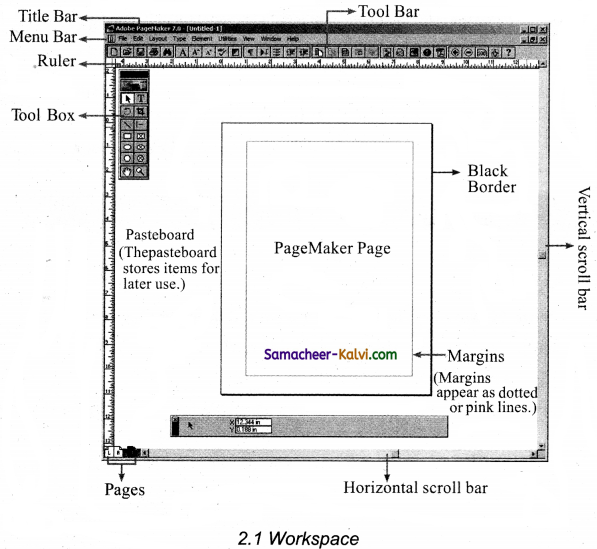
The main components of the window are Title bar, Menu bar, Tool bar, Ruler, Scroll bars and Text area.

Question 3.
What are the menus contains by Menu bar?
Answer:
Menu bar contains the following menus File, Edit, Layout, Type, Element, Utilities, View, Window and Help.

Samacheer Kalvi TN State Board 12th Computer Applications Important Questions Chapter 2 An Introduction to Adobe Pagemaker

Question 4.
What is scrolling? Write its types.
Answer:

  • Scrolling is the process of moving up and down or left and right through the document window.
  • There are two scrollbars namely Vertical and Horizontal scroll bars.

Question 5.
What purpose using Enter key at the end of a paragraph?
Answer:
The Enter key should be pressed only at the end of a paragraph or when a blank line is to be inserted.

Question 6.
What is use of UNDO Command?
Answer:

  • The Undo command is used to reverse the action of the last command.
  • To reverse the last command, click on Edit → Undo in the Menu bar or press Ctrl + Z in the keyboard.

Question 7.
Differentiate Copy and Paste command in PageMaker.
Answer:

Copy  Paste
In PageMaker, the copy command can be used to copy text from one location in a document.  In Pagemaker, the paste command cap be used to paste it as different location in a document.
The copy command creates a duplicate of the selected text, leaving the original text unchanged.  The paste command pastes the copied text at the position where the insertion point is placed.

Samacheer Kalvi TN State Board 12th Computer Applications Important Questions Chapter 2 An Introduction to Adobe Pagemaker

Question 8.
Differentiate Cut and Paste command using PageMaker.
Answer:

Cut  Paste
The cut command is used to selected text easily deleted.  The paste command is used for deleted text to be pasted in required location.
The cut command delete the selected text from its original position.  The paste command then place this text at the position where the insertion point is located.

Question 9.
What is called window shades?
Answer:

  • When you select a text block with the pointer tool, the block’s boundaries become visible.
  • Two handles are seen above and below the text block. These handles are called window shades.

Question 10.
What is meant by resizing a Text block?
Answer:

  • Two handles are seen above and below the text block.
  • There is a dark square on both ends of the handle. These are used to change the size of the text block.

Samacheer Kalvi TN State Board 12th Computer Applications Important Questions Chapter 2 An Introduction to Adobe Pagemaker

Question 11.
Write the difference between threaded text and unthreaded text.
Answer:

Threaded Text  Unthreaded Text
A process of connecting text among text blocks is called Threaded Text.  Unthreaded Text is where a text block stands alone, without being connected to any other block.
A threaded text block can be identified by a plus sign in its top and / or bottom handles.  These blocks have nothing in their top and bottom handles.

Question 12.
How do you separating text from the frame?
Answer:
To separate text from a frame,

  • Click the frame with the pointer tool.
  • Choose Element → frame → Delete content in the menu bar.
    The Text will not appear in the frame.

Question 13.
How can you close a document?
Answer:
After saving, the document can be closed using the file -» close command in the menu bar. (OR)
Ctrl + W shortcut key using from the keyboard.

Question 14.
What are the types of Scroll bar in PageMaker?
Answer:
In PageMaker, there are two sets of scroll bars, one for up and down movement and the other for the left and right movement of the document.

Samacheer Kalvi TN State Board 12th Computer Applications Important Questions Chapter 2 An Introduction to Adobe Pagemaker

Question 15.
How can you magnify a part of page by dragging?
Answer:

  • Select the zoom tool.
  • Drag to draw a marque around the area you want to magnify.
    Press Ctrl + Space bar to zoom in, press Ctrl + Alt + Space bar to zoom out.

Question 16.
What is known as formatting a document?
Answer:
Formatting is the process of changing the general arrangement of text, that is improving the appearance of the text by using various fonts, fonts colours, and font styles.

Question 17.
What is a font?
Answer:

  • A font is a set of letters, numbers or symbols in a certain style.
  • Each font looks different from other fonts.

Samacheer Kalvi TN State Board 12th Computer Applications Important Questions Chapter 2 An Introduction to Adobe Pagemaker

Question 18.
What is meant by Character formatting?
Answer:

  • Character formatting means displaying text in a certain way.
  • Character formatting consists of text properties – bold, italic, underline, font type, font size, font color etc.,

Question 19.
What is useful for character formatting using the control Palette?
Answer:

  • The control palette is especially useful when you are doing lot of formatting.
  • Its features change based on the object that is selected on your layout.

Question 20.
How can do to modify character attributes using the character control palette?
Answer:

  • Select the text you want to modify.
  • Make the appropriate changes in the control palette.

Samacheer Kalvi TN State Board 12th Computer Applications Important Questions Chapter 2 An Introduction to Adobe Pagemaker

Question 21.
What are the main drawing tools in PageMaker?
Answer:

  • There are so many drawing tools in PageMaker.
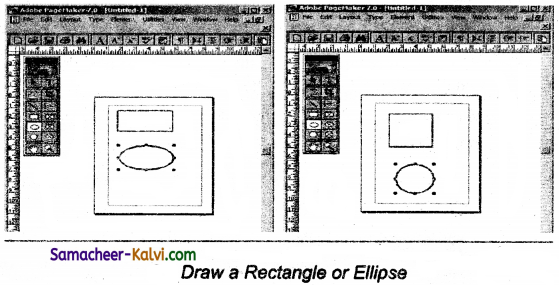
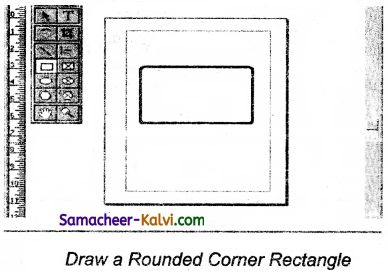
  • Line tool, Rectangle tool, Ellipse tool and Polygon tool are four main drawing tools.

Question 22.
What are the Drawing Lines in PageMaker?
Answer:

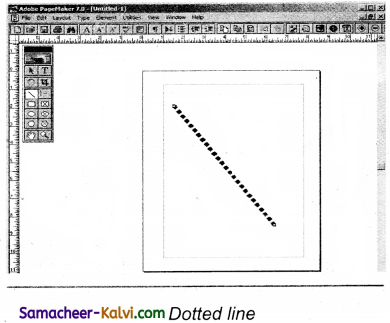
  • PageMaker has two line tools.
  • The first one creates a straight line at any orientation.
  • The second is a constrained line tool that draws only at increments of 45 degrees.

Question 23.
What are the Master pages containing?
Answer:

  • Master pages commonly contain repeating logos, page numbers, headers, and footers.
  • They also contain non printing layout guides, such as column guides, ruler guides, and margin guides.

Samacheer Kalvi TN State Board 12th Computer Applications Important Questions Chapter 2 An Introduction to Adobe Pagemaker

Question 24.
How can you to make master items invisible or Hiding?
Answer:
To make the master items invisible on a particular page, switch to the appropriate page, then choose view → Display Master items (which is usually ticked).

Question 25.
How can you showing Master Page Palette?
Answer:
To show Master Page palette.

  • Choose windows → Show Master pages in the menu bar.
  • The master pages palette appears.

Question 26.
What are rulers? How can you show and hide the ruler?
Answer:
There are two rulers bars. One is at the top and the other is at the left side.
To show the ruler:

  1. Click on view. The view menu will appear.
  2. Click on show rulers to show the rulers.

To hide the ruler:

  1. Click on view. The view’ menu will appear.
  2. Click on Hide Rulers to hide the rulers.

Samacheer Kalvi TN State Board 12th Computer Applications Important Questions Chapter 2 An Introduction to Adobe Pagemaker

Question 27.
How can you selecting text using the mouse?
Answer:
To select text using a mouse, the steps as follows:

  • Place the insertion point to the left of the character to be selected.
  • Press the left mouse button and drag the mouse to a position where you want to stop selecting.
  • Release the mouse button.
  • The selected text gets highlighted.

Question 28.
How can you selecting text using the keyboard?
Answer:
To select text using keyboard, the steps as follows:

  • Place the insertion point to the left of the first character you wish to select.
  • The Shift key is pressed down and the movement keys are used to highlight the required text.
  • When the Shift key is released, the text is selected.

Question 29.
How can do create a Text block with the text tool?
Answer:
To create a text block with the text tool:

  • Select the- text tool (T) from the toolbox. The pointer turns into an I-beam.
  • On an empty area of the page or pasteboard, click the I-beam where you. want to insert text.
  • Type the text you want.

Samacheer Kalvi TN State Board 12th Computer Applications Important Questions Chapter 2 An Introduction to Adobe Pagemaker

Question 30.
How can you to resize a Text block?
Answer:
To resize a text block, the steps as follows:

  • Click on the pointer tool.
  • Click either to left or right comer handle on the bottom of the text block and drag.
  • A red triangle in the bottom window shade means there is more text in the text block than is visible on the page.
  • Drag the window shade handle down to show more text.

Question 31.
How can you splitting a text block into two part?
Answer:
To split a text block into two part, the steps as follows:

  • Place the cursor on the bottom handle, click and drag upwards.
  • When you release the bottom handle will contain a red triangle.
  • Click once on this, and the cursor changes to a loaded text icon.
  • Position this where the second part of the text is to be, and click.

Question 32.
How can you importing text as automatic text flow?
Answer:

  • Before importing the text, first select Layout → Autoflow in the menu bar.
  • Then you should import the text;
  • Now, the loaded text icon looks different, it contains a squiggly narrow TN State Board 12th Computer Applications Important Questions Chapter 2 An Introduction to Adobe Pagemaker 1.
  • Place the loaded text icon at the top of the page and click.
  • But how the text will automatically flow on to the succeeding pages.

Samacheer Kalvi TN State Board 12th Computer Applications Important Questions Chapter 2 An Introduction to Adobe Pagemaker

Question 33.
What do you understanding story in PageMaker?
Answer:

  • A PageMaker story is similar to a newspaper article.
  • The front page of a newspaper may contain several independent articles, some of which continue on other pages .
  • In PageMaker, several stories may appear on the same publication page and continue elsewhere in the publication.

Question 34.
Write the steps to opening an existing document.
Answer:

  • Choose file → open in the menu bar or click on open icon in the tool bar or press Ctrl + O from keyboard.
  • The filename is given in the file name list box.
  • The name of the file to be opened can be choosen from the list.
  • Now click on the open button, the required file is opened.

Question 35.
What are the procedures should follows scrolling the document?
Answer:
The scrolling procedure is as follows:

  • To scroll left and right, the left and right arrow respectively clicked.
  • To scroll up and down the up and down arrow respectively should be clicked.
  • To scroll a relative distance in the document the scroll box should be drawn up or down.

Samacheer Kalvi TN State Board 12th Computer Applications Important Questions Chapter 2 An Introduction to Adobe Pagemaker

Question 36.
What are the steps to make the appropriate changes in the character specifications Dialog Box?
Answer:

  • Click the drop-down menu arrow of the font box and select the desired font.
  • Click the drop-down menu arrow of the font size box and select the font size.
  • Click the drop-down menu arrow of the color box and select the desired colour.
  • Click the Bold, italic, or underline buttons to make the text respectively changed. Then click on OK.

Question 37.
How can you changing the Text Colour?
Answer:

  • Select the text you want to colour.
  • Choose window → Show colors in the menu bar.
  • The colours palette appears, click the color you want to apply to the selected text.
  • The character change to the colour you selected in the palette.

Question 38.
How can you draw a line in PageMaker?
Answer:

  • Select the Line tool from the toolbox. The cursor changes to a cross hair.
  • Click and drag on the screen to draw your line. As you drag, a line appears.
  • Release the mouse button and the line will be drawn and selected, with sizing handles on either end.
  • Resize the line by clicking and dragging the handles, if necessary.

Samacheer Kalvi TN State Board 12th Computer Applications Important Questions Chapter 2 An Introduction to Adobe Pagemaker

Question 39.
Drawing a star with given number of sides and required inset.
(i) The value of star inset = 50 %
The number of sides = 15
Answer:

TN State Board 12th Computer Applications Important Questions Chapter 2 An Introduction to Adobe Pagemaker 2

(ii) The value of star inset = 25 %
The number of sides = 25
Answer:

TN State Board 12th Computer Applications Important Questions Chapter 2 An Introduction to Adobe Pagemaker 3

(iii) The value of star inset = 35 %
The number of sides = 70
Answer:

TN State Board 12th Computer Applications Important Questions Chapter 2 An Introduction to Adobe Pagemaker 4

Question 40.
How can you remove the unused pages from your document?
Answer:
Remove the unused pages from your document with a remove pages dialog box.

  • Choose Layout → Remove pages in the menu bar. The remove pages dialog box appears.
  • Type the page range you want to remove.
  • Click on OK button.

Samacheer Kalvi TN State Board 12th Computer Applications Important Questions Chapter 2 An Introduction to Adobe Pagemaker

Question 41.
How can you create a new Master page in PageMaker?
Answer:
To create new master page should follow as:

  • Click the New Master page icon in the master pages palette. The New Master page dialog box appears.
  • Enter the name of the new master page in the Name field.
  • Make the appropriate changes in the margins and columns Guides fields.
  • Click on OK.

Question 42.
Draw a work space window and write the parts of the window.
Answer:

TN State Board 12th Computer Applications Important Questions Chapter 2 An Introduction to Adobe Pagemaker 5

Samacheer Kalvi TN State Board 12th Computer Applications Important Questions Chapter 2 An Introduction to Adobe Pagemaker

Question 43.
Explain Main components of the Workspace window in PageMaker?
Answer:
The main components of the Workspace window are Title bar, Menu bar, Tool bar, Ruler, Scroll bars and Text areas.
(i) Title Bar:
It is topmost part of the window. It shows the name of the software and the name of the document at the left, and the control buttons (minimize, maximize and close) at the right.

TN State Board 12th Computer Applications Important Questions Chapter 2 An Introduction to Adobe Pagemaker 6

(ii) Menu bar:
Menu bar contains File, Edit, Layout, Type, Element, Utilities, View, Window, Help menus. There may be sub-menus under certain options in the pull-down menus.

TN State Board 12th Computer Applications Important Questions Chapter 2 An Introduction to Adobe Pagemaker 7

(iii) Tool Bar:
When you place the mouse pointer on a button in the Tool bar, a short text will appear as its description called Tool Tip.
If the tool box is not available on the screen, click on Window → Show tools, the tool box appears on the screen.

TN State Board 12th Computer Applications Important Questions Chapter 2 An Introduction to Adobe Pagemaker 8

Rulers:
There are two ruler bars one is at the top and the other is at the left side.
Click view → Show Rulers, to show the ruler.
Click view → Hide Rulers, to hide the ruler.

Scroll bars:
There are two scroll bars namely Vertical and Horizontal scroll bars for scrolling the document Vertically or horizontally.

Text areas:
In PageMaker the text of the document can be typed inside a text block. So we must use the text tool to create those text blocks.

After creating a Text block, you can type the text directly into the text block.

Samacheer Kalvi TN State Board 12th Computer Applications Important Questions Chapter 2 An Introduction to Adobe Pagemaker

Question 44.
How can you delete a character, or word, or block of text in a document?
Answer:
Delete a character or word:

  • Position the insertion point to the left of the character to be deleted.
  • Then Press Delete key.
  • Position the insertion point to the right of the character to be deleted.
  • Then Press Backspace key.

Delete a block of Text:

  • Select the text to be Deleted.
  • Press Delete or Backspace Key or Edit → Clear from the menu.

Question 45.
How can you move the text in the required location?
Answer:
The cut and paste command is used to move the text in the required location.

  • Select the text to be moved.
  • Choose Edit → Cut in the menu bar or Press Ctrl + X or click right mouse button and choose cut from the Pop-up menu.
  • Insertion point is moved to the place where the text is to be pasted.
  • Choose Edit → Paste in the menu bar, or Press Ctrl + V or click the right mouse button and choose paste from the Pop-up menu.
  • The selected text can be easily cut and pasted in this way.

Samacheer Kalvi TN State Board 12th Computer Applications Important Questions Chapter 2 An Introduction to Adobe Pagemaker

Question 46.
How can you copy the text in the required location?
Answer:
The selected text can be easily copied in the required location.

  • Select the text to be copied.
  • Choose Edit → Copy or Press Ctrl + C or click the right mouse button and choose copy from the Pop-up menu.
  • Insertion point is moved to the place where the text is to be pasted.
  • Choose Edit → Paste or Press Ctrl + V or click the right mouse button and choose paste from the Pop-up menu.
  • The text can also be pasted in this way to different location.

Question 47.
How can you placing (Importing) Text from other software program in the PageMaker documents?
Answer:

  • Choose File → Place. The place dialog box will appear.
  • Locate the document that contains the text you want to place and select it.
  • Click on open in the place dialog box. The pointer changes to the loaded text icon. TN State Board 12th Computer Applications Important Questions Chapter 2 An Introduction to Adobe Pagemaker 9
  • Make a text block to place the text or click in the page to place the text. The text will be placed in the page.
  • If the text to be placed is too big to fit on one page, PageMaker allows you to place it place it on several pages.
    This can be done manually or automatically.

Samacheer Kalvi TN State Board 12th Computer Applications Important Questions Chapter 2 An Introduction to Adobe Pagemaker

Question 48.
Explain different method to unthread a threaded block.
Method 1:

  • Select the block that you wish to unthread with the pointer tool
  • Click on Edit → Cut in the menu bar.
  • Now click on Edit → Paste in the menu bar. The block will reappear in the same position, but it is now an unthreaded block.

Method 2:

  • Select the block that you wish to unthread with the pointer tool.
  • Choose the text tool and select all the text in the block
  • Then click on Edit → Cut in the menu bar. Now click the insertion point within an existing threaded block
  • Click on Edit → Paste in the menu bar. The text will be added in this block.

Question 49.
How can you save, close and open a document in PageMaker?
Answer:
(i) Saving a Document: To save a document for a first time following commands are used.
(a) Choosing File → Save in the Menu bar or save icon in the Tool bar or Press Ctrl + S in the keyboard.
(b) Now save dialog box appear, then select or type filename in the list box, and then click on the save button.
(c) Save as command is used to save a file name in different location. File → Save as or shift + Ctrl + S is used.

(ii) Closing a Document:
After saving the document can be closed using File —» Close or Ctrl + W command is used.

(iii) Opening an existing Document:
Choose File → Open or open icon or Ctrl + O command is used to opening an existing file document.
Now open publication dialog box is opened, the file name is typed or select from the list box, then click on open button. Now the required file is opened.

Samacheer Kalvi TN State Board 12th Computer Applications Important Questions Chapter 2 An Introduction to Adobe Pagemaker

Question 50.
Tabulate the different types of movement keys using PageMaker document.
Answer:

Move  Press
One character to the left  Left Arrow
One character to the right  Right Arrow
One word to the left  Ctrl + Left Arrow
One word to the right  Ctrl + Right Arrow
Up one line  Up Arrow
Down one line  Down Arrow
To the end of a line  End
To the beginning of a line  Home
Up one paragraph  Ctrl + Up Arrow
Down one paragraph  Ctrl + Down Arrow

Question 51.
How can you draw a Dotted line in PageMaker?
Answer:
(i) Double click the Line tool from the tool box. A custom stroke dialog box appears.
(ii) Select the required stroke style in the drop-down list box
(iii) Then Click OK button, Now cursor changes to a cross hair.
(iv) Click and drag on the screen to draw your dotted line. As you drag, the line appears.
(v) Release the mouse button and the line will be drawn and selected, with sizing handles on either end.

TN State Board 12th Computer Applications Important Questions Chapter 2 An Introduction to Adobe Pagemaker 10

Samacheer Kalvi TN State Board 12th Computer Applications Important Questions Chapter 2 An Introduction to Adobe Pagemaker

Question 52.
Write the steps to draw Rectangle or Ellipse.
Answer:
To draw a rectangle or Ellipse.
(i) Click on the Rectangle or Ellipse tool from the tool box. The cursor changes to a cross hair.
(ii) Click and drag anywhere on the screen. As you drag, a rectangle or ellipse appears.
(iii) Release the mouse button when the rectangle or ellipse is of the desired size.
(iv) Press the shift key while you’re drawing to constrain the shape to a square or circle.
(v) Now, required shape of Rectangle and Ellipse are displayed in the document.

TN State Board 12th Computer Applications Important Questions Chapter 2 An Introduction to Adobe Pagemaker 11

Question 53.
Write the steps to draw a Rounded corner Rectangle.
Answer:

TN State Board 12th Computer Applications Important Questions Chapter 2 An Introduction to Adobe Pagemaker 12

(i) Double-click the Rectangle tool in the tool box. The rounded comers dialog box appears.
(ii) Choose a comer setting from the Dreset shapes.

Method 2:
The Page icons at the left bottom of the screen is move from one page to another page.
Click on the Page icon that corresponds to the page that you want to view. The page is displayed.

Method 3: (Page dialog box):
Choose Layout → Go to Page or Press Alt + Ctrl + G. Now Go to page dialog box appears.
In the dialog box, type the page number that you want to view.
Then click on OK. The required page is displayed on the screen.

Samacheer Kalvi TN State Board 12th Computer Applications Important Questions Chapter 2 An Introduction to Adobe Pagemaker

Question 54.
Write the steps to filling Rectangle with colour patterns.
Answer:
(i) Draw a Rectangle using Rectangle tool.
(ii) Select the Rectangle.
(iii) Choose Window → Show color (or) Press Ctrl + J, Now colors palette appears.
(iv) Click on the required colour from the colors palette.
(v) The rectangle has been filled with the colour.

TN State Board 12th Computer Applications Important Questions Chapter 2 An Introduction to Adobe Pagemaker 13

Question 55.
Write the different methods for navigating the pages in your publication.
Answer:
Method 1:
By using the page up and page down keys. This is most probably the navigation methods you will use most often.

Method 2:
The Page icons at the left bottom of the screen is move from one page to another page.
Click on the Page icon that corresponds to the page that you want to view. The page is displayed.

Method 3: (Page dialog box):
Choose Layout → Go to Page or Press Alt + Ctrl + G. Now Go to page dialog box appears.
In the dialog box, type the page number that you want to view.
Then click on OK. The required page is displayed on the screen.

Samacheer Kalvi TN State Board 12th Computer Applications Important Questions Chapter 2 An Introduction to Adobe Pagemaker

Question 56.
Write the steps to inserting pages in PageMaker.
Answer:
In PageMaker, insert pages before, after, or between the pages you’re currently viewing.

  • Identify, before the page you want to insert.
  • Choose Layout → Insert pages in the menu bar. The Insert pages dialog box appears.
  • Type the number of pages you want to insert.
  • To insert pages after the current page, choose ‘after’ from the Pop-up menu.
  • Now, click on Insert button.
  • The New pages are inserted in your publication.

Question 57.
Write the steps to print a document in PageMaker?
(i) Choose File → Print or Ctrl + P. The Print Document dialog box appears.
(ii) Select the printer from the printer drop-down list box.
(iii) Choose the pages to be printed in the pages group box by selecting one of the following available options.
All – This option prints the whole document.
Ranges – This option prints individual pages by the page number or a range of pages.
Eg: 1.(5, 7, 20)
2. (1, -20)
3.(5, 7, 10, -25)
Print – Select Odd or Even pages option that will print odd or even number pages.
(i) Type the number of copies you want in the copies text box.
(ii) If the collate option is selected, PageMaker will print a complete set of pages. For example to print pages 1 to 10, then a second set 25 to 50 and so on.
(iii) Finally choosing from the options in the print document dialog box, click print button to print the document.

TN State Board 12th Computer Applications Important Questions Chapter 2 An Introduction to Adobe Pagemaker 14

Samacheer Kalvi TN State Board 12th Computer Applications Important Questions Chapter 2 An Introduction to Adobe Pagemaker

Question 58.
What is desktop publishing?
Answer:

  1. Desktop Publishing (DTP) is the creation of document using page layout software on a computer.
  2. Desktop Publishing software can generate layouts and produce typographic quality text and images comparable to traditional typography and printing.

Question 59.
Give some example of DTP Software.
Answer:
Some of the popular DTP Software are Adobe Pagemaker, Adobe In Design, Quarkxpress etc.,

Question 60.
Write the steps to open PageMaker.
Answer:
We can open Adobe PageMaker using this command steps.
Start → All Programs → Adobe → PageMaker 7.0 → Adobe PageMaker 7.0

Samacheer Kalvi TN State Board 12th Computer Applications Important Questions Chapter 2 An Introduction to Adobe Pagemaker

Question 61.
How do you create a New document in PageMaker?
Answer:
Step 1: Choose File → New (or) Press Ctrl + N
Step 2: Now document setup dialog box appears, Now enter the appropriate settings for your new document.
Step 3: Click OK button.

Question 62.
What is a Pasteboard in PageMaker?
Answer:

  1. A document page is displayed within a dark border.
  2. The area outside of the dark border is reffered to as the pasteboard.
  3. Anything that is placed completely in the pasteboard is not visible when you print the document.

Question 63.
Write about the Menu bar of PageMaker.
Answer:

  1. Menu bar is one of the main component of work space window in PageMaker.
  2. Menu bar contains File, Edit, Layout, Type, Element, Utilities, View, Window, Help.
  3. There may be sub-menus under certain options in the pull-down menus.

Samacheer Kalvi TN State Board 12th Computer Applications Important Questions Chapter 2 An Introduction to Adobe Pagemaker

Question 64.
Differentiate Ellipse tool from Ellipse frame tool.
Answer:

Ellipse tool

 Ellipse frame tool

Used to draw circles and ellipses  Used to create elliptical placeholders for text and graphics.
An ellipse tool can be drawn anywhere in the image by defining its points.  An ellipse frame tool can be include any item you can add or create in the document window, including Open paths, Closed paths, Compound shapes and paths, type, artwork, 3D objects, and any placed file, such as an image.

Question 65.
What is text editing?
Answer:

  1. Editing means making changes to the text.
  2. Editing encompasses many tasks, such as inserting and deleting words and phrases, correcting errors, and moving and copying text to different places in the document.

Samacheer Kalvi TN State Board 12th Computer Applications Important Questions Chapter 2 An Introduction to Adobe Pagemaker

Question 66.
What is text block?
Answer:
A text block contains text you type, paste, or import. All text in PageMaker resides inside containers called Text blocks. A Text block can be connected to other text blocks so that the text in one text block can flow into another text.

Question 67.
What is threading text blocks?
Answer:

  1. The process of connecting text among text blocks is called threading text.
  2. Text that flows through one or more threaded blocks is called story.
  3. A threaded text block can be identified by a plus sign in its top and / or bottom handles.

Question 68.
What is threading text?
Answer:
The process of connecting text among text blocks is called threading text.

Samacheer Kalvi TN State Board 12th Computer Applications Important Questions Chapter 2 An Introduction to Adobe Pagemaker

Question 69.
How do you insert a page in PageMaker?
Answer:

  1. We can insert pages before, after or between the pages.
  2. Choose Layout → Insert pages in the menu bar.
  3. Type the number of pages in the dialog box.
  4. Click on Insert.

Question 70.
What is PageMaker? Explain its uses.
Answer:
PageMaker is a page layout software. Page layout software includes tools that allow you to easily position text and graphics on document pages.
Uses:

  • It is used to design and produce documents that can be printed.
  • We can create anything from a simple business card to a large book.
  • We could create a newsletter that includes articles and pictures on each page.

Samacheer Kalvi TN State Board 12th Computer Applications Important Questions Chapter 2 An Introduction to Adobe Pagemaker

Question 71.
Mention three tools in PageMaker and write their keyboard shortcuts.
Answer:

TN State Board 12th Computer Applications Important Questions Chapter 2 An Introduction to Adobe Pagemaker 21

Question 72.
Write the use of any three tools in PageMaker along with symbols.
Answer:

TN State Board 12th Computer Applications Important Questions Chapter 2 An Introduction to Adobe Pagemaker 22

Samacheer Kalvi TN State Board 12th Computer Applications Important Questions Chapter 2 An Introduction to Adobe Pagemaker

Question 73.
How do you rejoin split blocks?
Answer:
To rejoin the two text blocks that,

  1. Place the cursor on the bottom handle of the second text block, click and drag the bottom handle up to the top.
  2. Then place the cursor on the bottom handle of the first text block, and click and drag the bottom handle down if necessary.

Question 74.
How do you link frames containing text?
Answer:
To link frames containing text that,

  1. Draw a second frame with the frame tool of your choice.
  2. Click the first frame to select it.
  3. Click on the red triangle to load the text icon.
  4. Click the second frame, PageMaker flows the text into the second frame.

Samacheer Kalvi TN State Board 12th Computer Applications Important Questions Chapter 2 An Introduction to Adobe Pagemaker

Question 75.
What is the use of Master Page?
Answer:
In master page, Any text or object that you place on the master page will appear on the entire document pages to which the master is applied.

  1. It shortens the amount of time because you don’t have to create the same objects repeatedly on subsequent pages.
  2. Master pages commonly contain repeating logos, page numbers, headers and footers.
  3. Master pages also contain non printing layout guides, such as column guides, ruler guides and margin guides.

Question 76.
How to you insert page numbers in Master pages?
Answer:
To make page numbers appear on every page for inserting page numbers in master pages.

  1. Click on Master pages icon.
  2. Then click on Text tool. Now the cursor changes to I – beam.
  3. Then click on the left master page where you want to put the page number.
  4. Press Ctrl + Alt + P
  5. The page number displays as ‘LM’ on the left master page.
  6. Similarly click on the right master page where you want to put the page number.
  7. Press Ctrl + Alt + P
  8. The Page number displays as ‘RM‘ on the right master page, but will appear correctly on the actual pages.

Samacheer Kalvi TN State Board 12th Computer Applications Important Questions Chapter 2 An Introduction to Adobe Pagemaker

Question 77.
Explain the tools in PageMaker toolbox.
Answer:

TN State Board 12th Computer Applications Important Questions Chapter 2 An Introduction to Adobe Pagemaker 23

TN State Board 12th Computer Applications Important Questions Chapter 2 An Introduction to Adobe Pagemaker 24

Question 78.
Write the steps to place the text in a frame.
Answer:
The following steps are to place text in a frame:

  1. Click on one of a frame tool from the Tool box.
  2. Draw a frame with one of PageMaker’s frame tools (Rectangle frame tool or Ellipse frame tool or polygon frame tool). Make sure the object remains selected.
  3. Click on file. The file menu will appear.
  4. Click on place. The place dialog box will appear.
  5. Locate the document that contains the text you want to place, select it.
  6. Click on open.
  7. Click is a frame to place the text in it.
  8. The text will be placed in the frame.

Samacheer Kalvi TN State Board 12th Computer Applications Important Questions Chapter 2 An Introduction to Adobe Pagemaker

Question 79.
How can you convert text in a text block to a frame?
Answer:
Converting text in a Text block to a frame, you can do this, by using the following steps:

  1. Draw the frame of your choice using one of the PageMaker’s frame tool.
  2. Select the text block you want to insert in the frame.
  3. Click the frame while pressing the shift key. Now both elements will be selected.
  4. Choose Element → Frame → Attach content on the menu bar.
  5. Now the text appears in the frame.

Question 80.
Write the steps to draw a star using polygon tool?
Answer:
Drawing a star using Polygon tool, you can do this the following steps can be used.

  1. Click on the polygon tool from the tool box. The cursor changes to a cross hair.
  2. lick and drag anywhere on the screen. As you drag, a polygon appears.
  3. Release the mouse button when the polygon is of the desired size.
  4. Choose Element → Polygon settings in the menu bar. Now polygon settings dialogue box appears.
  5. Type 5 in the number of sides text box.
  6. Type 50 % in star inset text box.
  7. Click OK.
    Now the required star appears on the screen.

Samacheer Kalvi TN State Board 12th Computer Applications Important Questions Chapter 2 An Introduction to Adobe Pagemaker

Choose the correct answer:

Question 1.
Which of the following is called a page layout software?
(a) python
(b) Adobe PageMaker
(c) C++
(d) Oracle
Answer:
(b) Adobe PageMaker

Question 2.
Which of the following is not a DTP software?
(a) MS Powerpoint
(b) Adobe PageMaker
(c) Adobe In Design
(d) Quark X press
Answer:
(a) MS Powerpoint

Question 3.
Which of the following is correct shortcut key to create a new document in • PageMaker?
(a) Ctrl + O
(b) Ctrl + N
(c) Ctrl + R
(d) Ctrl + W
Answer:
(b) Ctrl + N

Samacheer Kalvi TN State Board 12th Computer Applications Important Questions Chapter 2 An Introduction to Adobe Pagemaker

Question 4.
Which is topmost part of the window?
(a) Menu bar
(b) Tool bar
(c) Scroll bar
(d) Title bar
Answer:
(d) Title bar

Question 5.
Which is shows at the right side of the title bar?
(a) File name
(b) Software name
(c) Control buttons
(d) User name
Answer:
(c) Control buttons

Question 6.
Which is shows at the left side of the title bar?
(a) Software name
(b) User name
(c) Control buttons
(d) Both (a) and (b)
Answer:
(d) Both (a) and (b)

Samacheer Kalvi TN State Board 12th Computer Applications Important Questions Chapter 2 An Introduction to Adobe Pagemaker

Question 7.
Which short cut key is used to pointer tool in PageMaker?
(a) F9
(b) F7
(c) F5
(d) F2
Answer:
(a) F9

Question 8.
Which is shortcut key used for polygon tool?
(a) Shift + F3
(b) Shift + F4
(c) Shift + F5
(d) Shift + F6
Answer:
(d) Shift + F6

Question 9.
Which shortcut key is used for Text tool?
(a) Shift + Alt + F1
(b) Shift + Alt + F2
(c) Shift + Alt + F3
(d) Shift + Alt + F4
Answer:
(a) Shift + Alt + F1

Samacheer Kalvi TN State Board 12th Computer Applications Important Questions Chapter 2 An Introduction to Adobe Pagemaker

Question 10.
Which tool is used to select, move and resize text objects and graphics?
(a) Pointer tool
(b) Text tool
(c) Line tool
(d) Polygon tool
Answer:
(a) Pointer tool

Question 11.
Which tool is used to trim imported graphics?
(a) Pointer tool
(b) Text tool
(c) Rotating tool
(d) Cropping tool
Answer:
(d) Cropping tool

Question 12.
Which tool is used to scroll the page?
(a) polygon tool
(b) Hand tool
(c) Zoom tool
(d) Ellipse tool
Answer:
(b) Hand tool

Samacheer Kalvi TN State Board 12th Computer Applications Important Questions Chapter 2 An Introduction to Adobe Pagemaker

Question 13.
Which is the moving up and down or left and right through the document window?
(a) Title bar
(b) Menu bar
(c) Tool bar
(d) Scroll bar
Answer:
(d) Scroll bar

Question 14.
Which menu will click appear to show rulers?
(a) View
(b) Edit
(c) File
(d) Tool
Answer:
(a) View

Question 15.
In PageMaker the text of the document can be typed inside a:
(a) Window
(b) Text block
(c) Paragraph
(d) Page
Answer:
(b) Text block

Samacheer Kalvi TN State Board 12th Computer Applications Important Questions Chapter 2 An Introduction to Adobe Pagemaker

Question 16.
As the characters are typed, the flashing vertical bar called:
(a) Editing
(b) Insertion point
(c) Pointer
(d) Rulers
Answer:
(b) Insertion point

Question 17.
Which key should be pressed only at the end of a paragraph?
(a) Ctrl key
(b) Alt key
(c) Enter key
(d) Shift key
Answer:
(c) Enter key

Question 18.
Double-click with I-Beam which text gets selected:
(a) A line
(b) A word
(c) A sentence
(d) A paragraph
Answer:
(b) A word

Samacheer Kalvi TN State Board 12th Computer Applications Important Questions Chapter 2 An Introduction to Adobe Pagemaker

Question 19.
Triple-click with I-beam which text gets selected:
(a) A line
(b) A word
(c) A sentence
(d) A paragraph
Answer:
(d) A paragraph

Question 20.
Which key is pressed down and the movement keys are used to highlight the required text?
(a) Ctrl key
(b) Alt key
(c) Enter key
(d) Shift Key
Answer:
(d) Shift Key

Question 21.
Which key is used, the insertion point to the left of the character to be deleted?
(a) Delete
(b) Backspace
(c) Cut
(d) None of these
Answer:
(a) Delete

Samacheer Kalvi TN State Board 12th Computer Applications Important Questions Chapter 2 An Introduction to Adobe Pagemaker 

Question 22.
Which key is used, the insertion point to the right of the character to be deleted?
(a) Delete
(b) Backspace
(c) Cut
(d) None of these
Answer:
(b) Backspace

Question 23.
Which of the following is used to delete the block of text?
(a) Delete
(b) Backspace
(c) Edit → Clear
(d) All of these
Answer:
(d) All of these

Question 24.
Which command is used to reverse the action of the last command?
(a) Do
(b) Undo
(c) Paste
(d) Copy
Answer:
(b) Undo

Samacheer Kalvi TN State Board 12th Computer Applications Important Questions Chapter 2 An Introduction to Adobe Pagemaker

Question 25.
Which shortcut key is used to reverse the action of the last command?
(a) Ctrl + U
(b) Ctrl + R
(c) Ctrl + Z
(d) Ctrl+ X
Answer:
(c) Ctrl + Z

Question 26.
Which menu can choose to reverse the action of the last command?
(a) Edit → Clear
(b) Edit → UNDO
(c) Edit → Delete
(d) Edit → Reverse
Answer:
(b) Edit → UNDO

Question 27.
Which command can creates a duplicate of the selected text?
(a) Move
(b) Paste
(c) Copy
(d) Cut
Answer:
(c) Copy

Samacheer Kalvi TN State Board 12th Computer Applications Important Questions Chapter 2 An Introduction to Adobe Pagemaker

Question 28.
Which command is used to places the text at the position where the insertion point is placed?
(a) Move
(b) Paste
(c) Copy
(d) Cut
Answer:
(b) Paste

Question 29.
Which of the shortcut key to delete the selected text?
(a) Ctrl + D
(b) Alt + D
(c) Ctrl + X
(d) Ctrl + V
Answer:
(c) Ctrl + X

Question 30.
Which of the shortcut key to be pasted for deleted or copied text?
(a) Ctrl + D
(b) Alt + D
(c) Ctrl + X
(d) Ctrl + V
Answer:
(d) Ctrl + V

Samacheer Kalvi TN State Board 12th Computer Applications Important Questions Chapter 2 An Introduction to Adobe Pagemaker

Question 31.
Choose the menu in the menu bar to delete the selected text:
(a) Edit → Cut
(b) File → Cut
(c) Insert Cut
(d) Tools → Cut
Answer:
(a) Edit → Cut

Question 32.
Choose the menu from the menu bar to paste the text:
(a) Edit → Paste
(b) File → Paste
(c) Insert → Paste
(d) Tools → Paste
Answer:
(a) Edit → Paste

Question 33.
Choose the menu from the menu bar to be copied:
(a) File → Copy
(b) Edit → Copy
(c) Insert → Copy
(d) Tools → Copy
Answer:
(b) Edit → Copy

Question 34.
Which of the shortcut key is used to copy the selected text?
(a) Ctrl + V
(b) Ctrl + O
(c) Ctrl + C
(d) Ctrl + S
Answer:
(c) Ctrl + C

Samacheer Kalvi TN State Board 12th Computer Applications Important Questions Chapter 2 An Introduction to Adobe Pagemaker

Question 35.
Which tool is select from the toolbox, the pointer turns into an I-beam?
(a) Text Tool (T)
(b) Pointer Tool TN State Board 12th Computer Applications Important Questions Chapter 2 An Introduction to Adobe Pagemaker 15
(c) Line Tool (\)
(d) Rectangle Tool TN State Board 12th Computer Applications Important Questions Chapter 2 An Introduction to Adobe Pagemaker 16
Answer:
(a) Text Tool (T)

Question 36.
Which tool is used to select a text block and become visible?
(a) Text Tool
(b) Pointer Tool
(c) Line Tool
(d) Rectangle Tool
Answer:
(b) Pointer Tool

Question 37.
__________ in the bottom window shade means there is more text in the text block than is visible on the page.
(a) Red triangle
(b) Red rectangle
(c) Red square
(d) Red parallelogram
Answer:
(a) Red triangle

Samacheer Kalvi TN State Board 12th Computer Applications Important Questions Chapter 2 An Introduction to Adobe Pagemaker

Question 38.
A PageMaker story is similar to a article.
(a) Word processor
(b) Spread sheet
(c) Newspaper
(d) Document
Answer:
(c) Newspaper

Question 39.
All text in PageMaker resides inside containers called:
(a) Auto flow
(b) Text blocks
(c) Layout
(d) Threaded
Answer:
(b) Text blocks

Question 40.
The process of connecting text among text blocks is called:
(a) Text blocks
(b) Story
(c) Threading text
(d) Text
Answer:
(c) Threading text

Question 41.
Text that flows through one or more threaded blocks is called a:
(a) Text blocks
(b) Story
(c) Threading text
(d) Text
Answer:
(b) Story

Samacheer Kalvi TN State Board 12th Computer Applications Important Questions Chapter 2 An Introduction to Adobe Pagemaker

Question 42.
Which sign is identified by its top and / or bottom handles a threaded text ‘ block?
(a) plus (+)
(b) minus (-)
(c) slash (/)
(d) back slash (\)
Answer:
(a) plus (+)

Question 43.
Which of the following is not save your document?
(a) Ctrl + S
(b) Ctrl + W
(c) Save icon
(d) File → Save
Answer:
(b) Ctrl + W

Question 44.
Which command is used to save a new file name in a different location?
(a) Save as
(b) Save on
(c) Save in
(d) Save me
Answer:
(a) Save as

Samacheer Kalvi TN State Board 12th Computer Applications Important Questions Chapter 2 An Introduction to Adobe Pagemaker

Question 45.
Which short cut key is used to close the document?
(a) Ctrl + E
(b) Ctrl + C
(c) Ctrl + L
(d) Ctrl + W
Answer:
(d) Ctrl + W

Question 46.
Which shortcut key is used to open the document?
(a) Ctrl + E
(b) Ctrl + C
(c) Ctrl + O
(d) Ctrl + W
Answer:
(c) Ctrl + O

Question 47.
Which key is pressed, to move the insertion point at end of a line?
(a) End
(b) Home
(c) Up arrow
(d) Ctrl + Up arrow
Answer:
(a) End

Samacheer Kalvi TN State Board 12th Computer Applications Important Questions Chapter 2 An Introduction to Adobe Pagemaker

Question 48.
Which key is pressed, to move the insertion point at the beginning the line?
(a) End
(b) Home
(c) Up arrow
(d) Ctrl + Up arrow
Answer:
(b) Home

Question 49.
Which key is used to toggle between magnification and reduction?
(a) Ctrl
(b) Alt
(c) End
(d) Home
Answer:
(a) Ctrl

Question 50.
Which shortcut key is used to zoom in?
(a) Ctrl + S
(b) Ctrl + Space bar
(c) Ctrl + Enter
(d) Ctrl + Insert
Answer:
(b) Ctrl + Space bar

Samacheer Kalvi TN State Board 12th Computer Applications Important Questions Chapter 2 An Introduction to Adobe Pagemaker

Question 51.
Which shortcut key is used to zoom out?
(a) Ctrl + Alt + Space bar
(b) Ctrl + Alt + Enter
(c) Ctrl + Alt + Insert
(d) Ctrl + Alt + Home
Answer:
(a) Ctrl + Alt + Space bar

Question 52.
Which is the process of changing the general arrangement of text?
(a) Magnifying
(b) Zoom in
(c) Zoom out
(d) Formatting
Answer:
(d) Formatting

Question 53.
A is a set of letters, numbers or symbols is a certain style.
(a) Style
(b) Font
(c) Color
(d) Text
Answer:
(b) Font

Samacheer Kalvi TN State Board 12th Computer Applications Important Questions Chapter 2 An Introduction to Adobe Pagemaker

Question 54.
Which shortcut key is used to appear character specifications Dialog Box?
(a) Ctrl + D
(b) Ctrl + B
(c) Ctrl + T
(d) Ctrl + C
Answer:
(c) Ctrl + T

Question 55.
How many types of drawing tools in PageMaker?
(a) 2
(b) 3
(c) 4
(d) many
Answer:
(d) many

Question 56.
How many types of line tools in PageMaker?
(a) 2
(b) 3
(c) 4
(d) 5
Answer:
(a) 2

Samacheer Kalvi TN State Board 12th Computer Applications Important Questions Chapter 2 An Introduction to Adobe Pagemaker

Question 57.
Which shortcut key is used to appear colour pallette?
(a) Ctrl + C
(b) Ctrl + B
(c) Ctrl + J
(d) Ctrl + R
Answer:
(c) Ctrl + J

Question 58.
Which is main purpose of PageMaker?
(a) Drawing
(b) Composing Pages
(c) Inserting pages
(d) Allignment pages
Answer:
(b) Composing Pages

Question 59.
Which shortcut key is used to go to a specific page in a document?
(a) Alt + Ctrl + G
(b) Alt + Ctrl + P
(c) Alt + Ctrl + V
(d) Alt + Ctrl + B
Answer:
(a) Alt + Ctrl + G’

Samacheer Kalvi TN State Board 12th Computer Applications Important Questions Chapter 2 An Introduction to Adobe Pagemaker

Question 60.
Which shortcut key is used to put the page number on every page?
(a) Ctrl + Alt + N
(b) Ctrl + Alt + P
(c) Ctrl + Alt + M
(d) Ctrl + Alt + K
Answer:
(b) Ctrl + Alt + P

Question 61.
By default, all PageMaker documents have a master page already created:
(a) Text
(b) File
(c) Dialog box
(d) Document master
Answer:
(d) Document master

Question 62.
Which shortcut key is used to print a document?
(a) Ctrl + S
(b) Ctrl + P
(c) Ctrl + O
(d) Ctrl + C
Answer:
(b) Ctrl + P

Samacheer Kalvi TN State Board 12th Computer Applications Important Questions Chapter 2 An Introduction to Adobe Pagemaker

Question 63.
Match the following:

(A) Rotating Tool  (i) Shift + F6
(B) Line Tool  (ii) Shift + F5
(C) Ellipse Tool  (iii) Shift + F3
(D) Polygon Tool  (iv) Shift + F2

(a) (A) – (ii); (B) – (iii); (C) – (iv); (D) – (i)
(b) (A) – (iv); (B) – (iii); (C) – (ii); (D) – (i)
(c) (A) – (ii); (B) – (iv); (C) – (i); (D) – (iii)
(d) (A) – (iv); (B) – (ii); (C) – (i); (D) – (iii)
Answer:
(b) (A) – (iv); (B) – (iii); (C) – (ii); (D) – (i)

Question 64.
Match the following:

(A) Zoom Tool  (i) Scroll
(B) Hand Tool  (ii) Resize
(C) Ellipse Tool  (iii) Magnify
(D) Pointer Tool  (iv) Circles

Question 65.(a) (A) – (iii); (B) – (i); (C) – (iv); (D) – (ii)
(b) (A) – (iii); (B) – (ii); (C) – (iv); (D) – (i)
(c) (A) – (iv); (B) – (i); (C) – (ii); (D) – (iii)
(d) (A) – (iv); (B) – (iii); (C) – (ii); (D) – (i)
Answer:
(a) (A) – (iii); (B) – (i); (C) – (iv); (D) – (ii)

Samacheer Kalvi TN State Board 12th Computer Applications Important Questions Chapter 2 An Introduction to Adobe Pagemaker

Question 66.
Match the following:

(A) View  (i) Reverse action
(B) Word  (ii) Rulers
(C) Paragraph  (iii) Double click
(D) UNDO  (iv) Triple click

(a) (A) – (iii); (B) – (ii); (C) – (iv); (D) – (i)
(b) (A) – (iii); (B) – (i); (C) – (iv); (D) – (ii)
(c) (A) – (ii); (B) – (iii); (C) – (iv); (D) – (i)
(d) (A) – (ii)- (B) – (i); (C) – (iv); (D) – (iii)
Answer:
(c) (A) – (ii); (B) – (iii); (C) – (iv); (D) – (i)

Match the following:

(A) Ctrl + Z (i) Close
(B)Ctrl + W (ii)UNDO
(C) Ctrl + Spacebar (iii) Character
(D) Ctrl + T (iv) Zoom in

(a) (A) – (ii); (B) – (i); (C) – (iv); (D) – (iii)
(b) (A) – (ii); (B) – (iii); (C) – (iv); (D) – (i)
(c) (A) – (iv); (B) – (iii); (C) – (i); (D) – (ii)
(d) (A) – (iv); (B) – (i); (C) – (ii); (D) – (iii)
Answer:
(a) (A) – (ii); (B) – (i); (C) – (iv); (D) – (iii)

Question 67.
Match the following:

(A) Ctrl + A  (i) Move beginning of the line
(B) Shift + Home  (ii) One line up
(C) Shift + End  (iii) Select whole document
(D) Shift + t  (iv) Move end of the current line

(a) (A)-(iii); (B)-(ii); (C)-(ii); (D)-(i)
(b) (A)-(iii); (B)-(i): (C)-(iv); (D)-(ii)
(c) (A)-(ii); (B)-(iii); (C)-(iv): (D)-(i)
(d) (A)-(ii); (B)-(i); (C)-(iv); (D)-(iii)
Answer:
(b) (A)-(iii); (B)-(i): (C)-(iv); (D)-(ii)

Samacheer Kalvi TN State Board 12th Computer Applications Important Questions Chapter 2 An Introduction to Adobe Pagemaker

Question 68.
Choose the incorrect pair:
(a) Ctrl + N – New file
(b) Ctrl + 0 – open file
(c) Shift + F3 – Rectangle Tool
(d) F9 – Pointer Tool
Answer:
(c) Shift + F3 – Rectangle Tool

Question 69.
Choose the incorrect pair:
(a) Text Tool – TN State Board 12th Computer Applications Important Questions Chapter 2 An Introduction to Adobe Pagemaker 17
(b) Pointer Tool – TN State Board 12th Computer Applications Important Questions Chapter 2 An Introduction to Adobe Pagemaker 18
(c) Line Tool – TN State Board 12th Computer Applications Important Questions Chapter 2 An Introduction to Adobe Pagemaker 19
(d) Rectangle Tool – TN State Board 12th Computer Applications Important Questions Chapter 2 An Introduction to Adobe Pagemaker 20
Answer:
(c) Line Tool – TN State Board 12th Computer Applications Important Questions Chapter 2 An Introduction to Adobe Pagemaker 19

Question 70.
Choose the incorrect pair:
(a) View – Show Rulers
(b) Enter key – blank line
(c) Del key – Right of the character
(d) Vertical bar – Insertion bar
Answer:
(c) Del key – Right of the character

Samacheer Kalvi TN State Board 12th Computer Applications Important Questions Chapter 2 An Introduction to Adobe Pagemaker

Question 71.
Choose the correct pair:
(a) File – Copy
(b) File – Paste
(c) File – Cut
(d) File – New
Answer:
(d) File – New

Question 72.
Choose the correct pair:
(a) Ctrl + Left arrow – one word right
(b) Ctrl + Right Arrow – one word left
(c) Home – beginning of a paragraph
(d) End – end of the line
Answer:
(d) End – end of the line

Question 73.
Choose the incorrect statement:
(a) Title bar is the topmost part of the window.
(b) Maximise button is used for maximising the current document window.
(c) Close button closes the software itself.
(d) Pointer tool is used to select and edit text
Answer:
(d) Pointer tool is used to select and edit text

Samacheer Kalvi TN State Board 12th Computer Applications Important Questions Chapter 2 An Introduction to Adobe Pagemaker

Question 74.
Choose the incorrect statement:
(a) Scrolling is the process of moving up and down.
(b) The Enter key must be pressed at the end of its each line in text block.
(c) Editing means making changes to the text.
(d) Text can be selected using mouse or the keyboard
Answer:
(b) The Enter key must be pressed at the end of its each line in text block.

Question 75.
Choose the incorrect statement:
(a) Press Ctrl + A to select the entire document.
(b) Ctrl + Z is used to reverse the action of the last command.
(c) Backspace key is used to delete the left of the character.
(d) Edit → Clear command is used to delete a block of text.
Answer:
(c) Backspace key is used to delete the left of the character.

Question 76.
Choose the correct statement:
(a) The selected text can be easily copied and pasted in the required location.
(b) Ctrl + C keys used to center the text in a document.
(c) A red triangle in the bottom window shade means there is end text in the text block.
(d) A PageMaker story is similar to a word processor software
Answer:
(a) The selected text can be easily copied and pasted in the required location.

Samacheer Kalvi TN State Board 12th Computer Applications Important Questions Chapter 2 An Introduction to Adobe Pagemaker

Question 77.
Choose the correct statement:
(a) In PageMaker, there are four sets of scroll bars.
(b) PageMaker’s scroll bars work differently than those in a word processor.
(c) Use the scroll bar on the right side to move left and right.
(d) Use the scroll bar at the bottom to move up and down.
Answer:
(b) PageMaker’s scroll bars work differently than those in a word processor.

Question 78.
Pick the odd one out:
(a) SAP
(b) Adobe PageMaker
(c) Adobe in Design
(d) QuarkXpress
Answer:
(a) SAP

Question 79.
Pick the odd one out:
(a) Title bar
(b) Line Tool
(d) Tool bar
(c) Menu bar
Answer:
(b) Line Tool

Samacheer Kalvi TN State Board 12th Computer Applications Important Questions Chapter 2 An Introduction to Adobe Pagemaker

Question 80.
Pick the odd one out:
(a) File
(b) Edit
(c) Type
(d) Window
Answer:
(d) Window

Question 81.
Pick the odd one out:
(a) Ctrl + X
(b) Ctrl + Z
(c) Ctrl + C
(d) Ctrl + V
Answer:
(b) Ctrl + Z

Question 82.
Pick the odd one out:
(a) Line Tool
(b) Rotating Tool
(c) Text Tool
(d) Text block
Answer:
(d) Text block

Samacheer Kalvi TN State Board 12th Computer Applications Important Questions Chapter 2 An Introduction to Adobe Pagemaker

Question 83.
Assertion (A):
Adobe PageMaker is a page layout software.
Reason (R):
Page layout software includes tools that allow you to easily position text and graphics on document pages.
(a) Both A and R are true, and R is the correct explanation for A
(b) Both A and R are true, But R is not the correct explanation for A.
(c) A is true, But R is false.
(d) A is false, But R is True.
Answer:
(a) Both A and R are true, and R is the correct explanation for A

Question 84.
Assertion (A):
A document page is displayed outside of the dark border.
Reason (R):
The area outside of the dark border is reffered to as the paste board.
(a) Both A and R are true, and R is the correct explanation for A . (b) Both A and R are true, But R is not the correct explanation for A.
(c) A is true, But R is false.
(d) A is false, But R is True.
Answer:
(d) A is false, But R is True.

Question 85.
Assertion (A):
PageMaker will automatically wrap the text to the next line.
Reason (R):
The Enter key must be pressed at the end of the each line in text block.
(a) Both A and R are true, and R is the correct explanation for A
(b) Both A and R are true, But R is not the correct explanation for A.
(c) A is true, But R is false.
(d) A is false, But R is True.
Answer:
(c) A is true, But R is false.

Samacheer Kalvi TN State Board 12th Computer Applications Important Questions Chapter 2 An Introduction to Adobe Pagemaker

Question 86.
Assertion (A):
When press Delete key, the position the insertion point to the right of the character to be deleted.
Reason (R):
When press Backspace key, the position the insertion point to the left of the character to be deleted.
(a) Both A and R are true, and R is the correct explanation for A
(b) Both A and R are false.
(c) A is true, But R is false.
(d) A is false, But R is True.
Answer:
(b) Both A and R are false.

Question 87.
Assertion (A):
Use the zoom tool to magnify or reduce the display of any area in your publication.
Reason (R):
Formatting is the process of changing the general arrangement of text.
(a) Both A and R are true, and R is the correct explanation for A
(b) Both A and R are true, But R is the not correct explanation for A.
(c) A is true, But R is false.
(d) A is false, But R is True.
Answer:
(b) Both A and R are true, But R is the not correct explanation for A.

Samacheer Kalvi TN State Board 12th Computer Applications Important Questions Chapter 2 An Introduction to Adobe Pagemaker

Question 88.
DTP stands for:
(a) Desktop Publishing
(b) Desktop Publication
(c) Doctor To Patient
(d) Desktop Printer
Answer:
(a) Desktop Publishing

Question 89.
________ is a DTP software.
(a) Lotus 1-2-3
(b) PageMaker
(c) Maya
(d) Flash
Answer:
(b) PageMaker

Question 90.
Which menu contains the New option?
(a) File menu
(b) Edit menu
(c) Layout menu
(d) Type menu
Answer:
(a) File menu

Samacheer Kalvi TN State Board 12th Computer Applications Important Questions Chapter 2 An Introduction to Adobe Pagemaker

Question 91.
In PageMaker Window, the area outside of the dark border is referred to as:
(a) page
(b) pasteboard
(c) blackboard
(d) dashboard
Answer:
(b) pasteboard

Question 92.
Shortcut to close a document in PageMaker is:
(a) Ctrl + A
(b) Ctrl + B
(c) Ctrl + C
(d) Ctrl + W
Answer:
(d) Ctrl + W

Question 93.
A tool is used for magnifying the particular portion of the area.
(a) Text tool
(b) Line tool
(c) Zoom tool
(d) Hand tool
Answer:
(c) Zoom tool

Samacheer Kalvi TN State Board 12th Computer Applications Important Questions Chapter 2 An Introduction to Adobe Pagemaker

Question 94.
_________ tool is used for drawing boxes.
(a) Line
(b) Ellipse
(c) Rectangle
(d) Text
Answer:
(c) Rectangle

Question 95.
Place option is present in menu.
(a) File
(b) Edit
(c) Layout
(d) Window
Answer:
(a) File

Question 96.
To select an entire document using the keyboard, press:
(a) Ctrl + A
(b) Ctrl + B
(c) Ctrl + C
(d) Ctrl + D
Answer:
(a) Ctrl + A

Samacheer Kalvi TN State Board 12th Computer Applications Important Questions Chapter 2 An Introduction to Adobe Pagemaker

Question 97.
Character formatting consists of which of the following text properties?
(a) Bold
(b) Italic
(c) Underline
(d) All of these
Answer:
(d) All of these

Question 98.
Which tool lets you edit text?
(a) Text tool
(b) Type tool
(c) Crop tool
(d) Hand tool
Answer:
(a) Text tool

Question 99.
Shortcut to print a document in Pagemaker is:
(a) Ctrl + A
(b) Ctrl + P
(c) Ctrl + C
(d) Ctrl + V
Answer:
(b) Ctrl + P

Samacheer Kalvi TN State Board 12th Computer Applications Important Questions Chapter 2 An Introduction to Adobe Pagemaker

Question 100.
Adobe PageMaker is a __________ software.
Answer:
DTP

Question 101.
__________ Bar is the topmost part of the PageMaker window.
Answer:
TITLE

Question 102.
________ is the process of moving up and down or left and right through the document window.
Answer:
Scrolling the document

Question 103.
__________ tool is used to draw a circle.
Answer:
Ellipse

Question 104.
The Insert pages option is available on clicking the _________ menu.
Answer:
Layout

Samacheer Kalvi TN State Board 12th Computer Applications Important Questions Chapter 2 An Introduction to Adobe Pagemaker

Question 105.
Match the following:

(A) Cut  (i) Ctrl + Z
(B) Copy  (ii) Ctrl + V
(C) Paste  (iii) Ctrl + X
(d) Undo  (iv) Ctrl + C

(a) (A) – (ii); (B) – (iv); (C) – (ii); (D) – (i)
(b) (A) – (iii); (B) – (iv); (C) – (ii); (D) – (i)
(c) (A) – (i); (B) – (iv); (C) – (iii); (D) – (i)
(d) (A) – (iv); (B) – (iv); (C) – (ii); (D) – (i)
Answer:
(b) (A) – (iii); (B) – (iv); (C) – (ii); (D) – (i)

Question 106.
Choose the odd man out:
(i) Adobe PageMaker, QuarkXPress, Adobe InDesign, Audacity
(ii) File, Edit, Layout, Type, Zip
(iii) Pointer Tool, Line tool, Hide Tool,Hand Tool
(iv) Bold, Italic, Portrait, Underline
Answer:
(i) Adobe PageMaker, QuarkXPress, Adobe InDesign, Audacity

Question 107.
Choose the correct statement:

(i)
(a) Text can be selected using mouse only.
(b) Text can be selected using mouse or the keyboard.
Answer:
(a) Text can be selected using mouse only.

(ii)
(a) DTP is an abbreviation for Desktop publishing.
(b) DTP is an abbreviation for Desktop publication.
Answer:
(a) DTP is an abbreviation for Desktop publishing.

Samacheer Kalvi TN State Board 12th Computer Applications Important Questions Chapter 2 An Introduction to Adobe Pagemaker

Question 108.
Choose the correct pair:
(a) Edit and Cut
(b) Edit and New
(c) Undo and Copy
(d) Undo and Redo
Answer:
(a) Edit and Cut

TN Board 12th Computer Applications Important Questions

TN Board 12th Computer Applications Important Questions Chapter 4 Introduction to Hypertext Pre-Processor

TN State Board 12th Computer Applications Important Questions Chapter 4 Introduction to Hypertext Pre-Processor

Question 1.
Write the famous quote said by founder of Microsoft, Billgates on Business and entertainment industry.
Answer:
“If your business establishment is not on the internet (online based), then your business will be out of business context”.

Question 2.
What are client server architecture model?
Answer:

  • Single Tier Architecture
  • Two Tier Architecture
  • Multi/Three Tier Architecture.

Question 3.
What is the use of single Tier Architecture?
Answer:

  • The single tier Architecture is used for the server, accessed by client.
  • The client application runs inside the server machine itself.

Samacheer Kalvi TN State Board 12th Computer Applications Important Questions Chapter 4 Introduction to Hypertext Pre-Processor

Question 4.
What is the use of the Two Tier Architecture?
Answer:

  • The two Tier Architecture is used for the server, accessed by client as two layers interactions.
  • Such as client layer in tire one and server layer in tire two.

Question 5.
What is the use of multi Three Tier Architecture?
Answer:

  • The use of multi/Three Tier Architecture is used for the server, accessed by client through more than one layer interaction.
  • The programmer could decide the count of business logic layers according to the software requirement.

Question 6.
What are the types of web scripting language?
Answer:

  • Web scripting languages are classified into two types, client side and server side scripting language.
  • PHP is completely different from client side scripting language like java script.

Samacheer Kalvi TN State Board 12th Computer Applications Important Questions Chapter 4 Introduction to Hypertext Pre-Processor

Question 7.
What is web development concept?
Answer:
Web development concept describes in detail about website development and hosting through network (Internet/ Intranet).

Question 8.
What are includes the process of development?
Answer:
The process of development includes web content generation, web page designing, website security and so on.

Question 9.
What are the PHP syntax?
Answer:
Three types of PHP syntax are available they are

  • Default syntax,
  • Short open tags,
  • HTML script embed tags.

Samacheer Kalvi TN State Board 12th Computer Applications Important Questions Chapter 4 Introduction to Hypertext Pre-Processor

Question 10.
What are default syntax?
Answer:
The default syntax begins with “<?php” and closes with “?>”.

Question 11.
What are short open tags?
Answer:
The short open tags begin with “<?” and closes with “?>”. But Admin user has to enable short style tags settings in php. ini file on the server.

Question 12.
Write the syntax for HTML script embed tags?
Answer:
Syntax:
<script language = “php”> echo “This is HTML script tags”;
</script>

Samacheer Kalvi TN State Board 12th Computer Applications Important Questions Chapter 4 Introduction to Hypertext Pre-Processor

Question 13.
What is variables?
Answer:
Variables are the storage location, which can store the values for the later manipulations in the program.

Question 14.
What is the main advantage of the PHP variable declaration?
Answer:
The main advantage of the PHP variable declaration is, it does not requires to specify the data type keyword separately such as int, char, float, double or string etc.,

Question 15.
What is var_dump() system?
Answer:
The var_dump() system define function, returns structured information (type and value) about variable in PHP.

Samacheer Kalvi TN State Board 12th Computer Applications Important Questions Chapter 4 Introduction to Hypertext Pre-Processor

Question 16.
What is an Array?
Answer:
An Array is a data type which has multiple values in single variable.
Eg: $Marks = array (“89”, “99”, “86”, “78”);

Question 17.
What is PHP an object?
Answer:
PHP object is a data type which contains information about data and function . inside the class.

Question 18.
What is NULL?
Answer:
NULL is a special data type which contains a single value NULL.

Samacheer Kalvi TN State Board 12th Computer Applications Important Questions Chapter 4 Introduction to Hypertext Pre-Processor

Question 19.
What is string in PHP?
Answer:
String is a collection of characters within the double or single quotes.
Eg: $x = “computer”; ‘
$y = ‘computer’;

Question 20.
What is a Resource?
Answer:

  • Resource is a specific variable, it has a reference to an external resource.
  • These variables hold specific handlers to handle files and database connections in respective PHP program.

Question 21.
What is assignment operator in PHP?
Answer:

  • The default assignment operator is “=”.
  • Assignment operators are performed with numeric values to store a value to a variable.
  • This = operator sets the left side operant value of expression to right side variable.

Samacheer Kalvi TN State Board 12th Computer Applications Important Questions Chapter 4 Introduction to Hypertext Pre-Processor

Question 22.
What are the use to perform Increment and Decrement operators?
Answer:

  • Increment and Decrement operators are used to perform the task of increasing or decreasing variables value.
  • This operator is mostly used during iterations in the program logics.

Question 23.
What are string operators?
Answer:
Two operators are used to perform string related operations such as concatenation and concatenation assignment.
. – concatenation operator
.= – concatenation assignment operator.

Question 24.
What is URL?
Answer:
URL means uniform resource locator, the address of a specific web page or file on the internet.

Question 25.
What is HTTP?
Answer:
HTTP means Hyper Text Transfer Protocol is the underlying protocol used by the World Wide Web and this protocol defines how messages are formatted and transmitted, and what actions web servers and browsers should take in response to various commands.

Samacheer Kalvi TN State Board 12th Computer Applications Important Questions Chapter 4 Introduction to Hypertext Pre-Processor

Question 26.
What will be the output of the following PHP code?
1. <?php
2. $one = 1;
3. print(Sone);
4. print $one; .
5. ?>
Output: 11 * (print can be used in PHP with or without parantheses)

Question 27.
What will be the output of the following PHP code?
Answer:
1. <?php
2. Scars = array (“volvo”, “BMW” “TOYOTO”)
3. Print $cars[2];
4. ?>
Output: Toyoto

Question 28.
What will be the output of the following PHP code?
Answer:
1. <?php
2. for ($i = 0; $i<5; $i++)
M
4. for($j = $i; $j>0; $i—)
5. print $i; –
8.}
7. ?>
Output: infinite loop, (No output)

Question 29.
What will be the output of the PHP code?
Answer:
$x = 5;
echo $x; echo “<br/>”;
echo $x+++$x++;
Output: 5
11

Samacheer Kalvi TN State Board 12th Computer Applications Important Questions Chapter 4 Introduction to Hypertext Pre-Processor

Question 30.
What is output?
Answer:
var_dump (0123 = = 123);
var_dump (‘0123’ = = 123);
var_dump (‘0123 = = = 123);
Output: false
true
false

Question 31.
What are basic rules for variable decoration in PHP?
Answer:

  • Variable name must always begin with $ symbol.
  • Variable name can never with a number.
  • Variable name are case-sensitive.

Question 32.
List the PHP supports data types.
Answer:
PHP supports data types are

  1. String
  2. Integer
  3. Float
  4. Boolean
  5. Array
  6. Object
  7. NULL
  8. Resource

Samacheer Kalvi TN State Board 12th Computer Applications Important Questions Chapter 4 Introduction to Hypertext Pre-Processor

Question 33.
What is use var_dump() function in PHP?
Answer:

  • The var_dump() function is used to dump information about a variable.
  • This function displays structured information such as type and value of the given variable.
  • Arrays and objects are explored recursively with values indented to show structure.

Question 34.
List the operators in PHP.
Answer:
The operators in PHP are

  1. Arithmetic operators
  2. Assignment operators
  3. Comparison operators .
  4. Increment/Decrement operators
  5. Logic operators
  6. String operators

Question 35.
Write the Arithmetic Operators and its purposes.
Answer:

  1. + – Addition, It performs the process of adding numbers.
  2. – – Subtraction, It performs the process of subtracting numbers.
  3. * – Multiplication, It performs the process of multiplying numbers.
  4. / – Division, It performs the process of dividing numbers.
  5. % – Modules, It performs of finding remainder in division.

Samacheer Kalvi TN State Board 12th Computer Applications Important Questions Chapter 4 Introduction to Hypertext Pre-Processor

Question 36.
Write the assignment operators and its description.
Answer:

TN State Board 12th Computer Applications Important Questions Chapter 4 Introduction to Hypertext Pre-Processor 1

TN State Board 12th Computer Applications Important Questions Chapter 4 Introduction to Hypertext Pre-Processor 2

Question 37.
Write the Increment and Decrement operators.
Answer:

TN State Board 12th Computer Applications Important Questions Chapter 4 Introduction to Hypertext Pre-Processor 3

Question 38.
Write the logical operators with example.
Answer:

TN State Board 12th Computer Applications Important Questions Chapter 4 Introduction to Hypertext Pre-Processor 4

Samacheer Kalvi TN State Board 12th Computer Applications Important Questions Chapter 4 Introduction to Hypertext Pre-Processor

Question 39.
What will be the output of the following PHP code?
Answer:
<?php
$x = 10;
$y = 20;
if ($x > $y + $y I = 3)
Print “Hello sir”; else
Print “How are you”;
?>
Output: Hello sir

Question 40.
What will be the output of the following PHP code?
Answer:
<?php
echo 5*9 / 3+9;
?>
Output: 24

Question 41.
What will be the output of the following PHP code?
Answer:
<?php
$a = 1; $b = 3;
$d = $a++ + ++$b;
echo $d; 1
?>
Output: 5

Question 42.
What will be the output of the following PHP code?
Answer:
<?php
$a = 10; $b = 10; if ($a = 5)
$b—;
Print $a; Print $b —;
?>
Output: 59

Samacheer Kalvi TN State Board 12th Computer Applications Important Questions Chapter 4 Introduction to Hypertext Pre-Processor

Question 43.
What will be the output of the following PHP code?
Answer:
<?php
$b = 1; $c = 4; $a = 5;
$d = $b + $c = = $a;
Print $d;
?>
Output: 1

Question 44.
What is PHP $ and $$ variable?
Answer:

  • The $ variable is a normal variable with the name var that stores any value like string, integer, float etc.,
  • The $$ variable is a reference variable that stores the value of the $ variable inside it.

Question 45.
How many types of array are there in PHP?
Answer:
There are three types of array in PHP

  • Indexed array
  • Associative array
  • Multidimensional array.

Samacheer Kalvi TN State Board 12th Computer Applications Important Questions Chapter 4 Introduction to Hypertext Pre-Processor

Question 46.
How is PHP script work?
Answer:

  1. Website or web page is developed by the programmer using PHP script.
  2. Next the entire website codes are moved to web server path in a remote server machine.
  3. From client side, the end user opens a browser, types the URL of the website or webpage and initiates the request to remote server machine over the network.
  4. After receiving the request from client machine the web server tries to compile and interpret the PHP code which is available in remote machine.
  5. Next a response will be generated and sent back to the client machine over the network from web server.
  6. Finally the browser which is installed in the client machine receives the response and displays the output to user.

Question 47.
Write the comparison operators.
Answer:

TN State Board 12th Computer Applications Important Questions Chapter 4 Introduction to Hypertext Pre-Processor 5

Samacheer Kalvi TN State Board 12th Computer Applications Important Questions Chapter 4 Introduction to Hypertext Pre-Processor

Question 48.
What are the advantages, you should use PHP program language?
Answer:

  1. PHP is an open source software
  2. PHP is a case sensitive language
  3. PHP is a simplicity program language
  4.  PHP is a Efficiency program language
  5. PHP is a Platform Independent program language
  6. PHP is a Flexibility program language
  7.  PHP is a Real-Time access monitoring program language.\

Question 49.
Write a PHP program to print the table of 7.
Answer:
<?php
define (‘a’/7);
Output: 7
14
21
28
35
42
49
56
63
70

Question 50.
Write a PHP program to find factorial number, (for example to find 4).
Answer:
<?php
$num = 4
Sfactorial = 1;
for ($x = $num; $x> = 1; $x –)
{
$factorial = $factorial*$x;
}
echo “Factorial of $num is $factoriai”;
?>
Output: Factorial of 4 is 24.

Samacheer Kalvi TN State Board 12th Computer Applications Important Questions Chapter 4 Introduction to Hypertext Pre-Processor

Question 50.
What are the common usages of PHP?
Answer:

  1. The common usages of PHP scripts can be used on most of the well- known operating systems like Linux, Unix, Solaris, Microsoft windows, MAC OS and many others.
  2. It also supports most web servers including Apache and IIS.

Question 51.
What is Webserver?
Answer:

  1. A Webserver is server software, or hardware dedicated to running said software, that can satisfy World Wide Web client requests.
  2. A web server can, in general, contain one or more websites.

Question 52.
What are the types scripting language?
Answer:
The types of scripting language are Perl, Javascript, VB script, Apple script, Microsoft ASP, JSP, PHP, Python etc.,

Samacheer Kalvi TN State Board 12th Computer Applications Important Questions Chapter 4 Introduction to Hypertext Pre-Processor

Question 53.
Difference between Client and Server.
Answer:

Client

 Server

The client is a separate hardware machine which is connected with server in the network.  The server is a high performance hardware machine it could run more than one application concurrently.
It could send the request and receive the response from the server hardware.  Server that the action takes place on a web server.

Question 54.
Give few examples of Web Browser.
Answer:
Web Browsers are Internet Explorer, Mozilla Firefox, Google chrome, Safari, Opera, Konqueror, Lynx etc.,

Question 55.
What is URL?
Answer:

  1. A URL (Uniform Resource Locator), is a reference to a web resource that specifies its location on a computer network and mechanism for retrieving it.
  2. The address of a World Wide Web page.

Samacheer Kalvi TN State Board 12th Computer Applications Important Questions Chapter 4 Introduction to Hypertext Pre-Processor

Question 56.
Is PHP a case sensitive language?
Answer:
Yes, PHP is a case sensitive language.

Question 57.
How to declare variables in PHP?
Answer:
The variable in PHP begins with a dollar ($) symbol and the assignment activity implemented using “=” operator, finally the statement ends with semicolon The semicolon indicates the end of statement.

Question 58.
Define Client Server Architecture.
Answer:

  1. Client server architecture is a computing model in which the server hosts, delivers and manages most of the resources and services to be consumed by the client.
  2. This type of architecture has one or more client computers connected to a central server over a network or internet connection.

Samacheer Kalvi TN State Board 12th Computer Applications Important Questions Chapter 4 Introduction to Hypertext Pre-Processor

Question 59.
Define Webserver.
Answer:

  1. A Webserver is server software, or hardware dedicated to running said software, that can satisfy World Wide Web client requests.
  2. A web server can, in general, contain one or more websites.

Question 60.
Write the features of server side scripting language.
Answer:

  1. Server side scripting language is a technique use in web development which involves employing scripts on a web server which produce a response customized for each users request to the website.
  2. Server side scripting is often used to provide a customized interface for the user.
  3. Serverside scripting also enables the website owner to hide the source code that generates the interface.
  4. Scripts can be written in any of a number of server-side scripting languages that are available in the following.
  5. ASP, Active VFP, ASP.NET, Cold Fusion Markup language, GO, Google Apps script, Hack, Haskell, Java Server Page, Java Script, Lasso, Lua, Parser, Perl, PHP, Python, R, Ruby, SMX, TCL, WebDNA, Progress web speed, Bigwig etc.,

Question 61.
Write is the purpose of Web server.
Answer:

  1. A web server is a server software, or hardware dedicated to running said software, that can satisfy World Wide Web client requests.
  2. A web server processes incoming network requests over HTTP and several other related protocols.
  3. The primary function of a Webserver is to store, process arid deliver web pages to clients.
  4. Multiple web server may be used for high traffic website.
  5. The primary function of Webserver is to serve content, a full implementation of HTTP also includes ways of receiving content from clients.
  6. Many generic web servers also support server-side scripting using active server pages or other scripting languages.

Samacheer Kalvi TN State Board 12th Computer Applications Important Questions Chapter 4 Introduction to Hypertext Pre-Processor

Question 62.
Differentiate Server side and Client Side Scripting language.
Answer:

Server side

 Client side

The server side that runs a scripting language is a web server.  The Client side used to run scripts is usually a browser.
A user’s request is fulfilled by running a script directly on the web server to generate dynamic HTML pages.  The source code is transfered from the web server to the users computer over the internet and run directly in the browser.
This HTML is then sent to the client browser.  The processing takes place on the end users computer.
It is usually used to provide interactive web sites that interface to databases or other data stores on the server.  The scripting language needs to be enable on the client computer.

Question 63.
In how many ways you can embed PHP code in an HTML page?
Answer:

  1. There are two ways to use can embed PHP code in an HTML page.
  2. The first way is to put the HTML outside of your PHP tags. You can even nut it ip the middle if you close and reopen the tags.
  3. The second way to use HTML with PHP is by using PRINT or ECHO. By using this method you can include the HTML inside of the PHP tags. This is a nice quick method if you only have a line or so to do.

Samacheer Kalvi TN State Board 12th Computer Applications Important Questions Chapter 4 Introduction to Hypertext Pre-Processor

Question 64.
Write short notes on PHP operator.
Answer:
Operator is a symbol which is used to perform mathematical and logical operations in the programming languages.
Different types of operator in PHP are –

  1. Arithmetic operators
  2. Assignment operators
  3. Comparison operators
  4.  Increment/Decrement operators
  5. Logical operators and
  6. String operators.

Question 65.
Explain client side and server side scripting language.
Answer:
All websites usually run on three components namely the server, the client and the database. To view a website, an individual has to use a browser. The browser can be termed as a client.
The client can use different technologies like mobile phones, laptops, computers, tablets, etc., to view the websites.
The server can run back-end architecture of a website, process requests, send pages to the browser, and so on. Server side scripting is usually done by a web server.

Client side scripting:

  1. Client scripting can be defined as a code that is present in a client’s HTML page.
  2.  It is usually attached to the browser in a language that is compatible with the browser.
  3. The language used for client scripting is Java script, VB script etc., It is the most widely used language for client-side scripting.
  4. Today, client-side scripting is rapidly growing and volving.

Server side scripting:

  1. The server side scripting usually happens on the back-end of a website.
  2. The user does not get access to view, A server side scripting creates a path for the website to the database and all the behind-the scene work.
  3. The commonly used in server scripting are Ruby, PHP, ASP etc.,
  4. Most of the websites today uses both client-side and server-side scripting. Popular sites like Amazon, Google, Facebook etc., make use of both client and server side scripting.

Samacheer Kalvi TN State Board 12th Computer Applications Important Questions Chapter 4 Introduction to Hypertext Pre-Processor

Question 66.
Discuss in detail about Website development activities.
Answer:
There are numerous steps in the website development activities, some basic Activities are –

  1. Information gathering,
  2. Planning,
  3. Design,
  4. Development,
  5. Testing and Delivery,
  6. Maintenance.

(i) Information Gathering:
It is important that your web designer start off by asking a lot of information from the company and needs in a website. Important information gathering are purpose, goals, Target Audience and content.

(ii) Planning:
During the planning phase, your web designer will also help you decide what technologies should be implemented and discuss any planning your website.

(iii) Design:
As part of the design phase, it is also incorporate elements such as the company logo or colours to help strengthen your company website. The most important to express you likes and dislikes on the side design.

(iv) Development:
(a) The first develop is home page, and followed by a shell for the interior page.
(b) On the technical front, a successful website requires an understanding of front end web development.

(v) Testing and Delivery:
(a) As part of testing, your designer should check to be sure that all of the code written for your website validates. This is helpful when checking for issues such as cross-browser compatibility.
(b) Finally include plugin installation, and web designer final approval, it is time to deliver the site.

(iii) Float:
Float datatypes contains decimal numbers. Eg: $m = 15.25;

(iv) Boolean:
Boolean is a data type which denotes the possible two states, true or false. Eg: $x = true; $y = false;

(v) Array:
Array is data type which has multiple values in single variable. Eg: Subjects = array (“Tamil”, “English”, “Computer Application”);

(vi) Object:
PHP object is a data type which contains information about data function inside the class.

(vii) NULL:
Null is a special data type which contains a single value NULL. Eg: $x = null;

(viii) Resource:
(a) Resource is a specific variable, it has a reference to an external resource.
(b) These variables hold specific handlers to handle files and database connections in respective PHP program.

Samacheer Kalvi TN State Board 12th Computer Applications Important Questions Chapter 4 Introduction to Hypertext Pre-Processor

Question 67.
Explain the process of Webserver installation.
Answer:
Web server software is available as open source or licensed version in the market.
The open source web servers such as Tomcat Apache, Nginx etc.,
The following are the steps to install and configure Apache Httpd web server and PHP Module in windows server machine.

Step 1 : http://httpd.appache.org/download.cgi download the Httpd Webserver software.

Step 2: User launches the MSI file and clicks next and next button to finish the installation on server machine.

Step 3: To test the installation, use the URL https ://localhost: 130/ (or) https://localhost:130130 Now, screen that display “Its works”

Step 4: Administrator user can start, stop and restart the web server service at any time via windows control panel.

Step 5: Webservers configuration setting file “httpd.conf ” is located in the conf directory. Edit this file and enable the PHP module to run PHP scripting language.

Question 68.
Discuss in detail about PHP data types.
Answer:
PHP scripting language supports 13 primitive data types. PHP supports the following important data types,

  1. String,
  2. Integer,
  3. Float,
  4. Boolean,
  5. Array,
  6. Object,
  7. NULL,
  8. Resource.

(i) String:
String is a collection of characters within the double or single quotes. Eg: $m = “Rajesh”;

(ii) Integer:
Integer datatype contains non decimal number.
Eg: $m = “2675”;

(iii) Float:
Float datatypes contains decimal numbers. Eg: $m = 15.25;

(iv) Boolean:
Boolean is a data type which denotes the possible two states, true or false. Eg: $x = true; $y = false;

(v) Array:
Array is data type which has multiple values in single variable. Eg: Subjects = array (“Tamil”, “English”, “Computer Application”);

(vi) Object:
PHP object is a data type which contains information about data function inside the class.

(vii) NULL:
Null is a special data type which contains a single value NULL. Eg: $x = null;

(viii) Resource:
(a) Resource is a specific variable, it has a reference to an external resource.
(b) These variables hold specific handlers to handle files and database connections in respective PHP program.

Samacheer Kalvi TN State Board 12th Computer Applications Important Questions Chapter 4 Introduction to Hypertext Pre-Processor

Question 69.
Explain operators in PHP with example.
Answer:
Operators is a symbol which is used to perform mathematical and logical operations in the programming languages. Different types of operator in PHP are –

  1. Arithmetic Operators,
  2. Assignment Operators,
  3. Comparison Operators,
  4. Increment/Decrement operators,
  5. Logical Operators,
  6. String operators.

Arithmetic Operators:
The arithmetic operators in PHP perform general arithmetical operations, such as addition, subtraction, multiplication and division etc., The Arithmetic operators are +, -, *, / and %.

Assignment operators:
(i) Assignment operators are performed with numeric values to store a value to a variable.
(ii) The default assignment operator is “=”. This operator sets the left side opprant value of expression to right side variable.
(iii) The Assignment operators are =,+=,-=,*=,/=,%=.

Comparison operators:
(i) Comparison operators perform an action to compare two values. These values may contain integer or string data types.
(ii) The comparison operators are = =, ===, !=, <>, !==.

(vi) Maintenance:
(a) Most web designers will be working together with you, to update the information on your web site.
(b) Many designers offer maintenance packages at reduced rates, based on how often you anticipate making changes or additions to your web site.

Increment and Decrement operators:
(i) Increment and decrement operators are used to perform the task of increasing or decreasing’variable value. This operator is mostly used during iterations in the program logics.
(ii) The Increment and Decrement operators are
++$x – pre – increment
$x+ + – post – increment
– -$x – pre – decrement
$x post – decrement

Logical operators:
(i) Logical operators are used to combine conditional statements.
(ii) The logical operators are && -> And, || -> Or,! -> Not, XOR -> XOR.

String operators:
(i) Two operators are used to perform string related operations such as concatenation and concatenation assignment.
The string operators are .
. Concatenation
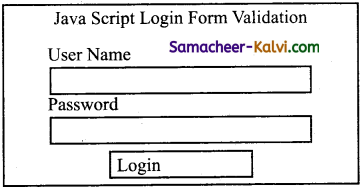
. = Concatenation Assignment.

Samacheer Kalvi TN State Board 12th Computer Applications Important Questions Chapter 4 Introduction to Hypertext Pre-Processor

Question 70.
Find out the following’web technology details from famous website using free web tools:
http://similarweb.com or http://pub-db.com
(i) Programming details
(ii) Webserver details
(iii) Hosting Country details.
Answer:
I. http://similanveb.com
(i) Programming details – ASP.NET, PHP
Client side – ASP. Net
Serverside -‘PHP
(ii) Webserver details – Nginx (engine x) is a light weight open source web server developed by Igor sysoev.
(iii) Hosting country details – Amazon in united states of America.

II. http://pub-db.com
(i) Programming details:
Serverside – PHP 5.4.16
Clientside – Javascript Markup – HTML 5
(ii) Web server details – Apache 2.4.6, HTTP server is a popular open source web server by Apache software foundation.
(iii) Hosting country details – Linode in Singapore.

Samacheer Kalvi TN State Board 12th Computer Applications Important Questions Chapter 4 Introduction to Hypertext Pre-Processor

Choose the correct answer:

Question 1.
Who was introduced the concept of internet and world wide web (www)?
(a) Berners-Lee
(b) Billgates
(c) Pichai Elango
(d) Martin glow
Answer:
(a) Berners-Lee

Question 2.
Which script language most widely used and recognizable technologies in use on the internet?
(a) TCL
(b) PHP
(c) Ruby
(d) Perl
Answer:
(b) PHP

Question 3.
CGI stands for:
(a) Central Gateway Interface
(b) Cascading Gateway Information
(c) Common Gateway Interface
(d) Common Good Interface
Answer:
(c) Common Gateway Interface

Samacheer Kalvi TN State Board 12th Computer Applications Important Questions Chapter 4 Introduction to Hypertext Pre-Processor

Question 4.
CSS stands for:
(a) Cascading Style Sheets
(b) Cascading srever Sheets
(c) Common Style Sheets
(d) Common Server System
Answer:
(a) Cascading Style Sheets

Question 5.
Which of the following apache foundation Webserver software?
(a) Ruby
(b) Httpd
(c) Perl
(d) PHP
Answer:
(b) Httpd

Question 6.
What is default port number for MSI file from Apache foundation?
(a) 130
(b) 150
(c) 130130
(d) Both (a) and (c)
Answer:
(d) Both (a) and (c)

Samacheer Kalvi TN State Board 12th Computer Applications Important Questions Chapter 4 Introduction to Hypertext Pre-Processor

Question 7.
Which directory is located httpd.conf Webserver file?
(a) temp
(b) software
(c) conf
(d) config
Answer:
(c) conf

Question 8.
The default PHP syntax begin with:
(a) “<?PhP”
(b) “«?PHP”
(c) “?<PhP”
(d) “?<PHP>”
Answer:
(a) “<?PhP”

Question 9.
The default PHP syntax closes with:
(a) “<?”
(b) “?>”
(c) ?”>”
(d) “?”>
Answer:
(b) “?>”

Samacheer Kalvi TN State Board 12th Computer Applications Important Questions Chapter 4 Introduction to Hypertext Pre-Processor

Question 10.
What is called storage location which can store the values for manipulation in the program?
(a) constant
(b) Integer
(c) Variable
(d) Literal
Answer:
(c) Variable

Question 11.
Which symbol is begin with PHP variable?
(a) #
(b) $
(c) *
(d) &
Answer:
(b) $

Question 12.
Which of the following is indicates the end of statement?
(a) ,(comma)
(b) .(full stop)
(c) :(colon)
(d) ;(semicolon)
Answer:
(d) ;(semicolon)

Samacheer Kalvi TN State Board 12th Computer Applications Important Questions Chapter 4 Introduction to Hypertext Pre-Processor

Question 13.
How many primitive data types supports PHP scripting language?
(a) 8
(b) 10
(c) 11
(d) 13
Answer:
(d) 13

Question 14.
String is a collection of:
(a) numbers
(b) numeric values
(c) characters
(d) symbols
Answer:
(c) characters

Question 15.
Which data types denote the two possible states?
(a) Integer
(b) Float
(c) Array
(d) Boolean
Answer:
(d) Boolean

Samacheer Kalvi TN State Board 12th Computer Applications Important Questions Chapter 4 Introduction to Hypertext Pre-Processor

Question 16.
Which data type has multiple values in single variable?
(a) Integer
(b) Float
(c) Array
(d) Boolean
Answer:
(c) Array

Question 17.
Which function is used to dump information about a variable?
(a) var_dump()
(b) dump()
(c) var_x()
(d) var_dumpx()
Answer:
(a) var_dump()

Question 18.
What is the special data type which contains a single value?
(a) Boolean
(b) Array
(c) NULL
(d) Resource
Answer:
(c) NULL

Samacheer Kalvi TN State Board 12th Computer Applications Important Questions Chapter 4 Introduction to Hypertext Pre-Processor

Question 19.
Which operator performs to finding remainder in division?
(a) %(module)
(b) /(division)
(c) \(back slash)
(d) – (minus)
Answer:
(a) %(module)

Question 20.
Which is similar Assignment expression for x + = y?
(a) x + y
(b) x = x + y
(c) x + y = y
(d) y = y + x
Answer:
(b) x = x + y

Question 21.
Which of the following operator is not equal?
(a) ! =
(b) <>
(c) = = =
(d) Both (a) and (b)
Answer:
(d) Both (a) and (b)

Samacheer Kalvi TN State Board 12th Computer Applications Important Questions Chapter 4 Introduction to Hypertext Pre-Processor

Question 22.
What is called two operators are used to perform string related operations?
(a) concatenation
(b) concatenation assignment
(c) Both (a) and (b)
(d) assignment
Answer:
(c) Both (a) and (b)

Question 23.
HTTP stands for:
(a) Hyper Text Transfer Protocol
(b) Hyper Text Transmission Protocol
(c) Hyper Text Transfer Preprocessor
(d) Hyper Text Transmission Preprocessor
Answer:
(a) Hyper Text Transfer Protocol

Question 24.
PHP scripts are executed on:
(a) ISP computer
(b) client computer
(c) server computer
(d) depends on PhP scripts
Answer:
(c) server computer

Question 25.
Which of the following statements prints in PhP?
(a) out
(b) write
(c) echo
(d) display
Answer:
(b) write

Samacheer Kalvi TN State Board 12th Computer Applications Important Questions Chapter 4 Introduction to Hypertext Pre-Processor

Question 26.
In PHP a variable needs to be declare before assign:
(a) True
(b) False
(c) Depends on website
(d) Depends on server
Answer:
(b) False

Question 27.
What will be the output of the PHP code?
1. <?php
2. $Total = “25”;
3. $more = 10;
4. $Total = $Total + Smore;
5. echo “$Total”;
6. ?>
(a) Error
(b) 2510
(c) 35
(d) 10
Answer:
(c) 35

Question 28.
Which statement will output $x on the screen?
(a) echo “\$x”;
(b) echo “$$x”;
(c) echo “/$x”;
(d) echo “$x”;
Answer:
(a) echo “\$x”;

Samacheer Kalvi TN State Board 12th Computer Applications Important Questions Chapter 4 Introduction to Hypertext Pre-Processor

Question 29.
What will be the output of the following PhP code?
1. <?PhP
2. $a = “clue”;
3. $a = “get”;
4. echo “$a”;
5. ?>
(a) get
(b) true
(c) false
(d) clueget
Answer:
(d) clueget

Question 30.
What will be the output of the following PHP code?
1. <? php
2. $a = 5;
3. $b = 5;
4. echo “$a”;($a=$b)
5. ?>
(a) 5==5
(b) error
(c) 1
(d) false
Answer:
(c) 1

Question 31.
Match the following:

(A) CSS  (i) Web server
(B) Java script  (ii) Server side script
(C) ASP  (iii) HTML method
(D) Apache Tomcat  (iv) Client side script

(a) (A) – (iv); (B) – (iii); (C) – (ii); (D) – (i)
(b) (A) – (iv); (B) – (ii); (C) – (i); (D) – (iii)
(c) (A) – (ii); (B) – (i); (C) – (iii); (D) – (iv)
(d) (A) – (ii); (B) – (iv); (C) – (iii); (D) – (i)
Answer:
(a) (A) – (iv); (B) – (iii); (C) – (ii); (D) – (I)

Samacheer Kalvi TN State Board 12th Computer Applications Important Questions Chapter 4 Introduction to Hypertext Pre-Processor

Question 32.
Match the following:

(A) Web server  (i) OPP’s
(B) PHP  (ii) Software
(C) client  (iii) Service provider
(D) Server  (iv) Service requester

(a) (A) – (ii); (B) – (iii); (C) – (iv); (D) – (i)
(b) (A) – (ii); (B) – (i); (C) – (iv)- (D) – (iii)
(c) (A) – (iii); (B) – (i); (C) – (iv); (B) – (ii)
(d) (A) – (iii); (B) – (ii); (C) – (i); (D) – (iv)
Answer:
(b) (A) – (ii); (B) – (i); (C) – (iv)- (D) – (iii)

Question 33.
Match the following:

(A)”<?”  (i) php variable begins
(B) “?>”  (ii) Statement ends
(C) $  (iii) begin php statement
(D) ;  (iv) Closes php statement

(a) (A) – (iii); (B) – (i); (C) – (ii); (D) – (iv)
(b) (A) – (iv); (B) – (i); (C) – (iii); (D) – (ii)
(c) (A) – (iii); (B) – (iv); (C) – (i); (D) – (ii)
(d) (A) – (iv); (B) – (ii); (C) – (iii); (D) – (i)
Answer:
(c) (A) – (iii); (B) – (iv); (C) – (i); (D) – (ii)

Question 34.
Match the following:

(A) String  (i) Non decimal number
(B) Integer  (ii) Multiple values
(C) Array  (iii) Single values
(D) NULL  (iv) With double Quotes

(a) (A) – (iv); (B) – (i); (C) – (ii); (D) – (iii)
(b) (A) – (iv); (B) – (iii); (C) – (ii); (D) – (i)
(c) (A) – (iii); (B) – (ii); (C) – (i); (D) – (iv)
(d) (A) – (iii); (B) – (i); (C) – (iv); (D) – (ii)
Answer:
(a) (A) – (iv); (B) – (i); (C) – (ii); (D) – (iii)

Samacheer Kalvi TN State Board 12th Computer Applications Important Questions Chapter 4 Introduction to Hypertext Pre-Processor

Question 35.
Match the following:

(A) %  (i) Not equal
(B) !=  (ii) Module
(C) ++$x  (iii) Not
(D) !  (iv) Pre increment

(a) (A) – (ii); (B) – (iii); (C) – (iv); (D) – (i)
(b) (A) – (iii); (B) – (ii); (C) – (i); (D) – (iv)
(c) (A) – (iii); {B) – (i); (C) – (iv); (D) – (ii)
(d) (A) – (ii); (B) – (i); (C) – (iv); (D) – (iii)
Answer:
(d) (A) – (ii); (B) – (i); (C) – (iv); (D) – (iii)

Question 36.
Choose the incorrect pair:
(a) PHP – Server side
(b) ASP – client side
(c) IIS – web server
(d) Web server – software
Answer:
(b) ASP – client side

Question 37.
Choose the incorrect pair:
(a) String – character
(b) Float – decimal
(c) Array – multiple
(d) Object – numeric
Answer:
(d) Object – numeric

Samacheer Kalvi TN State Board 12th Computer Applications Important Questions Chapter 4 Introduction to Hypertext Pre-Processor

Question 38.
Choose the incorrect pair:
(a) = = – equal
(b) == = – equal to
(c) ! = – not equal
(d) !== – Not identical
Answer:
(b) == = – equal to

Question 39.
Choose the correct pair:
(a) &&- OR
(b) || – AND
(c) ! – NOT
(d) XOR – XR
Answer:
(c) ! – NOT

Question 40.
Choose the correct pair:
(a) URL – directory
(b) HTTP – statement
(c) Server – clients
(d) Browser – hardware
Answer:
(c) Server – clients

Samacheer Kalvi TN State Board 12th Computer Applications Important Questions Chapter 4 Introduction to Hypertext Pre-Processor

Question 41.
Choose the incorrect statement:
(a) PHP is a one of the important server side web and general purpose scripting language.
(b) PHP scripting language can be executed via an interpreter.
(c) PHP is an open source community development initiation.
(d) PHP scripting language was developed by microsoft corporation.
Answer:
(d) PHP scripting language was developed by microsoft corporation.

Question 42.
Choose the incorrect statement:
(a) The server is a high performance hardware machine.
(b) The client is a individual software which is connected in the network.
(c) The server is called as service provider.
(d) The client is called as service requester.
Answer:
(b) The client is a individual software which is connected in the network.

Question 43.
Choose the incorrect statement:
(a) Single Tier architecture is used for the user, accessed by database administrator.
(b) The client application runs inside the server machine itself.
(c) Web server is software which is running in server hardware.Answer:
(d) Web server takes the responsibilities for compilation and execution of server side scripting language.
Answer:
(a) Single Tier architecture is used for the user, accessed by database administrator.

Samacheer Kalvi TN State Board 12th Computer Applications Important Questions Chapter 4 Introduction to Hypertext Pre-Processor

Question 44.
Choose the correct statement:
(a) PHP is fully same client side scripting language like Java script.
(b) PHP also supports OPP’s concepts.
(c) Website development and hosting through software.
(d) The process of development also include computer generation.
Answer:
(b) PHP also supports OPP’s concepts.

Question 45.
Choose the correct statement:
(a) The variable in PHP begins with a * (asterisk) symbol
(b) ,(comma) indicates the PhP end statement.
(c) PHP scripting language supports 13 primitive data types.
(d) String is a collection of characters within single quotes.
Answer:
(c) PHP scripting language supports 13 primitive data types.

Question 46.
Assertion (A):
In 1990’s British scientist Tim Berners-Lee introduced the concept of internet and World Wide Web (www).
Reason (R):
These concepts required a new set of programming languages over the network communication and also recently called as web scripting, language.
(a) Both A and R are true, and R is the correct explanation for A
(b) Both A and R are true, But R is not the correct explanation for A.
(c) A is true, But R is false.
(d) A is false, But R is true.
Answer:
(a) Both A and R are true, and R is the correct explanation for A.

Samacheer Kalvi TN State Board 12th Computer Applications Important Questions Chapter 4 Introduction to Hypertext Pre-Processor

Question 47.
Assertion (A):
The main objective of internet implies that an application is shared by more than one hardware either it could be server or client machine.
Reason (R):
Internet was emerging in the computer network field.
(a) Both A and R are true, and R is the correct explanation for A.
(b) Both A and R are true, but R is not the correct explanation for A.
(c) A is true, But R is false.
(d) A is false, But R is true.
Answer:
(b) Both A and R are true, but R is not the correct explanation for A.

Question 48.
Assertion (A):
Webserver is software which is running in server hardware.
Reason (R):
The architecture is used for the server, accessed by Data Base Administrator.
(a) Both A and R are true, and R is the correct explanation for A.
(b) Both A and R are true,but R is not the correct explanation for A.
(c) A is true, But R is false.
(d) A is false, But R is true.
Answer:
(c) A is true, But R is false.

Question 49.
Assertion (A):
PHP script language is not supports Object Oriented Programming (OOP’s) concepts.
Reason (R):
Webserver software is available as open source or licensed version in the market.
(a) Both A and R are true, and R is the correct explanation for A.
(b) Both A and R are true, and R is not the correct explanation for A.
(c) A is true, But R is false.
(d) A is false, But R is true.
Answer:
(d) A is false, But R is true.

Samacheer Kalvi TN State Board 12th Computer Applications Important Questions Chapter 4 Introduction to Hypertext Pre-Processor

Question 50.
Assertion (A):
PHP scripts can be written inside of HTML code and save the file with extension of HTML.
Reason (R):
The embeded PHP file get executed by the Java interpreter.
(a) Both A and R are true.
(b) Both A and R are False.
(c) A is true, But R is false.
(d) A is false, But R is true.
Answer:
(b) Both A and R are False.

Question 51.
Pick the odd one out.
(a) Ruby
(b) PHP
(c) ASP
(d) CGI
Answer:
(d) CGI

Question 52.
Pick the odd one out.
(a) String
(b) Integer
(c) Open
(d) Float
Answer:
(c) Open

Samacheer Kalvi TN State Board 12th Computer Applications Important Questions Chapter 4 Introduction to Hypertext Pre-Processor

Question 53.
Pick the odd one out.
(a) %
(b) *
(c) +
(d) S
Answer:
(d) S

Question 54.
Pick the odd one out.
(a) ! =
(b) & &
(c) ||
(d) !
Answer:
(a) ! =

Samacheer Kalvi TN State Board 12th Computer Applications Important Questions Chapter 4 Introduction to Hypertext Pre-Processor

Question 55.
Pick the odd one out.
(a) /* */
(b) “<?”
(c) #
(d) ||
Answer:
(b) “<?”

Question 56.
What does PHP stand for?
(a) Personal Home Page
(b) Hypertext Preprocessor
(c) Pretext Hypertext Processor
(d) Pre-processor Home Page
Answer:
(b) Hypertext Preprocessor

Question 57.
What does PHP files have a default file extension?
(a) .html
(b) .xml
(c) .php
(d) .ph
Answer:
(c) .php

Samacheer Kalvi TN State Board 12th Computer Applications Important Questions Chapter 4 Introduction to Hypertext Pre-Processor

Question 58.
A PHP script should start with ……….. and end with ………
(a) <php>
(b) < ? php ? >
(c) < ? ? >
(d) < ?php? >
Answer:
(c) < ? ? >

Question 59.
Which of the following must be installed on your computer so as to run PHP script?
(a) Adobe
(b) windows
(c) Apache
(d) IIS
Answer:
(c) Apache

Question 60.
We can use ……………… to comment a single line?
(i) /?
(ii) //
(iii) #
(iv) /**/
(a) Only (ii)
(b) (i), (iii) and (iv)
(c) (ii), (iii) and (iv)
(d) Both (ii) and (iv)
Answer:
(c) (ii), (iii) and (iv)

Samacheer Kalvi TN State Board 12th Computer Applications Important Questions Chapter 4 Introduction to Hypertext Pre-Processor

Question 61.
Which of the following PHP statement/statements will store 41 in variable num?
(a) Both (i) and (ii)
(b) All of the mentioned.
(c) Only (iii)
(d) Only (i)
(e) $num=41
Answer:
(e) $num=41

Question 62.
What will be the output of the following PHP code?
<?php
$num = 1;
$numl = 2;
print $num . “+”. $numl;
?>
(a) 3
(b) 1+2
(c) 1.+.2
(d) Error
Answer:
(b) 1+2

Question 63.
Which of the following PHP statements will output Hello World on the screen?
(a) echo (“Hello World”);
(b) print (“Hello World”);
(c) printf (“Hello World”);
(d) sprintf (“Hello World”);
Answer:
(b) print (“Hello World”);

Samacheer Kalvi TN State Board 12th Computer Applications Important Questions Chapter 4 Introduction to Hypertext Pre-Processor

Question 64.
Which statement will output $x on the screen?
(a) echo “\$x”;
(b) echo “$$x”;
(c) echo “/$x”;
(d) echo “$x;
Answer:
(a) echo “\$x”;

Question 65.
Which of the below symbols is a newline character?
(a) \r
(b) \n
(c) /n
(d) /r
Answer:
(b) \n

TN Board 12th Computer Applications Important Questions

TN Board 12th Computer Applications Important Questions Chapter 5 PHP Function and Array

TN State Board 12th Computer Applications Important Questions Chapter 5 PHP Function and Array

Question 1.
Define function calling.
Answer:
A function declaration part will be executed by a call to the function. Programmer has to create function calling part inside respective program.

Question 2.
Define Arguments.
Answer:
The Arguments are mentioned after the function name and inside of the parenthesis. There is no limit for sending arguments, just separate them with a comma notation.

Question 3.
Write the associative array syntax.
Answer:
Syntax:
array (keyl =s> value1. key2 => value2, keyn => value n, etc); where,
key – specifies the numeric or string type of key. value – specifies the value.

Samacheer Kalvi TN State Board 12th Computer Applications Important Questions Chapter 5 PHP Function and Array

Question 4.
What is needed to be able to use image function?
Answer:
GD library is needed to execute image function.

Question 5.
How to create an empty array in PHP?
Answer:
It is very easy to create an array in PHP. We can create an array in PHP using array 0 function or simply assigning [ ] in front of variable.
Eg: $array = [ ]

Question 6.
How to get number of elements in an array?
Answer:
Use count 0 function to count the number of elements in an PHP array.
Eg:
$array = [‘ram’, ‘ravi’, ‘rani’, ‘raja’]-; echo count (Sarray);
Output: 4

Samacheer Kalvi TN State Board 12th Computer Applications Important Questions Chapter 5 PHP Function and Array

Question 7.
Write a simple program in PHP to define a function.
Answer:
// Define a function
function add_numbers( ).
{
echo 1+2; .
}
add_numbers( );
?> .
Output: 3

Question 8.
What is the default of array?
Answer:
Any new array is always initialized with a default value as follows.

  1. For byte, short, int, long – default value is zero (0)
  2. For float, double – default value is 0.0
  3. For Boolean – default value is false
  4. For object – default value is null.

Samacheer Kalvi TN State Board 12th Computer Applications Important Questions Chapter 5 PHP Function and Array

Question 9.
Can we declare array size as a negative number?
Answer:
No, we cannot declare the negative integer as an array-size.
If we declare, there will be no compile time error.
However, we will get negative array size exception at run time.

Question 10.
What will be output of the following PHP code?
Answer:
<? php
function calc ($price, Stax = ” “)
{
Stotal = Sprice + (Sprice * Stax); echo “Stotal”;
)
calc (42);
?> .
Output: 42

Question 11.
Write a PHP program to valid an email address.
Answer:
<? php
function valid_email ($email)
{
Sresult = trim ($email); .
if (filter_var ($ result, FILTER_VALIDATE_EMAIL) ) {
return “true”;
}
else .
{
echo “false”;
} .
• }
‘ ?>

Samacheer Kalvi TN State Board 12th Computer Applications Important Questions Chapter 5 PHP Function and Array

Question 12.
What are the features of PHP functions?
Answer:

  1. PHP functions are reducing duplication of code.
  2. PHP functions are decomposing complex problems into simpler pieces.
  3. PHP functions are improving clarity of the code.
  4. PHP functions are reuse of code.
  5. PHP functions and Information hiding.
  6. PHP arrays are using for each looping concepts.

Question 13.
Write a PHP functions with one a argument program.
Answer:
<?php
function School_Name($sname)
{
echo $sname.”in Tamilnadu.<br>”;
}
School_Name (“Government Higher Madurai”);
School_Name (“Government Higher Trichy”);
School_Name .(“Government Higher Chennai”);
School_Name (“Government Higher Kanchipuram”);
School_Name (“Government Higher Tirunelveli”);
?>

Question 14.
Write a PHP function with two arguments program.
Answer:
<?php .
function School_Name (Ssname,$Strength) {
echo Ssname.”in Tamilnadu and Student Strength is” .$Strength;
}
School_Name (“Government Higher Secondary School Madurai”,200);
School_Name (“Government Higher Secondary School Trichy”,300);
School_Name (“Government Higher Secondary School Chennai”,250);
School_Name (“Government Higher Secondary School Kanchipuram”,100);
School_Name (“Government Higher Secondary School . Tirunelveli”,200);
?>

Samacheer Kalvi TN State Board 12th Computer Applications Important Questions Chapter 5 PHP Function and Array

Question 15.
Write a PHP function program to return a value, use the return statement.
Answer:
<?php
function sum($x, $y) { ‘
$z – $x + $y;
return } .
echo “5 + $z;
10 = ” . sum(5,10) . “<br>”;
echo “7 + 13 = ” . sum(7,13) . “<br>”;
echo
?> “2 + 4 = ” . sum(2,4);

Samacheer Kalvi TN State Board 12th Computer Applications Important Questions Chapter 5 PHP Function and Array

Question 16.
Define Function in PHP.
Answer:
A block of segment in a program that performs a specific operation tasks (Insert, execute, delete, calculate etc.,). This segment is known as function. A function is a type of sub- routine or procedure in a program.

Question 17.
Define User define Function.
Answer:
Besides the built-in PHP functions, we can create our own functions. A functions is a block of statements that can be used repeatedly in a program is called user define function.

Question 18.
What is parameterized Function.
Answer:
PHP parametrized functions are the functions with parameters or arguments. The parameter is also called as arguments, it is like variable.

Samacheer Kalvi TN State Board 12th Computer Applications Important Questions Chapter 5 PHP Function and Array

Question 19.
List out System defined Functions.
Answer:

  1. A function is already created by system it is a reusable piece or block of ‘ code that performs a specific action.
  2. Function can either return values when called or can simply perform an operation without returning any value.

Question 20.
Write Syntax of the Function in PHP.
Answer:
Syntax:
function functionName ( )
{
custom Logic code to be executed;
}

Question 21.
Define Array in PHP.
Answer:
Array is a concept that stores more than one value of same data type (homogeneous) in single array variable.

Samacheer Kalvi TN State Board 12th Computer Applications Important Questions Chapter 5 PHP Function and Array

Question 22.
Usage of Array in PHP.
Answer:

  1. Array in PHP is one of the most useful aspects of using arrays.
  2. PHP is combined with the foreach statement, this allows you to quickly loop through an array with very little code.

Question 23.
List out the types of array in PHP.
Answer:
They are 3 types of array concepts in PHP.

  1. Indexed arrays
  2. Associative array and
  3. Multi – dimensional array.

Question 24.
Define associative array.
Answer:
Associative arrays are a key-value pair data structure. Instead of having storing data in a linear array, with associative arrays we can store our data in a collection and assign it a unique key which we may use for referencing our data.

Samacheer Kalvi TN State Board 12th Computer Applications Important Questions Chapter 5 PHP Function and Array

Question 25.
Write array Syntax in PHP.
Answer:
Array syntax:
$ Array_variable = array(“value1”, “value2”, “value3”);
where,
array – keyword of array ( )
value 1 – value at 0th position,
value 2 – value at 1st position,
value 3 – value at 2nd position.

Question 26.
Write the features System define Functions.
Answer:

  1. A system define function is already created by the system.
  2. It is reusable piece of code that performs specific action.
  3. Functions can either return values when called or can simply perform an operation without returning any value.

Question 27.
Write the purpose of parameterized Function.
Answer:

  1. Required information can be shared between function declaration and function calling part inside the program.
  2. The parameter is also called as arguments, it is like variables.
  3. The arguments are mentioned after the function name and inside of the parenthesis.
  4. There is no limit for sending arguments, just separates them with a common notation.

Samacheer Kalvi TN State Board 12th Computer Applications Important Questions Chapter 5 PHP Function and Array

Question 28.
Differentiate user define and system define Functions.
Answer:

User defined function

 System defined function

Besides the built in PHP functions, we can create our own functions. A function is already created by system.
A function is a block of statement that can be used repeatedly in a program. It is a reusable piece or block of code that performs a specific action.
A function declaration part will be executed by a call to the function Programmer has to create function calling part inside the respective program. Functions can either return values when called or can simply perform an operation without returning any value.

Question 29.
Write Short notes on Array.
Answer:

  1. Arrays in PHP is a type of data structure that allows us to store multiple elements of similar data type under a single variable thereby saving us the effort of creating a different variable for every data.
  2. The arrays are helpful to create a list of elements of similar types,which can be accessed using their index or key.
  3. An array is created using an array ( ) function in PHP. All PHP array elements are assigned to an index number by default.

Samacheer Kalvi TN State Board 12th Computer Applications Important Questions Chapter 5 PHP Function and Array

Question 30.
Differentiate Associate array and Multidimensional array.
Answer:

Associate array

 Multidimensional array

Associative arrays are a key – value pair data structure.  A multidimensional array is an array containing one or more arrays.
Instead of having storing data in a linear array, with associative arrays you can store your data in a collection and assign it a unique key which you may use for referencing your data.  PHP understands multidimensional arrays that are two, three, four, five or more levels deep.
Associative arrays are arrays that use named keys that you assign to them.  However, arrays more than three levels deep are hard to manage for most people.

Question 31.
Explain Function concepts in PHP.
Answer:

  1. A function is a type of subroutine or procedure in a program.
  2. In most of the programming language, a block of segment in a program that perform a specific operation tasks (Insert, execute, delete, calculate etc.,) This segment is also known as function.
  3. A function will be executed by a call to the function and the function returns any data type values or NULL value to called function in the part of respective program.
  4. The function can be divided into three types as user defined function, pre – defined and parameterized function.
  5. User defined functions in PHP gives a privilege to user to write own specific operation inside of existing program module.
  6. PHP has over 700 functions built in that perform different tasks.
  7. Built in functions are functions that exist in PHP installation package.

Samacheer Kalvi TN State Board 12th Computer Applications Important Questions Chapter 5 PHP Function and Array

Question 32.
Discuss in detail about User define Functions.
Answer:
(i) User defined function in PHP gives a privilege to user to write own specific operation inside of exiting program module.
(ii) A user defined function declaration begins with the keyword function.
(iii) User can write any custom logic inside the block.
(iv) A function declaration part will be executed by a call to the function.
(v) Programmer has to create function calling part inside the respective program.
(vi) The syntax of user defined function is
function fanctionName ( )
{
codes
}

Question 33.
Explain the multidimensional array.
Answer:

  1. A Multidimensional array is an array containing one or more arrays.
  2. PHP understands multidimensional arrays that are two, three, four, five, or more levels deep.
  3. However, arrays more than three levels deep are hard to manage for most people.
  4. The dimension of an array indicates the number of indices you need to select an element.
  5. For a two-dimensional array you need two indices to select an element.
  6. For a three-dimeiisional array you need three indices to select an element.
  7. The advantage of multidimensional array is detailed information can be stored.
  8. On top level, it can either be kept indexed or associative, which makes it more user-friendly, as they can use it as per their requirements.

Samacheer Kalvi TN State Board 12th Computer Applications Important Questions Chapter 5 PHP Function and Array

Question 34.
Explain Array concepts and their types.
Answer:
Array is a concept that stores more than one value of same data type (homogeneous) in single array variable,
There are three types of array concepts in PHP. They are
(i) Indexed arrays
(ii) Associative array and
(iii) Multi-dimensional array.
The syntax of array is
$Array – variable = array (“value1”, “value2”, “value3);
Where,
$Array – variable – Array variable name
array – keyword of array
value 1 – value at 0th position
value 2 – value at 1st position
value 3 – value at 2nd position

(i) Indexed Arrays:
Arrays with numeric index for the available values in array variable which contains key value pair as user / developer can take the values using keys.
Eg:
<?php
Sstudents = array (“YUVA”, “SEENO”, “GUNA”); ,
?>
the $students names are stored the index value of $students(0), $student(1), $student(2) respectively.

(ii) Associative Array:
Associative arrays are a key-value pair data structure. Instead of having storing data in a linear array, with associative arrays you can store your data in a collection and assign it a unique key which you may use referencing your data. .
Eg:
<? php
Smarks = array (“Ram” => “35”, “RAJA” => “30”, “PALAN” => “25”);
?>

(iii) Multidimensional Array:
A multidimensional array is an array containing one or more arrays. PHP understands multidimensional arrays that are two, three, four, five, or more levels deep. However, arrays more than three levels are hard to manage for most people.
Eg:
<?php
$students = array ,
(
array (“$enthilkumar”, 100, 96), array (“Dharani”, 60, 59) , array (“Murugan”, 89, 68)
) ;

Samacheer Kalvi TN State Board 12th Computer Applications Important Questions Chapter 5 PHP Function and Array

Question 35.
Explain Indexed array and Associate array in PHP.
Answer:
Indexed Array:
There are two ways to create indexed arrays.
The index can be assigned automatically (index always starts at 0), like this ($student = array “RAM”, “VELU”, “PALANI”); the index can be assigned as
$student[0] = “RAM”;
Sstudent[1] = “VELU”;
Sstudent[2] = “PALANI”;
In another indexed array is loop through an indexed array, to loop through and print all the value of an indexed array, we could use a for loop.
Eg:
<?php
$cars = array (“VOIVO”, “BMW”,
$arrlength = count (Scars);
for ($x =0; $x < $arrlength; $x++)
{
echo $cars [$x]; echo “<br>”;
}
?>

Associative Arrays:
Associative arrays are arrays that use named keys that we assign to them.
There are two ways to create an associative arrays.
Eg:
Sage = array (“RAM” => “35”);
“VELU” => 40, “PALANI” > = 45);
(or)
Sage [‘RAM’] = “35”;
Sage [‘VELU’] = “40”;
Sage [‘PALANI’] = “45”;
The named key can then be used in a script.
In another way is to loop through and print all the values of an associative array, we could use a‘foreach’loop.
Eg:
<?php
$age = array (“RAM” => “35”, “VELU” = “40”, “PALANI” => “45”);
foreach ($age as $x $x_value)
{
echo “key=”.$x.”, value=”.$x_value; echo “<brs”;
}
?>

Samacheer Kalvi TN State Board 12th Computer Applications Important Questions Chapter 5 PHP Function and Array

Question 36.
Create store the student details arrays and display the values.
Answer:
<?php
Sstudents = array (“RAM” => “90”, “mani” => “80”,
“Kumar” => “70”);
print_r ($students);
echo “Ram got”. $students [“Ram”];
?>
Output: Ram got 90

Question 37.
List out real world Built-in string function usages in PHP.
Answer:

  1. To get length of string – strlen(string);
  2. counting the number of words in string – str word count (string);
  3. Reversing a string – strev (string);
  4. Finding text within a string – strpos (string, text);
  5. Replacing text within a string – strjreplace (string to be replaced, text, string);
  6. Converting lower case into Title case – Ucwords (string);
  7. Converting a whole string into upper case – strtoupper (string);
  8. Comparing strings – string (string 1, string2);

Samacheer Kalvi TN State Board 12th Computer Applications Important Questions Chapter 5 PHP Function and Array

Choose the correct answer:

Question 1.
Which is also called as arguments?
(a) Parameter
(b) Function
(c) Subroutine
(d) Constants
Answer:
(a) Parameter

Question 2.
How many types of array concepts in PHP?
(a) 2
(b) 3
(c) 4
(d) 5
Answer:
(b) 3

Question 3.
Which is one of the most useful aspects of using arfays in PHP?
(a) For each statement
(b) Conditional statement
(c) branch statement
(d) loop statement
Answer:
(a) For each statement

Samacheer Kalvi TN State Board 12th Computer Applications Important Questions Chapter 5 PHP Function and Array

Question 4.
PHP’s numerically indexed array begin with position:
(a) 1
(b) 2
(c) 0
(d) -1
Answer:
(c) 0

Question 5.
Which of the following are correct ways of creating an array?
(i) state [0] = “TAMILNADU”;
(ii) state [f] = array (“TAMILNADU”); –
(iii) $state [0] = “TAMILNADU”;
(iv) $state = array (“TAMILNADU”);
(a) (iii) and (iv)
(b) (ii) and (iii)
(c) only (i)
(d) (i), (ii) and (iv)
Answer:
(a) (iii) and (iv)

Question 6.
Which function will return true if a variable is an array or false if it not?
(a) this_array ()
(b) is_array ()
(c) do array ()
(d) in_array ()
Answer:
(b) is_array ()

Samacheer Kalvi TN State Board 12th Computer Applications Important Questions Chapter 5 PHP Function and Array

Question 7.
What will be the output of the following PHP code?
<?php
$Fruits = array (‘apple’,orange’, ‘banana’);
echo (next (Sfruits));
echo (next ($fruits));
?>
(a) orangeorange
(b) appleorange
(c) orangebanana
(d) appleapple
Answer:
(c) orangebanana

Question 8.
What will be the output of the following PHP code?
$x = array (“aaa”, “bbb”, “ccc”, “bbb”, “ddd”, “bbbb”);
$y = array_count_values ($x) ; echo $y (bbb);
?>
(a) 2
(b) 3
(c) 4
(d) 1
Answer:
(a) 2

Question 9.
What will be the output of the following PHP code?
<? php
$x = array (1, 3, 2, 4, 5, 6, 2,- 4);
$y = array_count_values ($x);
echo $y [6];
?>
(a) 1
(b) 2
(c) 3
(d) 4
Answer:
(a) 1

Samacheer Kalvi TN State Board 12th Computer Applications Important Questions Chapter 5 PHP Function and Array

Question 10.
Which operator is used to concatenate two strings in PHP?
(a) (•) – dot operator
(b) (+) – operator
(c) (,) – comma operator
(d) (:) – colon operator
Answer:
(a) (•) – dot operator

Question 11.
PHP variable are:
(a) single type variable
(b) multi type variable
(c) double type variable
(d) trible type variable
Answer:
(b) multi type variable

Question 12.
In PHP the error control operator is:
(a) .
(b) *
(c) @
(d) &
Answer:
(c) @

Samacheer Kalvi TN State Board 12th Computer Applications Important Questions Chapter 5 PHP Function and Array

Question 13.
PHP is a:
(a) client side script language
(b) server side script language
(c) even – driven language
(d) High – level language
Answer:
(b) server side script language

Question 14.
The PHP syntax is most similar to:
(a) Pearl and C
(b) Java script
(c) VB script
(d) Visual Basic
Answer:
(a) Pearl and C

Question 15.
Which of the following function is used for terminate the script execution in PHP?
(a) break ()
(b) quit ()
(c) die ()
(d) stop ()
Answer:
(c) die ()

Samacheer Kalvi TN State Board 12th Computer Applications Important Questions Chapter 5 PHP Function and Array

Question 16.
Match the following:

(A) Function  (i) Built in function
(B) User defined function  (ii) Ideal solution
(C) System defined function  (iii) Arguments
(D) Parameterized function  (iv) System created

(a) (A) – (ii); (B) – (i); (C) – (iv); (D) – (iii)
(b) (A) – (ii); (B) – (iii); (C) – (i); (D) – (iv)
(c) (A) – (iv); (B) – (i); (C) – (iii); (D) – (ii)
(d) (A) – (iv)- (B) – (ii); (C) – (i); (D) – (iii)
Answer:
(a) (A) – (ii); (B) – (i); (C) – (iv); (D) – (iii)

Question 17.
Match the following:

(A) Array  (i) More arrays
(B) Associative array  (ii) Data set
(C) Indexed arrays  (iii) named keys
(D) Multidimensional array  (iv) Heterogeneous data

(a) (A) – (ii); (B) – (i); (C) – (iv); (D) – (iii)
(b) (A) – (iv); (B) – (iii); (C) – (ii); (D) – (i)
(c) (A) – (ii); (B) – (iii); (C) – (iv); (D) – (i)
(d) (A) – (iv); (B) – (i); (C) – (ii); (D) – (iii)
Answer:
(b) (A) – (iv); (B) – (iii); (C) – (ii); (D) – (i)

Question 18.
Choose incorrect pair:
(a) PHP – server side
(b) Function – subroutine
(c) NULL – data type
(d) UDF – Language
Answer:
(d) UDF – Language

Samacheer Kalvi TN State Board 12th Computer Applications Important Questions Chapter 5 PHP Function and Array

Question 19.
Choose correct pair:
(a) Parameter – Arguments
(b) calling – variable
(c) Array – Function
(d) data – operator
Answer:
(a) Parameter – Arguments

Question 20.
Choose incorrect statement:
(a) PHP has over 700 functions built-in that perform different tasks.
(b) Built-in functions are functions that exist in PHP installation package.
(c) In PHP client side scripting language.
(d) A function is a type of procedure in a program.
Answer:
(c) In PHP client side scripting language.

Question 21.
Choose the correct statement.
(a) The parameter is also called Recursion.
(b) A function declaration part will be executed by a call to the function.
(c) Programmer has to create function calling part outside the respective program.
(d) PHP function can be divided in to two types..
Answer:
(b) A function declaration part will be executed by a call to the function.

Samacheer Kalvi TN State Board 12th Computer Applications Important Questions Chapter 5 PHP Function and Array

Question 22.
Assertion (A):
A user – defined function declaration begins with the keyword ‘function’.
Reason (R):
Functions and array concepts are very important to solve the many complex problems in real world.
(a) Both A and R are True, and R is the correct explanation fpr A.
(b) Both A and R are True, but R is the not correct explanation for A.
(c) A is True, but R is false.
(d) A is false, but R is true.
Answer:
(b) Both A and R are True, but R is the not correct explanation for A.

Question 23.
Assertion (A):
Associative arrays are a key-value pair data structure.
Reason (R):
A multidimensional array is an array containing single value.
(a) Both A and R are True, and R is the correct explanation for A.
(b) Both A and R are True, but R is the not correct explanation for A.
(c) A is True, but R is false.
(d) A is false, but R is true.
Answer:
(c) A is True, but R is false.

Question 24.
Pick the odd one out:
(a) Associative
(b) Function
(c) Indexed
(d) Multi-dimension
Answer:
(b) Function

Samacheer Kalvi TN State Board 12th Computer Applications Important Questions Chapter 5 PHP Function and Array

Question 25.
Pick the odd one out:
(a) Arrays
(b) User defined
(c) System defined
(d) Built-in
Answer:
(a) Arrays

Question 26.
Which one of the following is the right way of defining a function in PHP?
(a) function { function body }
(b) data type functionNamefparameters) { function body }
(c) functionName(parameters) {function body }
(d) function functionName(parameters) {function body }
Answer:
(d) function functionName(parameters) {function body }

Question 27.
A function in PHP which starts with (double underscore) is know as:
(a) Magic Function
(b) Inbuilt Function
(c) Default Function
(d) User Defined Function
Answer:
(a) Magic Function

Samacheer Kalvi TN State Board 12th Computer Applications Important Questions Chapter 5 PHP Function and Array

Question 28.
PHP’s numerically indexed array begin with position:
(a) 1
(b) 2
(c) 0
(d) -1
Answer:
(c) 0

Question 29.
Which of the following are correct ways of creating an array?
(i) state[0] = “Tamilnadu”;
(ii) $state[ ] = array(“Tamilnadu”);
(iii) $state[0] = “Tamilnadu”;
(iv) $state = array{“Tamilnadu”);
(a) (iii) and (iv)
(b) (ii) and (iii)
(c) Only (i)
(d) (ii), (iii) and (iv)
Answer:
(a) (iii) and (iv)

Question 30.
What will be the output of the following PHP code?
<?php
$a=array(“A”, “Gat”, “Dog”, “A”, “Dog”);
$b=array(“A”, “A” “Cat”, “A”, “Tiger”); –
$c=array_combine($a,$b);
print_r(array_count_vaiues($c));
?>
(a) Array ([A] => 5 [Cat] => 2 [Dog] => 2 [Tiger] => 1)
(b) Array ([A] => 2 [Cat] => 2 [Dog] => 1 [Tiger] => 1)
(c) Array ([A] ==> 6 [Cat] => 1 [Dog] => 2 [Tiger] => 1)
(d) Array ([A] => 2 [Cat] => 1 [Dog] => 4 [Tiger] => 1 )
Answer:
(a) Array ([A] => 5 [Cat] => 2 [Dog] => 2 [Tiger] => 1)

Samacheer Kalvi TN State Board 12th Computer Applications Important Questions Chapter 5 PHP Function and Array

Question 31.
For finding nonempty elements in array we use:
(a) is_array () function
(b) sizeof ( ) function
(c) array_count () function
(d) count ( ) function
Answer:
(a) is_array () function

Question 32.
Indices of arrays can be either strings or numbers and they are denoted as:
(a) $my_array {4}
(b) $my_array [4]
(c) $my_array| 41
(d) None of them
Answer:
(b) $my_array [4]

Question 33.
PHP arrays are also called as:
(a) Vector arrays
(b) Perl arrays
(c) Hashes
(d) All of them
Answer:
(d) All of them

Samacheer Kalvi TN State Board 12th Computer Applications Important Questions Chapter 5 PHP Function and Array

Question 34.
As compared to associative arrays vector arrays are much:
(a) Faster
(b) Slower
(c) Stable
(d) None of them
Answer:
(a) Faster

Question 35.
What functions count elements in an array?
(a) count
(b) Sizeof
(c) Array Count
(d) Countarray
Answer:
(a) count

TN Board 12th Computer Applications Important Questions

TN Board 12th Computer Applications Important Questions Chapter 6 PHP Conditional Statements

TN State Board 12th Computer Applications Important Questions Chapter 6 PHP Conditional Statements

Question 1.
When is a conditional statement ended with end if?
Answer:
When the original it was followed by and then the code block without braces.

Question 2.
What will be the values of $a and $b after the code below is executed?
Answer:
$a = ‘1’;
$b = &$a;
Sb = “2$b;
output: “21”
(Both $a and $b will be equal to the string “21” after the above code is executed)

Question 3.
Draw flow chart if elseif…else statement.
Answer:

TN State Board 12th Computer Applications Important Questions Chapter 6 PHP Conditional Statements 1

(i) This flow chart explain if, elseif…else statement, it used to take decision based on the different condition.
(ii) If condition is true, the following conditional code will be executed, if it is false exit from the conditional code.

Samacheer Kalvi TN State Board 12th Computer Applications Important Questions Chapter 6 PHP Conditional Statements

Question 4.
Write a PHP program to find bigger, smaller, equal of any two number.
Answer:
<? php
if ($a>$b)
{
}echo “A is bigger than B”;
else if ($a = = $b)
{
echo “A is equal toB”;
}
else
{
echo “A is smaller than B”;
} .
?>

Question 5.
What is faster if or switch statement?
Answer:

  1. A switch statement might prove to be faster than if provided number of cases are good.
  2. If-else better for boolean values whereas switch statements are great for fixed data values.
  3. If-else statement can test expressions based on the ranges of values or conditions, whereas a switch statement tests expressions based only on a single integer, enumerated value, or string object.

Samacheer Kalvi TN State Board 12th Computer Applications Important Questions Chapter 6 PHP Conditional Statements

Question 6.
Explain the following conditional statement PHP coding.
Answer:
<! DOCTYPE html>
<html>
<body>
<? php
$S = date (“D”);
if ($S < “15”) *
{
echo “working day”;
}
?>
</body>
</html>
Output: Working day
Explanation of code:
1. <? PHP . – starting php
2 . Ss = date(“D”-) – Declaring variable
3. if ($S < “15”) – If condition true code executes
4. echo – Built in function to print the text
5. ?> – closing of php

Question 7.
Write a simple php program to print grade of the student result using if… elseif…else conditional statement.
Answer:
coding:
<?php
$ result = 70;
if ($result > = 75)
{
echo “Grade A…Pass”;
}
elseif ($result > = 60)
{
echo “Grade B…Pass”;
}
elseif ($result > = 45)
{
echo “Grade C pass”;
}
else
{
echo “Fail”;
}
?>

Samacheer Kalvi TN State Board 12th Computer Applications Important Questions Chapter 6 PHP Conditional Statements

Question 8.
Write a php program using switch case for string variable.
Answer:
$position = “dba”;
switch ($position)
{
case “member”:
echo “welcome member”;
break;
case “teacher”:
echo “welcome teacher”;
break;
case “student”:
echo “welcome student”;
break;
default:
echo “Welcome you all others”;
break;
}

Question 9.
Why switch statement is better for multi-way branching.
Answer:

  1. When compiler compiles a switch statement, if will inspect each of the case constants and create a jump table.
  2. A jump table that will use for selecting the path of execution depending on the value of the expression.
  3. Therefore, if we need to select among a large group of values, a switch statement will run much faster than the equivalent logic coded using a sequence of if…elses.
  4. The compiler can do this because it knows that the case constants are all the same type and simply must be compared for equality with the switch expression.
  5. While in case of it expressions, the compiler has no such knowledge.

Samacheer Kalvi TN State Board 12th Computer Applications Important Questions Chapter 6 PHP Conditional Statements

Question 10.
Write a PHP program to check given character is vowel or consonant using if…else if statement.
Answer:
<? php
$char = $_post [ ‘ch’]; ,
if ($char==”a”) ‘
{
echo $char.”is vowel”;
}
elseif ($char==”e”)
{
echo $char.”is vowel”;
}
elseif ($char==”iM)
{
echo $char .”is vowel”;
elseif ($char==”o”)
{
echo $char. “is vowel”;
}
elseif ($char==”u”)
{
echo $char.”is vowel”;
}
else
{
echo $char. “is consonant”;
}
?>

Question 11.
Write a PHP program a day of the week using if…elseif…else statement.
Answer:
<?php
if ($day==”Mon”) ‘
echo “Monday”;
elseif ($day==”Tue”)
echo “Tuesday”;
elseif ($day==”Wed”)
echo “WEDNESDAY”;
elseif ($day==”Thu”)
echo “THURSDAY”;
elseif ($day==”Fri”)
echo “FRIDAY”;
elseif ($day==”Sat”)
echo “SATURDAY”;
else
echo “SUNDAY”;
?>

Samacheer Kalvi TN State Board 12th Computer Applications Important Questions Chapter 6 PHP Conditional Statements

Question 12.
Write a PHP program day of the week using switch case statement.
Answer:
<?php
$today=date(“D”);
switch ($today)
<
case “Mon”:
echo “Today is Monday”;
break; ’
case “Tue”:
echo “Today is Tuesday”; .
break;
case “Wed”:
echo “Today is Wednesday”;
break;
case “Thu”
echo “Today is Thursday”;
break;
case “fri”
echo “Today is Friday”;
break; ‘
case “sat”
echo “Today is Saturday”;
break;
case “sun”:
echo “Today is Sunday”;
break;
default:
echo “Thank you”; break;
}
?>

Samacheer Kalvi TN State Board 12th Computer Applications Important Questions Chapter 6 PHP Conditional Statements

Question 13.
Define Conditional Statements in PHP.
Answer:
Conditional statements in PHP are useful writing decision making logics. It is most important feature of many programming language.

Question 14.
Define if statement in PHP.
Answer:
If statement is a conditional branching statement. If statement executes a statement or a group of statements if a specific condition is satisfied as per the user expectation.

Question 15.
What is if else statement in PHP?
Answer:
If… else statement in PHP is the if statement executes a statement or a group of statements if a specific condition is satisfied by the user expectation. When the condition gets falls the else block is executed.

Samacheer Kalvi TN State Board 12th Computer Applications Important Questions Chapter 6 PHP Conditional Statements

Question 16.
List out Conditional Statements in PHP.
Answer:
The conditional statements in PHP are
if statement, if…else statement,
if… elseif… else statement, switch statement.

Question 17.
Write Syntax of the If else statement in PHP.
Answer:
Syntax:
if (condition)
{
Execute statement(s) if condition is true;
}
else
{
Execute statement(s) if condition is false;
}

Question 18.
Define if…elseif….else Statement in PHP.
Answer:
If … elseif… else statement in PHP is a combination of if…else statement. More than one statement can execute the condition based on user needs.

Samacheer Kalvi TN State Board 12th Computer Applications Important Questions Chapter 6 PHP Conditional Statements

Question 19.
Usage of Switch Statement in PHP.
Answer:

  1. The switch statement is used to perform different actions based on different conditions.
  2. Switch statement works the same as if statements but they can check for multiple values at a time.

Question 20.
Write Syntax of Switch statement.
Answer:
Syntax:
Switch (n)
{
case label 1:
code to be executed if n = label 1;
break;
case label 2:
code to be executed if n = label 2;
break;
case label 3:
code to be executed if n = label 3;
break;
——–
——–
default:
code to be executed if n is different from all labels;
}

Question 21.
Compare if and if else statement.
Answer:

If statement

 If… else statement

The if statement is used to execute a block of code only if the specified condition evaluates to true.  The if…else statement allows you to execute one block of code if the specified condition is evaluates to true and another block of code if it is evaluates to false.
The if statement is quite basic because in if statement output will display when condition must be true, if condition is false it display nothing.  If…else statements allows you to display output in both the conditions, that is if condition is true display some message otherwise display other message.

Samacheer Kalvi TN State Board 12th Computer Applications Important Questions Chapter 6 PHP Conditional Statements

Question 22.
Write the features Conditional Statements in PHP.
Answer:

  1. PHP programmers evaluate different conditions during of a program and take decisions based on whether these conditions evaluate to true or false.
  2. if statement – executes some code if one condition is true.
  3. if., .else statement – executes some code if a condition is true and another code if that condition is false.
  4. if…elseif… else statement – executes different codes for more than two conditions.
  5. Switch statement – selects one of many blocks of code to be executed.

Question 23.
Write the purpose of if elseif else statement.
Answer:

  1. When we want to execute different code for different set of conditions, and we have more than two possible conditions, then we use if…elseif… else statement.
  2. We have also used logical operator are very useful while writing multiple condition if statement.
  3. When use if…elseif…else statement as many as you want, each condition inside if ( ) can accept logical operators like AND, OR, NOT.
  4. If… elseif…else statement is a combination of if-else statement.

Question 24.
Differentiate Switch and if else statement.
Answer:

Switch statement

 if…else statement

Switch statement is to use when the same value is compared against a set. of values.  If…else can be used for any occasion where comparison need to be done.
In switch statement usually there are no conditions to evaluate, it can bit efficient over an elseif counter part.  Each if statement checks a condition and operands associated with the condition can be different from one if to another attached elseif.
The switch statements work the same as if statements but they can check for multiple values at a time.  The if statement is a way to make decision based upon the result of a condition.

Samacheer Kalvi TN State Board 12th Computer Applications Important Questions Chapter 6 PHP Conditional Statements

Question 25.
Write Short notes on Switch statement.
Answer:
(i) Use the switch statement to select one of many blocks of code to be executed.
(ii) The switch statement is used to perform different action based on different conditions.
Syntax:
switch (n)
{
case label 1:
code to be executed if n = label 1;
break;
case label 2:
code to be executed if n = label 2;
break;
case lebel 3;
code to be executed if n = label 3;
break;
default:
code to be executed if n is different from all blocks;
}
(iii) The switch statements work the same as if statements but they can check for multiple values at a time.
(iv) The break statement is used to prevent the code from running into the next case automatically.
(v) The default statement is used if no match is found.

Question 26.
Differentiate if statement and if elseif else statement.
Answer:

if statement

 if…elseif…else statement

The if statement is used to execute a block of code only if the specified condition evaluates to true. The if…elseif…else is a special statement that is used to combine multiple if…else statement.
If statement executes a statement if a specific condition is satisfied as per the user expectation. If…elseif…else statement is a combination of if – else statement.
If statement is used simple decision making logics. If…elseif…else statement is more than one statement can execute the condition based on user needs.

Samacheer Kalvi TN State Board 12th Computer Applications Important Questions Chapter 6 PHP Conditional Statements

Question 27.
Explain Function Conditional Statements in PHP.
Answer:
The PHP conditional statements are –
(i) If statement
(ii) If…else statement
(iii) If…elseif… else statement
(iv) Switch statement

(i) If statement:
This statement executes a statement or a group of statements if a specific condition is satisfied as per the user expectation.
Syntax:
if (condition)
{
Execute statements if condition is true;
}
Eg:
<?php
$pass_mark = 35;
$student_mark =70;
if ($student_mark > = $pass_mark)
{
echo “The student is eligible for promotion”;
}
?>

(ii) If…else statement:
This statement executes a statement or a group of statements if a specific condition is satisfied by the user expectation. When the condition gets false the else block is executed.
Syntax:
if (condition)
{
Execute statement(s) if condition is true;
}
else
{
Execute statement(s) if condition is false;
)
Eg:
<?php
$pass_mark = 35;
$student_mark = 70;
if ($student_mark > = $pass_mark)
{
echo “The student passed”;
}
else
{
echo “The student failed”;
}
?>

(iii) If…elseif… else statement:
This statement is a combination of if ..else statement. More than one statement can execute the condition based on user needs..
Syntax:
if (condition-1)
{
Execute statements if condition is true;
}
elseif (condition-2)
{
Execute statements if condition is true;
}
else
{
Execute statements if both conditions are false;
}
Eg:
<?php
$pass_mark = 35;
$first_class = 60;
$student_mark =70;
if ($student_mark > = $first_class)
{
echo “The student passed with first class”;
}
elseif ($student_mark > = $pass_mark.)
{
echo “The student passed”;
}
else
{
echo “The student failed”;
}
?>

(iv) Switch statement:
Refer III- Q.No – 4

Samacheer Kalvi TN State Board 12th Computer Applications Important Questions Chapter 6 PHP Conditional Statements

Question 28.
Discuss in detail about Switch statement with an example.
Answer:
The switch statement is used to perform different actions based on different conditions.
Syntax:
switch(n)
{
case label 1:
code to be executed if n = label 1;
break;
case label 2:
code to be executed if n = label 2;
break;
case label 3:
code to be executed if n = label 3;
break;
default:
code to be executed if n is different from all labels;
}

Eg:
<?php
” $f col.br = “red”;
switch ($fcolor)
{
case “red”;
echo “my favourite color is red”;
break;
case “blue”;
echo “my favourite color is blue”;
break;
case “green”:
echo “my favourite color is greeh”;
break;
default:
echo “my favourite color is neither Red, Blue, nor
green!”;
}
?>

Question 29.
Explain the process Conditional Statements in PHP?
Answer:
(i) PHP lets programmers evaluate different conditions during process of a program and take decisions based on whether these conditions evaluate to true or false.
(ii) These conditions, and the actions associated with them, are expressed by means of a programming construct called a process conditional statement. PHP supports different types of process conditional statements.
(a) The if statement: In if statements output will appear when only condition must be true.
(b) The if…else statement: If-else statements allows you to display output in both the condition if condition is true or. false.
(c) The if…elseif…else statement: The if…elseif…else statement lets you chain together multiple if-else statements, thus allowing the programmer to define actions for more than just two possible outcomes.
(d) The switch statement: The switch statement is similar to a series of if statements on the same expression.

Samacheer Kalvi TN State Board 12th Computer Applications Important Questions Chapter 6 PHP Conditional Statements

Question 30.
Explain concepts of if… elseif… else statement.
Answer:
If…elseif…else statement is a combination of If…else statement. More than one statement can execute the condition based on user needs.
The if…elseif…else statement is a special statement that is used to combine multiple if., else statements.
If…elseif…else statement is more than one statement can execute the condition based on user needs.
Syntax:
If(condition-1)
{
Execute statements if condition is true;
}
elseif (condition-2)
{
Execute statements if 2nd condition is true;
}
else
{
Execute statements if both condition are false;
}

Eg:
<?php
$pass_mark =35;
$first_class = 60;
$student_mark =70;
if ($student_mark> = $first_class)
{
echo “The student passed with first class”;
}
elseif ($student_mark > = $pass_mark)
{
echo “The student passed”;
}
else
{
echo “The student failed”;
}
?>

Question 31.
Explain if else statement in PHP.
Answer:
If…else statement executes a statement or a group of statements if a specific condition is satisfied by the user expectation. When the condition gets false ‘ the else block is executed.
If…else can be used for any occasion where comparison need to be done.
If…else statement is a way to make decision based upon the result of a condition.
Syntax:
if (condition)
{
Execute statement(s) if condition is true;
}
else
Execute statement(s) if condition is false;
}
Eg:
<?php
$pass_mark = 35; .
$student_mark = 70;
if ($student_mark> = pass_mark)
{
echo “The student passed” ;
}
else
echo “The student failed”
}
?>

Samacheer Kalvi TN State Board 12th Computer Applications Important Questions Chapter 6 PHP Conditional Statements

Question 32.
Create simple decision making scenario using if else statement in student management application.
Answer:
If…else:
If it raining outside, you don’t have to water the plants by yourself. So you can tell. If it is raining, I shall not water the plants, else I have to water them. So .now, we can write pseudo code.
if (raining==true)
do not water
else
do water .

Nested if…else:
If a boy is more than 13 years old, we call him teenager. If he is more than 21 years old, he is eligible for marriage. Using nested If…else.

If a boy is less than 13 years old he is not a teenager, else if he is less than 21 . years old he is not eligible for marriage else he is eligible.

Pseudo code:
If (age < 13)
“Not a Teenager”
else
{ if (age < 21)
“Not a eligible for marriage”
else
“eligible for marriage”
}

Question 33.
Explain real world usages in using Conditional Statements.
Answer:
A conditional statement is a statement that is stated in if… then format. This kind of statement is kind of statement is something that is often used to write a hypothesis in science.

The hypothesis can be created before a test is ever imagined, and the test is then designed to test the hypothesis. On the otherhand, the text might be known, and the conditional statement is then used to predict the outcome of the experiment.

Example I:
If you believe “money can’t buy happiness”
then
you’re not “spending it correctly”.

Example II:
If ”a person spends the money on himself”,
then
“he will be happier at the end of the day”.
else
If”a person doesn’t speñd the money on himself”,
then
“he will be happier at the end of the day”.

Example – III:
If son said “I do my homework”
then
Father represent “I get my payment”
The statement son → father is a conditional statement which represent “if son, then father”.

Samacheer Kalvi TN State Board 12th Computer Applications Important Questions Chapter 6 PHP Conditional Statements

Choose the correct answer:

Question 1.
Which statement is a combination of if-else statement?
(a) If statement
(b) break statement
(c) If…elseif…else statement
(d) If…else statement
Answer:
(c) If…elseif…else statement

Question 2.
Which statement is used to perform different actions based on different conditions?
(a) If statement
(b) Switch statement
(c)If…elseif…else statement
(d) If.. .elsestatement
Answer:
(b) Switch statement

Question 3.
Which statement contains boolean expression inside brackets?
(a) if statement
(b) switch statement
(c) break statement
(d) default statement
Answer:
(a) if statement

Samacheer Kalvi TN State Board 12th Computer Applications Important Questions Chapter 6 PHP Conditional Statements

Question 4.
Which statement executes a statement if a specific condition is satisfied?
(a) if statement
(b) switch statement
(c) break statement
(d) default statement
Answer:
(a) if statement

Question 5.
What type of statements are useful for writing decision making logics?
(a) looping
(b) conditional
(c) branch statement
(d) All the above
Answer:
(b) conditional

Question 6.
What will be the output in the PHP code?
<?php
$x = 0; ‘
if ($x = = 1) ’
if ($x > = O’) ‘
print “true”; .
else
print “false”;
?>
(a) true
(b) false
(c) error
(d) no output
Answer:
(d) no output

Samacheer Kalvi TN State Board 12th Computer Applications Important Questions Chapter 6 PHP Conditional Statements

Question 7.
What will be the output in the PHP code?
<? php
$a = 1′; .
if ($a—) print “True”;
if ($a++)
print “False”; .
?>
(a) true
(b) false
(c) error
(d) no output
Answer:
(a) true

Question 8.
What will be the output in the PHP code?
<? php
$a « 1;
If (print $a)
print “true”;
else
print “false”;
?>
(a) true
(b) false
(c) error
(d) no output
Answer:
(a) true

Question 9.
What will be the output in the PHP code?
<? php
$a = ”
if ($a) .
print “all”;
if
else
print “some”;
?>
(a) all
(b) some
(c) error
(d) no output
Answer:
(b) some

Samacheer Kalvi TN State Board 12th Computer Applications Important Questions Chapter 6 PHP Conditional Statements

Question 10.
The following syntax is correct for if conditional statement.
if condition
{
code
}
(a) true
(b) false
(c) error
(d) not correct
Answer:
(a) true

Question 11.
If <expression> Where, the expression can be of which type?
(a) True
(b) Any number
(c) Any string
(d) All the above
Answer:
(d) All the above

Question 12.
What error does the if condition gives if not terminated with end statement?
(a) Syntax error
(b) Unexpected end
(c) Expecting keyword end
(d) All the above
Answer:
(d) All the above

Samacheer Kalvi TN State Board 12th Computer Applications Important Questions Chapter 6 PHP Conditional Statements

Question 13.
What is output?
if 1 < 2
Print “One is less than Two”;
end
(a) error
(b) syntax error
(c) one is less than two
(d) none
Answer:
(c) one is less than two

Question 14.
What is output?
if 11 < 2
Print “Eleven is less than two”
end
print “11 is greater”
(a) 11 is greater
(b) Eleven is less than two
(c) Eleven is less than two 11 is greater
(d) None
Answer:
(a) 11 is greater

Samacheer Kalvi TN State Board 12th Computer Applications Important Questions Chapter 6 PHP Conditional Statements

Question 15.
What is output?
<? php
$x = 12; .
if ($x >0)
{
echo “positive number”
}
else
{
echo “Negative number”
}
?>
(a) positive
(b) negative
(c) error
(d) no output
Answer:
(a) positive

Question 16.
Match the following:

(A) If  (i) group of statement
(B) If – else  (ii) a statement
(C) If – elseif – else  (iii) multiple values
(D) Switch  (iv) combination of if – else statement

(a) (A) – (ii); (B) – (iii); (C) – (i); (D) – (iv)
(b) (A) – (ii); (B) – (i); (C) – (iv); (D) – (iii)
(c) (A) – (iv); (B) – (iii); (C) – (i); (D) – (ii)
(d) (A) – (iv); (B) – (i); (C) – (ii); (D) – (iii)
Answer:
(b) (A) – (ii); (B) – (i); (C) – (iv); (D) – (iii)

Samacheer Kalvi TN State Board 12th Computer Applications Important Questions Chapter 6 PHP Conditional Statements

Question 17.
Choose the incorrect pair:
(a) condition – decision
(b) if – control statement
(c) switch – multiple statement
(d) else if – another condition
Answer:
(b) if – control statement

Question 18.
Choose the incorrect statement:
(a) Switch statement work with same as while statements.
(b) The if statement is way to make decision based statement.
(c) If statement contains boolean expression inside brackets.
(d) The else statement must follow if or else if statement.
Answer:
(a) Switch statement work with same as while statements.

Question 19.
Assertion (A):
Conditional statements are useful for writing decision making logics.
Reason (R):
It is most important feature of many programming languages, including PHP
(a) Both A and R are true, and R is the correct explanation for A.
(b) Both A and R are true, but R is not the correct explanation for A.
(c A is true, But R is false.
(d) A is false, But R is true.
Answer:
(a) Both A and R are true, and R is the correct explanation for A.

Samacheer Kalvi TN State Board 12th Computer Applications Important Questions Chapter 6 PHP Conditional Statements

Question 20.
Pick the odd one out:
(a) If
(b) If…else
(c) break
(d) Switch
Answer:
(c) break

Question 21.
What will be the output of the following PHP code?
<?php
$x;
if ($x)
print “hi” ;
else
print “how are u”;
?>
(a) how are u
(b) hi
(c) error
(d) no output
Answer:
(a) how are u

Samacheer Kalvi TN State Board 12th Computer Applications Important Questions Chapter 6 PHP Conditional Statements

Question 22.
What will be the output of the following PHP code ?
<?php
$x = 0;
if ($x++)
print “hi”; .
else
print “how are u”;
?>
(a) hi
(b) no output
(c) error
(d) how are u
Answer:
(d) how are u

Question 23.
What will be the output of the following PHP code?
<?php
$x;
if ($x == 0)
print “hi” ;
else
print “how are u”;
print “hello”
?>
(a) how are uhello
(b) hihello
(c) hi
(d) no output
Answer:
(b) hihello

Samacheer Kalvi TN State Board 12th Computer Applications Important Questions Chapter 6 PHP Conditional Statements

Question 24.
Statement which is used to make choice between two options and only option is to be performed is written as:
(a) if statement
(b) if else statement
(c) then else statement
(d) else one statement
Answer:
(b) if else statement

Question 25.
What will be the output of the following PHP code ?
<?php
$a = “”;
if ($a)
print “all”;
if
else
print “some”;
?>
(a) all
(b) some
(c) error
(d) no output
Answer:
(b) some

Samacheer Kalvi TN State Board 12th Computer Applications Important Questions Chapter 6 PHP Conditional Statements

Question 26.
What will be the output of the following PHP code?
< ?php
$a = “” ;
if ($a)
print “all”;
if
else
print “some”;
?>
(a) all
(b) some
(c) error
(d) no output
Answer:
(b) some

Question 27.
What will be the output of the following PHP code?
<?php
$x = 10;
$y = 20;
if ($x > $y + $y != 3)
print “hi” ;
else
print “how are u”;
?>
(a) how are u
(b) hi
(c) error
(d) no output
Answer:
(b) hi

Question 28.
What will be the output of the following PHP code?
<?php
$x = 10;
$y = 20;
if ($x > $y && 1||1)
print “hi” ;
else
print “how are u”;
?>
(a) how are u
(b) hi
(c) error
(d) no output
Answer:
(b) hi

Samacheer Kalvi TN State Board 12th Computer Applications Important Questions Chapter 6 PHP Conditional Statements

Question 29.
What will be the output of the following PHP code ?
<?php
if .(-100)
print “hi” ;
else
print “how are u”;
?>
(a) how are u
(b) hi
(c) error
(d) no output
Answer:
(b) hi

TN Board 12th Computer Applications Important Questions

TN Board 12th Computer Applications Important Questions Chapter 7 Looping Structure

TN State Board 12th Computer Applications Important Questions Chapter 7 Looping Structure

Question 1.
When to use while loops?
Answer:

  • While loops are used to execute a block of code until a certain condition becomes true.
  • We can use a while loop to read records returned from a database query.

Question 2.
Write the type of while loops.
Answer:
The two types of while loops are

  1. Do..while – Executes the block of code atleast once before evaluating the condition.
  2. While – Check the condition first. If it evaluates to true, the block of code is executed as long as the condition is true. If it evaluates to false, the execution of the while loop is terminated.

Samacheer Kalvi TN State Board 12th Computer Applications Important Questions Chapter 7 Looping Structure

Question 3.
What will be the output in the php code?
Answer:
<?php $1 = 0;
while ($i < 3)
{
. echo $i +1. “<br>”;
$i ++;
}
?>
Output: 1
2
3

Question 4.
What will be the output in the php code?
Answer:
<?php
Scolors = array (“red”, “green”, “blue”, “yellow”); foreach (Scolors as Svalue)
{
echo “Svalue <br>;
>
?>
Output: red
green
blue
yellow

Samacheer Kalvi TN State Board 12th Computer Applications Important Questions Chapter 7 Looping Structure

Question 5.
What is output in the php code?
Answer:
<?php
for($i = 1; $i < 10; $i++)
{
echo $i;
} –
Output: 1 2 3 4 5 6 7 8 9

Question 6.
Write a php program using for loop in the following pattern.
1
2 3
4 5 6
7 8 9 10
Answer:
<?php
$k = 1;
for ($i =0; $i < 4; $i++)
{
for ($j = 0;$j <= $i; $j++)
{
echo $k ”
$k++;
}
echo “<br>”;
}
?>

Samacheer Kalvi TN State Board 12th Computer Applications Important Questions Chapter 7 Looping Structure

Question 7.
Write a php program using for loop in the following pattern?
1
2 2
3 3 3
4 4 4 4
5 5 5 5 5
Answer:
<?php
for ($i = 0; $i >= 5; $i++)
{
for ($j = 1; $j >= $i, $j++)
{
echo $i;
} ‘
echo “<br>”;
}
?>

Question 8.
Write a PHP program using for statement in the following pattern.
Answer:
1
1 1
1 1 1
1 1 1 1
1 1 1 1 1
Answer:
<?php
for($i = 0; $i <= 5; $i++) {
for($j = 1; $j <= $i; $j++) {
echo “1”;
}
echo “<br>”;
}
?>

Samacheer Kalvi TN State Board 12th Computer Applications Important Questions Chapter 7 Looping Structure

Question 9.
Write a PhP program using for statement in the following pattern.
1 1 1 1 1
1 1 1 1
1 1 1
1 1
1
Answer:
<?php
for($i = 0; $i <= 5; $i++)
{ . for($j = 5 – $i; $j >= 1; $j–)
{
echo “1”;
}
echo “<br>”;
}
?>

Question 10.
Write a PhP program using for statement in the following pattern.
5 5 5 5 5
4 4 4 4
3 3 3
2 2
1
Answer:
<?php
for ($i = 5; $i >= 1; $i —)
{
for ($j = $i; $j >= 1; $j —)
{
echo $i.” “;
}
echo “<br>”;
}
?>

Samacheer Kalvi TN State Board 12th Computer Applications Important Questions Chapter 7 Looping Structure

Question 11.
Write a PHP program using for statement in the following pattern.
* * * * *
* * * * *
* * * * *
* * * * *
* * * * *
Answer:
<?php
for ($i =1; $i <= 5; $i++)
{
for ($j = 1; $j <= 5; $j++)
{
echo ;
}
echo “<br>”;
?>

Question 12.
What will be output?
Answer:
<?php
$n = ( );
while ($n <= 10)
{
echo “$n <br/>”;
$n++;
}
?>
Output: 0 1 2 3 4 5 6 7 8 9 10

Samacheer Kalvi TN State Board 12th Computer Applications Important Questions Chapter 7 Looping Structure

Question 13.
Define Looping Structure in PHP.
Answer:
In PHP programming it is often necessary to repeat the same block of code a given number of times, or until a certain condition is met. This can be accomplished using looping structure.

Question 14.
Define For loop in PHP.
Answer:
For loop is an important function looping system which is used for iteration logics when the programmer know in advance how many times the loop should run.

Question 15.
What is Foreach loop in PHP?
Answer:

  1. Foreach loop is exclusively available in PHP. It works only with arrays. The loop iteration depends on each KEY value pair in the array.
  2. Foreach, loop iteration the value of the current array element is assigned to $ value variable and the array pointer is shifted by one, until it reaches the end of the array element.

Samacheer Kalvi TN State Board 12th Computer Applications Important Questions Chapter 7 Looping Structure

Question 16.
List out Looping Structure in PHP.
Answer:

  • For loop
  • Foreach loop
  • While loop

Question 17.
Write Syntax of For Loop in PHP.
Answer:
The syntax of For Loop in PHP is
for (init counter; test counter; increment counter)
{
code to be executed;
}
Where,
init counter – Initialize the loop initial counter value,
test counter – Evaluated for every iteration of the loop,
increment counter – Increases the loop counter

Question 18.
Write Syntax of Foreach Loop in PHP.
Answer:
The syntax of Foreach loop in PHP is
for each ($array as $value)
{
code to be executed:
}

Samacheer Kalvi TN State Board 12th Computer Applications Important Questions Chapter 7 Looping Structure

Question 19.
Write Syntax of while loop in PHP.
Answer:
The syntax of while loop in PHP is while (condition is true)
{
code to be executed;
}

Question 20.
Write Syntax of Do while loop in PHP.
Answer:
The syntax of Do while loop in PHP is
do
{
code to be executed;
}
while (condition is true);

Question 21.
Compare For loop and Foreach loop.
Answer:

For loop

 For each loop

For loop is a functional looping system which is used for iteration logics.  Foreach loop works only with arrays. The loop iteration depends on each KEY value pair in the array.
For loop executes a block of code a specified number of times.  The Foreach construct provides an easy way to iterate over arrays.

Samacheer Kalvi TN State Board 12th Computer Applications Important Questions Chapter 7 Looping Structure

Question 22.
Usage of Foreach loop in PHP.
Answer:
Foreach loop in PHP is used loop iteration the value of the current array element is assigned to $ value variable and the array pointer is shifted by one, until it reaches the end of the array element.

Question 23.
Write the features Looping Structure.
Answer:
Looping structure in PHP are used to execute the same block of code a specified number of times. The features of looping structure are

  1. For – loops through a block of code a specified number of times.
  2. While – loops through a block of code if and as long as a specified condition is true.
  3. Do.. while – loops through a block of code once, and then repeats the loop as long as long as a special condition is true.
  4. Foreach – loops through a block of code for each element in an array.

Question 24.
Write the purpose of Looping Structure in PHP.
Answer:

  1. Looping structure in PHP is main purpose to execute a statement or a block of statements, multiple times until and unless a specific condition is met.
  2. Looping structure, the user to save both time and effort of writing the same code multiple times.
  3. PHP supports four types of looping structure for loop, while loop, do- while loop and foreach loop.

Samacheer Kalvi TN State Board 12th Computer Applications Important Questions Chapter 7 Looping Structure

Question 25.
Differentiate Foreach and While loop.
Answer:

Foreach loop

 While loop

Foreach loops through a block of code for each element in an array.  While loops through a block of code until the condition is evaluate true.
Foreach loop, we don’t have any idea about the number of iterations.  While loop, we know already that howmany times the loop should be run.
Foreach loop is used to iterate only arrays and objects.  A while loop executes orders until a certain condition is met.

Question 26.
Write short notes on Do While Loop.
Answer:
Do while loop in PHP is a variant of while loop, which evaluates the condition at the end of each loop iteration.

A Do while loop the block of code executed one, and then the condition is evaluated, if foe condition is true, the statement is repeated as long as the specified condition evaluated to is true.
Do while syntax:
do
{
code to be executed;
}
while (condition is true);
Eg:
<?php
$i = I
do
{
$i++;
echo “The number is” .$i. “<br>”;
}
while ($i <= 3);
?>

Samacheer Kalvi TN State Board 12th Computer Applications Important Questions Chapter 7 Looping Structure

Question 27.
Differentiate While and Do while loops.
Answer:

While loop

 Do while loop

While loop, the condition to be evaluated is tested at the begining of each loop iteration. Do.. while loop, the condition is evaluated at the end of the loop iteration rather than the begining.
If the conditional expression evaluates to false, the loop will never be executed. With a do – while loop, on the other hand the loop will always be executed once, even if the conditional expression is false.
While loops execute a block of code while the specified condition is true. Do – while – loops through a block of code once, and then repeats the loop as long as the specified condition is true.

Question 28.
Explain Looping Structure in PHP.
Answer:

TN State Board 12th Computer Applications Important Questions Chapter 7 Looping Structure 1

This flow chart explain, if it evaluates true, the loop continues, otherwise the loop exit to outside block.
Looping structures are useful for writing iteration logics. It is the most important feature of many programming languages, including PHP.
They are implemented using the following loop structure.
• For loop
• Foreach loop
• While loop

(i) For loop:
For loop is an important functional looping system which is used for iteration logics when the programmer know in advance how many times the loop should run.
Syntax:
for (init counter; test counter; increment counter!
{
code to be executed;
}

(ii) Foreach loop:
Foreach loop is exclusively available in PHP. It works only with arrays. The loop iteration depends on each key value pair in the array.
Foreach, loop iteration the value of the current array element is assigned to $ value variable and the array pointer is shifted by one, until it reaches the end of the array element.
Syntax:
foreach ($ array as $ value)
{
code to be executed;
}

(iii) While loop:
While loop is an important feature which is used for simple iteration logics. It is checking the condition whether true or false. It executes the loop if specified condition it true.
Syntax:
while(condition)
{
code to be executed;
}

(iv) Do While loop:
Do while loop always run the statement inside of the loop block at the firstime execution. Then it is checking the condition whether true or false. It executes the loop, if the specified condition is true.
Syntax:
do
{
code to executed;
}
while (condition is true);

Samacheer Kalvi TN State Board 12th Computer Applications Important Questions Chapter 7 Looping Structure

Question 29.
Discuss in detail about For each loop.
Answer:
(i) Foreach loop is used to iterate over arrays.
(ii) Foreach loop is exclusively available in PHP. It works only with arrays.
(iii) The loop iteration depends on each key value pair in the array.
(iv) Foreach, loop iteration the value of the current array element is assigned to $ value variable and the array pointer is shifted by one, until it reaches the end of the array element.
Syntax:
foreach ($ array as $ value)
{
code to be executed;
}
Eg: seq = [50, 100, 150]
foreach X of seq
Print x
end
Foreach – supports iteration over three different kind of values arrays, Normal objects, Traversable objects.

Question 30.
Explain the process Do while loop.
Answer:
Do while loop always run the statement inside of the loop block at the first execution. Then it is checking the condition whether true or false. It executes the loop, if the specified condition is true.

TN State Board 12th Computer Applications Important Questions Chapter 7 Looping Structure 2

In the above, Do while flowchart is working, run the looping code first and then check for the condition. If the specified condition is true to execute the block of code, else stop or exit the loop.
Syntax:
do
{
code to be executed;
}
while (condition is true);
Eg:
<?php
$count = 10;
$number =1;
do
{
echo “number”; $number++;
}
while ($number <= $count)
?>
The $count variable value is 10, and Snumber variable initial value 1, it’s incremented every times by 1, when it reached the Snumber value is 10, then the loop will be closed.

Samacheer Kalvi TN State Board 12th Computer Applications Important Questions Chapter 7 Looping Structure

Question 31.
Explain concepts of For loop with example.
Answer:
For loop:
For loop is an important functional looping system which is used for iteration logics when the programmer know in advance how many times the loop should run.
Syntax:
forfinit counter; test counter; increment counter)
{
code to be executed;
}
Where,
init counter – Initialize the loop initial counter value,
test counter – Evaluated for every iteration of the loop, if it evaluates true, the loop continues. If it evaluates to FALSE, the loop ends.
Increment counter – Increases the loop counter value.
Eg:
<?php
for ($i = 0; $i< = 10; $i++)
{
echo “The number is : $i <br>”;
}
?>

For loop structure is

TN State Board 12th Computer Applications Important Questions Chapter 7 Looping Structure 3

The for structure will be executed again and again when the condition is true, otherwise exit from the loop.

Samacheer Kalvi TN State Board 12th Computer Applications Important Questions Chapter 7 Looping Structure

Question 32.
Explain array concepts in Looping Structure.
Answer:
(i) The Foreach loop is mainly used for looping through the values of an array.
(ii) It loops over the array, and each value for the current array element is assigned to $ value, and the array pointer is advanced by one to go the next element on the array.
(iii) Foreach loop is exclusively available in PHP. It works only with arrays.
(iv) The loop iteration depends on each key value pair in the array.
(v) Foreach, loop iteration the value of the current array element is assigned to $ value variable and the array pointer is shifted by one, until it reaches the end of the array element.
(vi) The Foreach construct provides an easy way to iterate over arrays.
Syntax for Foreach loop:
foreach ($ array as $ value)
{
code to be executed;
}
Eg:
m = [10, 20, 30]
foreach i of m
print i
end

Question 33.
Create simple array element and display the values using Foreach.
Answer:
<?php
$marks = array (“98”, “78”, “88”, “90”);
foreach($marks as $value)
{
echo “$value <br>”;
}
?>
Output:
98
78
88
90

Samacheer Kalvi TN State Board 12th Computer Applications Important Questions Chapter 7 Looping Structure

Question 34.
Explain real world usages in using looping structure.
Answer:

  1. Using facebook as an example for real world usage in using looping structure.
  2. Chatting, Sending message, Photos, articles etc., are using in our account that are may reached around the world wide.
  3. Click to view our friends list. Every body has a variable number of friends, so need code to iterate over each friend to display their photo, name, and profile link.
  4. In facebook update our friend request/ messages/ notification at the top of the page.
  5. This would generally use a loop as we would not want to be requesting an update constantly yet we do want the browser to check periodically for an update.
  6. As far as how loops would be used for facebook – style application, it would mainly displaying a sequence of entries, such as list of friends or people.
  7. We would retrieve the list or array structure, and then use a loop to walk through the list and generate something like to display.

Samacheer Kalvi TN State Board 12th Computer Applications Important Questions Chapter 7 Looping Structure

Choose the correct answer:

Question 1.
What will be output in the PHP code?
<?php
$i = 0
while ($i < 5)
{
echo $i + 1. “<br>”;
$i++;
}
?>
(a) 1
2
3
4

(b) 1
2
3
4
5

(c) 1
2
3
4
5
6

(d) 0
1
2
3
4
5
Answer:
(b) 1
2
3
4
5

Samacheer Kalvi TN State Board 12th Computer Applications Important Questions Chapter 7 Looping Structure

Question 2.
What will be the output in the PhP code?
<?php
$i = 9;
do
{
echo “$i is”. “<br>”;
}
while ($i < 9);
?>
(a) 10
(b) 8
(c) 9
(d) 11
Answer:
(c) 9

Question 3.
Which loop works only arrays and objects?
(a) For
(b) Foreach
(c) While
(d) Do while
Answer:
(b) Foreach

Samacheer Kalvi TN State Board 12th Computer Applications Important Questions Chapter 7 Looping Structure

Question 4.
Which loop always run the statement inside of the loop block?
(a) For
(b) Foreach
(c) While
(d) Do while
Answer:
(d) Do while

Question 5.
Which loop is used for simple iteration logic?
(a) For
(b) Foreach
(c) While
(d) Do while
Answer:
(c) While

Question 6.
Which loop is exclusively available in PHP?
(a) For
(b) Foreach
(c) While
(d) Do while
Answer:
(b) Foreach

Samacheer Kalvi TN State Board 12th Computer Applications Important Questions Chapter 7 Looping Structure

Question 7.
Which loops execute through a block of code as long as the specified condition is true?
(a) For
(b) Foreach
(c) While
(d) Do while
Answer:
(c) While

Question 8.
Which loops execute through a block of code once, and then repeats the loop as long as the specified condition is true?
(a) For
(b) Foreach
(c) While
(d) Do while
Answer:
(d) Do while

Question 9.
Which loops execute through block of code a specified number of times?
(a) For
(b) Foreach
(c) While
(d) Do while
Answer:
(a) For

Samacheer Kalvi TN State Board 12th Computer Applications Important Questions Chapter 7 Looping Structure

Question 10.
Which loops execute through a block of code for each element in an array?
(a) For
(b) Foreach
(c) While
(d) Do while
Answer:
(b) Foreach

Question 11.
Match the following:

(A) For  (i) Arrays
(B) For each  (ii) again and again
(C) While  (iii) check at the end
(D) Do while  (iv) check initially

(a) (A) – (iv); (B) – (i); (C) – (iv); (D) – (iii)
(b) (A) – (ii); (B) – (iii); (C) – (i); (D) – (iv)
(c) (A) – (iv); (B) – (iii); (C) – (ii); (D) – (i)
(d) (A) – (iv); (B) – (i); (C) – (iii); (D) – (i)
Answer:
(a) (A) – (iv); (B) – (i); (C) – (iv); (D) – (iii)

Question 12.
Choose the incorrect pair: (php variable assigning)
(a) $num = 111;
(b) num = 111;
(c) $num = “111”;
(d) $num =1+2;
Answer:
(b) num = 111;

Question 13.
Choose the incorrect statement:
(a) In For loop, init counter to initialize the loop value.
(b) In For loop, Evaluated for every iteration of the loop.
(c) Increment counter, Increase the loop counter value.
(d) Do-while loop works only with arrays.
Answer:
(d) Do-while loop works only with arrays.

Samacheer Kalvi TN State Board 12th Computer Applications Important Questions Chapter 7 Looping Structure

Question 14.
Assertion (A):
Do..while loops through a block of code once, and then repeats the loop as long as the specified condition is true.
Reason (R):
The while loops execute a block of code while the specified condition is true.
(a) Both A and R are true, and R is the correct explanation for A.
(b) Both A and R are true, but R is not the correct explanation for A.
(c) A is true, But R is false.
(d) A is false, But R is true.
Answer:
(b) Both A and R are true, but R is not the correct explanation for A.

Question 15.
Pick the odd one out.
(a) For
(b) Foreach
(c) If.. else
(d) While
Answer:
(c) If., else

Question 16.
Most complicated looping structure is:
(a) While
(b) Do While
(c) For
(d) None of them
Answer:
(c) For

Samacheer Kalvi TN State Board 12th Computer Applications Important Questions Chapter 7 Looping Structure

Question 17.
Loops that iterate for fixed number of times is called:
(a) Unbounded loops
(b) Bounded loops
(c) While loops
(d) For loops
Answer:
(d) For loops

Question 18.
Which loop evaluates condition expression as Boolean, if it is true, it executes statements and when it is false it will terminate?
(a) For loop
(b) Foreach loop
(c) While loop
(d) All of them
Answer:
(c) While loop

Question 19.
Which loop evaluates condition expression as Boolean, if it is true, it executes statements and when it is false it will terminate?
(a) For loop
(b) For each loop
(c) While loop
(d) All of them
Answer:
(c) While loop

Samacheer Kalvi TN State Board 12th Computer Applications Important Questions Chapter 7 Looping Structure

Question 20.
What will be displayed in a browser when the following PHP code is executed:
<?php
for ($counter = 20; $counter < 10; $counter++)
{
echo “Welcome to Tamilnadu”;
}
echo “Counter is: Scounter”;
?>
(a) Welcome to Tamilnadu
(b) Counter is: 20
(c) Welcome to Tamilnadu Counter is: 22
(d) Welcome to Tamilnadu Welcome to Tamilnadu Counter is: 22
Answer:
(b) Counter is: 20

Question 21.
What will be displayed in a browser when the following PHP code is executed:
<?php
for ($counter = 10; $counter < 10;
$counter = $counter + 5){
echo “Hello”;
}
?>
(a) Hello Hello Hello Hello Hello
(b) Hello Hello Hello
(c) Hello
(d) None of the above
Answer:
(d) None of the above

Question 22.
PHP supports four types of looping techniques:
(a) For loop
(b) While loop
(c) Foreach loop
(d) All the above
Answer:
(d) All the above

Samacheer Kalvi TN State Board 12th Computer Applications Important Questions Chapter 7 Looping Structure

Question 23.
Consider the following code
<? php
$count=12;
do{
printf(“%d squared=%d<br/>”,
$count, pow ($count,2));
} while($count<4);
?>
What will be the output of the code?
(a) 12 squared 141
(b) 12 squared=144
(c) “12 squared= 141”
(d) Execution error
Answer:
(b) 12 squared=144


Question 24.
What will be the output of the following PHP code ?
<?php
for ($x =1; $x < 10; ++$x)
print “*\t”;
}
?>
(a) * * * * * * * * * *
(b) * * * * * * * * *
(c) * * * * * * * * * * *
(d) Infinite loop
Answer:
(b) * * * * * * * * *

Samacheer Kalvi TN State Board 12th Computer Applications Important Questions Chapter 7 Looping Structure

Question 25.
What will be the output of the following PHP code ?
<?php
for ($x = -1; $x < 10;—$x)
{
print $x;
}
?>
(a) 123456713910412
(b) 123456713910
(c) 1234567139104
(d) Infinite loop
Answer:
(d) Infinite loop

TN Board 12th Computer Applications Important Questions

TN Board 12th Computer Applications Important Questions Chapter 10 Introduction to Computer Networks

TN State Board 12th Computer Applications Important Questions Chapter 10 Introduction to Computer Networks

Question 1.
List the shared resources in internet.
Answer:

  • Some of the shared resources are file server, web camera, speakers, printer, scanner, fax machine etc.,
  • Accessing services such as WWW, digital audio, digital video which are shared to use applications, software and storage services.

Question 2.
What is nodes?
Answer:
Computer which is connected to network called as nodes. The data originates and terminates at these particular nodes is called as a source and destination.

Samacheer Kalvi TN State Board 12th Computer Applications Important Questions Chapter 10 Introduction to Computer Networks

Question 3.
What is 5G?
Answer:

  • 5G (Fifth Generation), the industry of telecommunication has been hard working on the development of their next generation “5G” cellular communication technology.
  • This 5G intense to boost up the speed the mobile connections dramatically.

Question 4.
What is Ethernet?
Answer:
A system for connecting a number of computer systems to form a local network, with protocols to control the passing of information and to avoid simultaneous transmission by two or more system.

Question 5.
What is Hosts?
Answer:

  • A network hosts is a computer connected to a computer network. A host may work as a server offering information resources, services and applications to users or other nodes on the network.
  • Hosts are assigned at least one network address.

Samacheer Kalvi TN State Board 12th Computer Applications Important Questions Chapter 10 Introduction to Computer Networks

Question 6.
What are online service providers?
Answer:
Online service providers are Flipkart, Amazon, Snap deal etc., to buy • products via internet and have the product at door steps.

Question 7.
What is E-Governance?
Answer:
E-Govemance (Electronic governance) is the application of information and communication technology for delivering government services, exchange of information, communication transactions and services between govemment- to-citizen.

Question 8.
What is E-banking?
Answer:
E-banking (Electronic banking) is a product designed for the purpose of online banking that enables you to have easy and safe access to your bank account.

Question 9.
Define merchandising.
Answer:
Merchandising is to makes merchant an easier to get a specific type of products, company, brand can be done easier via internet.

Samacheer Kalvi TN State Board 12th Computer Applications Important Questions Chapter 10 Introduction to Computer Networks

Question 10.
Write some internet powerful search engine?
Answer:
The some internet powerful search engine are internet explorer, yahoo, bing and later, google stepped in with user friendly gmail, youtube, google drive, google maps etc.,

Question 11.
What are two things have marked its evolution of internet growing?
Answer:
The two things have marked its evolution of internet growing now a days are mobile technology and social web.

Question 12.
What are plays powerful communication computer networks?
Answer:
Using computer networks can easily communicate at very low cost via mobile, social media, Telephone, e-mail, chatting, video telephone, video conferencing, skpye, sms, mms, whatsapp, groupware etc.,

Question 13.
What is resources sharing?
Answer:
Resource sharing means one device accessed by many systems via network.

Samacheer Kalvi TN State Board 12th Computer Applications Important Questions Chapter 10 Introduction to Computer Networks

Question 14.
What are resource sharing devices available?
Answer:
Resource sharing is sharing such as printers, scanners, PDA, Fax machine and modems etc.,

Question 15.
What is cloud computing?
Answer:
A cloud computing means storing and accessing data and programs over the internet instead of your computer’s hard drive.

Question 16.
What is usage of cloud computing?
Answer:

  • The usage of latest technologies as cloud computing are being used to allow globally without sacrifying security or limiting user access.
  • Here on internet conversations happen faster, quick decision making saves a lot of time.

Question 17.
What are the method easily done to pay or receive payments?
Answer:
There are two methods commonly used using internet, they are gateways and online payments.

Samacheer Kalvi TN State Board 12th Computer Applications Important Questions Chapter 10 Introduction to Computer Networks

Question 18.
What are the business easily done using internet?
Answer:
Company renewals, license, other certificates, bill payments, receipts, invoice, stock manitenance etc., can be done without any geographical boundaries using internet.

Question 19.
What are advantages using internet for business man?
Answer:

  • Direct human interactions are reduced using internet.
  • Buyer directly purchase any product from manufacturer with lowest cost, middle person brokerage charges are reduced.

Question 20.
What are devices used networks at home?
Answer:
Network at home is a group of devices such as computers, mobile, speakers, camera, game system,’and printer that connect via network with each other.

Samacheer Kalvi TN State Board 12th Computer Applications Important Questions Chapter 10 Introduction to Computer Networks

Question 21.
What are ways to connected networks at home?
Answer:
Networks at home were connected in two ways they are

  • Wired network
  • Wireless network

Question 22.
Define wired network.
Answer:
A wired netw ork system connected with network cable. Eg: speakers, CCTV, printers, outdoors, and scanners etc., with cables (Wi-Fi).

Question 23.
Define wireless network.
Answer:
A wireless network is connecting devices like tablets (tab), indoor cameras and E-readers etc., without cable.

Question 24.
What are main role plays network at home?
Answer:
Network at home plays main role to access all such as e-banking, e-leaming, e-govemance, e-health, telemedicine, telemarketing, callcenters, video conferencing, digitalization of memories, can easy to access and use by avoiding lot of time and stacked at queue.

Samacheer Kalvi TN State Board 12th Computer Applications Important Questions Chapter 10 Introduction to Computer Networks

Question 25.
What is mobile network?
Answer:
Mobile network is the network connecting devices without cable (wireless).

Question 26.
What are devices used fixed transceivers and moving via more than one cell during transmission?
Answer:
Mobiles, Tablets, Pagers, Laptops, Engaged with Mobile broadband just like Modems etc.,

Question 27.
List out the social network media.
Answer:
Social network media are Whatsapp, Facebook, Twitter, Blogs, Pinterest, Linkedln, Classmates and so on.

Question 28.
List out the social network attributes.
Answer:
Social networks share several attributes in common they are membership, content contribution, frequent return visits, human relationship building.

Samacheer Kalvi TN State Board 12th Computer Applications Important Questions Chapter 10 Introduction to Computer Networks

Question 29.
What is flame wars?
Answer:
When we have mixed group of people coming together online, many discussions arise which lead to personal attacks called flame wars.

Question 30.
What is cloud storage?
Answer:

  • Cloud storage is a service model in which data is maintained, managed, backup remotely and made available to users over a network.
  • Just a storage of data on online, access in different area no geographical limits was in neeed.

Question 31.
What is E-Readers?
Answer:
E-Readers is similarly called as e-book reader these were designed for the purpose of reading via mobile electronics device to read digital e-books and periodically.

Question 32.
What is WWW?
Answer:
The WWW (World Wide Web) is combination of all resources and users on the internet that are using the Hyper Text Transfer Protocol (HTTP).
The World Wide Web is the universe of network accessible information, an embodiment of human knowledge.

Samacheer Kalvi TN State Board 12th Computer Applications Important Questions Chapter 10 Introduction to Computer Networks

Question 33.
Write short note on development on mobile networks.
Answer:

  1. The first generation (1G) mobile wireless communication network was analog used for voice calls only.
  2. The second generation (2G) is a digital technology and supports text messaging.
  3. The third generation (3G) mobile technology provided higher data . transmission, rate, increased capacity and provide multimedia support.
  4. The fourth generaion (4G) LTE (Long Term Evolution) provides in addition to the usual voice and other services, but not reached many parts of the world.
  5. The fifth generation (5G) is a currently under development of their next generation. 5G intense to boost up the speed the mobile connections dramatically.

Question 34.
Write short notes on SABRE.
Answer:

  1. SABRE (Semi Automatic Business Research Environment) at commercial Airline Reservation System online connected with two main frame computers.
  2. Packets switching was developed by Paul Baran and Donald devices to transfer the information between computers and networks.
  3. NPL (National Physical Laboratory) network at United Kingdom Local Area Network (LAN) using line speed of 768 kbit/s was implemented by Davies Pioneered.

Samacheer Kalvi TN State Board 12th Computer Applications Important Questions Chapter 10 Introduction to Computer Networks

Question 35.
Write INTERNET stands for
Answer:

  1. INTERNET – INTERnational NETwork (Technology, telecom, intelligence)
  2. INTERNET – INTERconnected computerNETwork (science, space and environment)
  3. INTERNET – Interesting Notions Transmitted Electronically Round Newly Engineered Technology.

Question 36.
Write the steps of disadvantages of Internet.
Answer:

  1. Simply wasting the precious time on internet by surfing, searching unwanted things.
  2. Lot of unnecessary information is also there, why because anyone can post anything on their webpage, blogs.
  3. Hackers and viruses can easily theft our more valuable information available in the internet. There a lot of security issues are there in E-banking.

Question 37.
Write a short note on mobile networks.
Answer:

  1. Mobile network is the network connecting devices without cable (wireless).
  2. Mobile computers, such as laptop, tablet, and hand held computers, were fastest growing segments.
  3. At land ares network was distributed as cells, each will be served by single location transceiver, but generally three cells sites or a base transceiver station.
  4. The base station provides the cell with network coverage and other features that can be utilized for transmission of voice, data and other content as well.

Samacheer Kalvi TN State Board 12th Computer Applications Important Questions Chapter 10 Introduction to Computer Networks

Question 38.
Expand the following.
(i) SAGE
(ii) SABRE
(iii) ARPANET
(iv) ARCNET
Answer:
(i) SAGE – Semi Automatic Ground Environment
(ii) SABRE – Semi Automatic Business Research Environment.
(iii) ARPANET – Advanced Research Projects Agency Network.
(iv) ARCNET – Attached Resource Computer NETwork.

Question 39.
Briefly explain internet explosion.
Answer:

  1. Internet is simply defined as the World Wide Web connection of individual networks which operated by academic, industry, governments, and private parties.
  2. The internet served to interconnect with laboratories engaged at government research, and from 1994 it is expanded to serve millions of user and a multiple purpose in all parts of this universe.
  3. Internet promotes as the universal source of information of billions of people, at work, at home, at school.
  4. Mobile technology on hand made possible to great reach of internet and increase the internet user all over the world.
  5. The internet allows all to be democratic in mass media. Anyone can have a webpage in internet with very low investment.
  6. Almost anyone that who can read and write can have a access and a presence in World Wide Web very low investment.
  7. People everywhere can express and publish their ideas and opinions via blogging.

Samacheer Kalvi TN State Board 12th Computer Applications Important Questions Chapter 10 Introduction to Computer Networks

Question 40.
Explain growth of business using networks.
Answer:

  1. Networks are necessary for successful business operations and technology for the business interaction.
  2. Now a days computer networks were faster, the communication has been transformed the way of business performed.
  3. By the usage of latest technologies, such as cloud computing are being used to allow globally without sacrifying security or limiting user access.
  4. On the way of e-banking we already have seen that we can pay or receive money from or to the customer may be easily done via gateways or by online payments were much easier on this method.
  5. Government subsidies were available for their business to promote their business by digitalization.
  6. Direct human interactions are reduced because of internet.
  7. Buyer directly purchase any product from manufacturer with lowest cost, middle person brokerage charges are reduced.

Question 41.
Mention some features of mobile networks.
Answer:

  1. Mobile device is less consumption of power is used comparing with a single transmitter or satellite often cell towers were nearer.
  2. Huge capacity than a large transmitter, at single frequency can be used for different or many links as long as they are in different cells.
  3. Covering large area than a single transmitter, we can add more towers indefinitely and cannot be limited by any horizon limits.
  4. Private cellular networks can be used at various locations like research and about large organizations and small industries, likely as public safety agencies.
  5. Even though all the service provider giving internet cannot make a reach to computer.
  6. When the reach of mobile it makes all to access the internet via mobile or cellular phone reaches the network easier to access.
  7. Where ever we go, we can access to easily.

Samacheer Kalvi TN State Board 12th Computer Applications Important Questions Chapter 10 Introduction to Computer Networks

Question 42.
Explain the attributes of social networks for sharing to common people.
Answer:
(i) Membership:

  1. Social nets all generally requires user to register names and accounts for duplicate and secrecy.
  2. Many public networks offer free registration, but some charge fees for their premium services.
  3. Private networks restrict registration to people who meet certain eligibility criteria.

(ii) Content contribution:
Networks allows members to easily share comments, movies, music, short films and / or photos with others.

(iii) Frequent return visits:
Healthy social net takes a centers around a base of members who check in regularly to contribute theirs and also for new updates.

(iv) Human relationship building:
The common goal of most social networks is allowing the interactions that build stronger connections within communicates of people.

Samacheer Kalvi TN State Board 12th Computer Applications Important Questions Chapter 10 Introduction to Computer Networks

Question 43.
Explain usefulness of social networks.
Answer:
(i) Group information sharing over long distances:

  • Friends and family members can keep in contact via mobile phone calls or by text messages, social net suggestion a much richer environment for staying connected.
  • Many scenarios such as sharing photo, albums, video or convey their wishes someone, work better these networks because an entire group can participate together with one.

(ii) Broadcast announcements:

  • Cities can more comfort to spread work of emergencies and natural calamities.
  • Venues and local shops can advertise upcoming events on social networks.

(iii) Fostering diversity of thought:

  • Some critics of social networks point out that online communities attract people by similar interests and backgrounds.
  • When we have mixed group of people coming together online, many discussions arise which lead to personal attacks called flame wars.

Samacheer Kalvi TN State Board 12th Computer Applications Important Questions Chapter 10 Introduction to Computer Networks

Question 44.
Define Computer Network.
Answer:

  1. A set of computers connected together for the purpose of sharing resources is called as computer network.
  2. At present, Internet is the most common resource shared everywhere.

Question 45.
Define internet.
Answer:
Networks of network is called Internet.
The internet is a global wide area network that connects computer systems across the world. And exchanges private, public, business, academic and- government networks.

Question 46.
What are the common uses of computer network?
Answer:
The common uses of computer networks are

  1. Communication
  2. Resource sharing
  3. Data or software sharing
  4. Money saving

Samacheer Kalvi TN State Board 12th Computer Applications Important Questions Chapter 10 Introduction to Computer Networks

Question 47.
List out same features of mobile network.
Answer:

  1. Less consumption of power is used in mobile devices.
  2. Huge capacity than a large transmitter, at single frequency can be used for different in cells.
  3. Covering large area than a single transmitter, we can add more towers indefinitely.

Question 48.
Difference between wired and wireless networks.
Answer:

Wired Network

 Wireless Network

A wired network system connected with network cable.  A wireless network is connecting device like tablets (tab).
Eg: Speakers, CCTV, Printers, outdoors and Scanners etc., with cable (Wi – Fi)  Eg: Indoor cameras and E – readers etc., without cables.

Question 49.
Define ARPANET.
Answer:

  1. ARPANET (Advanced Research Projects Agency Network) was the network that became the basis for the internet.
  2. ARPANET was an early packet-switching network and the first network to implement the TCP / IP protocol.
  3. ARPANET was developed under the direction of the U.S. Advanced Research Projects Agency (ARPA).
  4. In 1969, the idea became a modest reality with the interconnection of four university computers.

Samacheer Kalvi TN State Board 12th Computer Applications Important Questions Chapter 10 Introduction to Computer Networks

Question 50.
What is the usage of cloud storage and cloud computing?
Answer:

  1. Cloud storage is simply storing data and files, and performing backups to an external location offsite.
  2. Cloud storage, data is stored on a virtual server, not the employees actual devices.
  3. Cloud computing is running applications through a virtual desktop over a secure internet connection.
  4. Cloud computing, No special hardware requirements. The ability to access apps and data from just about anywhere on just about my device.
  5. Combining cloud storage with cloud computing provides companies the benefits of both services.

Question 51.
Explain the growth of the computer networking.
Answer:
(i) The growth of the computer networking technology was developing in very interesting and fastest way.
(ii) Growth on popularity of cloud storage and cloud computing. On behalf of buying physical copies of games, music and movies, increasingly downloading and buy digital licenses their need via Internet.
(iii) Developments on mobile network infrastructure that have allow the people in their developed areas who can allow it to their developed areas who can allow it to their smart mobile phones as video broadcasting system and as mobile television.
(iv) Some of the people underlying and staying connected all the times, whenever they at the workplace, via a home network, via public Wi-Fi hotspot or smart phones.
(v) “5G” (fifth generation)cellular communication technology, this 5G intense to boost up the speed the mobile connections dramatically.
(vi) Artificial Intelligence (AI) will help to maintain, manage, and protect it.
(vii) Artificial network is powering algorithms will become most intelligent; it might find faster and reliable methods of anticipating threats and cleaning networks.
(viii) Artificial intelligence able to be a better predict traffic as it collects and analyzes data in real time, some of network managers were better prepared for big events such as the worldcup, Olympics, valentine’s day, which often put on the Internet under pressure.

Samacheer Kalvi TN State Board 12th Computer Applications Important Questions Chapter 10 Introduction to Computer Networks

Question 52.
Mention some uses of network at business, home, mobile, social application.
Answer:
The computer networks plays major role on providing information to large, small organization as well as individual common man.

(i) Network in Business:

  • In Twenty first centuries communications is necessary for successful business operations and technology for the business interaction.
  • We all know that “time is money” in business. On the way of e-banking, we can pay or receive money from or to the customer may be easily done via gateways or by online payments were much easier.
  • Commercial information, cheaper marketing, comparison of product can be very easier now a days.
  • Company renewals, licence, other certificates, bill payments, receipts, invoice, stock maintenance, can be done without any geographical boundaries required here on doing via Internet and computer networks.

(ii) Network at home:

  • Network at home were connected in two ways they are wired network and wireless network.
  • Network at home plays main role to access all such as e e-learning, e-govemance, e-health, telemedicine, callcenters, video conferencing, digitalization of memories, can easy to access and use by avoiding lot of time and stacked at queue.

Mobile Networks:

  • Mobile network is the network connecting devices without cable.
  • Mobile network is used for searching some important points, checking mail can be done, watching the progress can be easier on this way. Computer knowledge not necessary to easily access the internet via mobile network.

(iv) Social Application:

  • Social network media is very fast and easiest way to cover the all the people, who they are connected in network.
    Eg: Whatsapp, Facebook, Twitter, Blogs, Pinterest, Linkedln, classmates and so on. .
  • Through the above social media we share our thoughts in diffr^nt formats and different size of files. The corporate also ores intram
  • Usefulness of social networks are group information sharing ove’ long distance, Broadcast announcements, fostering diversity 01 thoughts etc.,

Samacheer Kalvi TN State Board 12th Computer Applications Important Questions Chapter 10 Introduction to Computer Networks

Question 53.
List out the wireless network?
Answer:

  1. Wireless PAN (Personal Area Network)
  2. Wireless LAN (Local Area Network)
  3. Wireless Adhoc Network.
  4. Wireless MAN (Metropolitan Area Network)
  5. Cellular Network.
  6. Global Area Network.
  7. Space Network

Question 54.
Find out how your family members and public members uses the network?
Answer:
Our family members using computer networks on mobiles. My mother using youtube by searching on videos for different cooking. My younger brother playing network gaming and other entertainments. My father to access network for email, paying phone bill, electricity bill, corporation taxes and other E-Govemance, E-banking etc., My elder sister using network for video conferencing with his friends and searching research materials for her higher studies. Myself using social media and ordered delicious food from various hotels.

The public members are probably using network for mail searching, Social media, Reservation Ticket Booking etc., Now a days on this current situation of people are using individual networks such as mobile, tab etc.,
(Students are requested to write about your family members and nearer people Using network).

Samacheer Kalvi TN State Board 12th Computer Applications Important Questions Chapter 10 Introduction to Computer Networks

Question 55.
Instead of landline (wired network) what were the types of wireless network you know.
Answer:

  1. Wireless LAN
  2. Cellular network

Question 56.
Some of example devices with wireless networks.
Answer:
Tablets (tab), Indoor cameras, E-readers, Laptops, Smartphones, Bluetooth etc.,

Question 57.
How social media has its memory management?
Answer:

  1. Social media has shared memory, it provides a buffer-type functionality that speeds up the delivery of temporal/historical data.
  2. The main idea is to have a central point in the memory(RAM) of the platform that will manage and provide a temporal/ historical data.

Samacheer Kalvi TN State Board 12th Computer Applications Important Questions Chapter 10 Introduction to Computer Networks

Question 58.
Do you have a account on social media (or) create an account.
Answer:
If you have social media account you can use social media through registered login id and password.
Create an account in social media for example to create an account in facebook should follow the steps.
(i) Go to facebook.com / r. php (Displaying registration form)
(ii) Enter the new login name go by in everyday life.
(iii) Enter your date of birth.
(iv) Enter the mobile number, to use email instead of mail or sign-up with email.
(v) Tap male or female to select your gender.
(vi) Choose a password and tap signup.
(vii) If we finish creating an account, we need to confirm our email or mobile numbers.
Using Facebook account, we can create other social media accounts.

Question 59.
Analyse how the social media applications transfer a huge data.
Answer:
(i) Social media is defined as web-based and mobile based internet applications.
(ii) Social media data is clearly the largest, richest and most dynamic guidance base of human behaviour, bringing new opportunities to understand individuals, groups and society.
(iii) All the status updates, pictures and videos posted by the people on their social media contains information.
(iv) These user behaviour data – can be transferred via applications for individual or business purposes.
(v) For example, facebook collects information from all devices that we have installed it or access its service from do depending on the permission, it will collect things from our devices like location via GPS, time zone etc., This information are collected as data, these datas can be used for individual, public and commercial purpose.

Samacheer Kalvi TN State Board 12th Computer Applications Important Questions Chapter 10 Introduction to Computer Networks

Choose the correct answer:

Question 1.
Networks of network is called:
(a) WAN
(b) MAN
(c) Internet
(d) LAN
Answer:
(c) Internet

Question 2.
What is called computer networking exchanges the data with each other through wired or wireless connections between different terminals?
(a) Nodes
(b) Internet
(c) Networking
(d) All of these
Answer:
(a) Nodes

Question 3.
Which one of the following cable media which is transferred the data through wires?
(a) WAN
(b) Nodes
(c) MAN
(d) Fiber optics
Answer:
(d) Fiber optics

Samacheer Kalvi TN State Board 12th Computer Applications Important Questions Chapter 10 Introduction to Computer Networks

Question 4.
An example of wireless media:
(a) cable
(b) Wi-Fi
(c) nodes
(d) All of these
Answer:
(b) Wi-Fi

Question 5.
Which is identified by networking nodes?
(a) Computer name
(b) Server name
(c) Mail address
(d) IP addresses
Answer:
(d) IP addresses

Question 6.
Which is called connecting more than one computer?
(a) Server
(b) Hub
(c) Node
(d) Network
Answer:
(d) Network

Samacheer Kalvi TN State Board 12th Computer Applications Important Questions Chapter 10 Introduction to Computer Networks

Question 7.
Who were developed by packet switching?
(a) Paul Baran
(b) Donald devices
(c) Both (a) and (b)
(d) Vintcerf
Answer:
(c) Both (a) and (b)

Question 8.
Which company was introduced first telephone switch?
(a) Western electric
(b) European electric
(c) Southern electric
(d) West European electric
Answer:
(a) Western electric

Question 9.
Expand ARPANET:
(a) Advanced Research Project Agency Network.
(b) American Research Project Agency Network.
(c) Australian Research Project Agency Network.
(d) All Research Project Agency Network.
Answer:
(a) Advanced Research Project Agency Network

Samacheer Kalvi TN State Board 12th Computer Applications Important Questions Chapter 10 Introduction to Computer Networks

Question 10.
Expand ARCNET:
(a) Advanced Research Computer Network.
(b) Attached Resource Computer Network.
(c) American Research Computer Network.
(d) All Resource Computer Network.
Answer:
(b) Attached Resource Computer Network

Question 11.
How many nodes were connected by ARPANET in 1969?
(a) 2
(b) 3
(c) 4
(d) 5
Answer:
(c) 4

Question 12.
Which French network named was the first for making hosts?
(a) Western Electric
(b) French Network
(c) Cyclades
(d) Normalades
Answer:
(c) Cyclades

Samacheer Kalvi TN State Board 12th Computer Applications Important Questions Chapter 10 Introduction to Computer Networks

Question 13.
Which is responsible for reliable delivery of data?
(a) Hosts
(b) HUB
(c) Node
(d) Server
Answer:
(a) Hosts

Question 14.
Which was created by John Murphy of data point corporation?
(a) ARPANET
(b) ARCNET
(c) ETHERNET
(d) HOSTS
Answer:
(b) ARCNET

Question 15.
Which was token passing network used first to share the storage device in 1976?
(a) ARCNET
(b) ETHERNET
(c) ARPANET
(d) HOSTS
Answer:
(a) ARCNET

Samacheer Kalvi TN State Board 12th Computer Applications Important Questions Chapter 10 Introduction to Computer Networks

Question 16.
INTERNET stands for:
(a) ESITER national NETwork
(b) INTER connected computer NETwork.
(c) Interesting Notions Transmitted Electronically Round Newly Engineered Technology
(d) All of these
Answer:
(d) All of these

Question 17.
Which is made easier to collect their certificates through online?
(a) E-Banking
(b) E-Govemance
(c) E-Leaming
(d) E-Business
Answer:
(b) E-Govemance

Question 18.
Which was can easily theft our more valuable information available in the Internet?
(a) Hackers
(b) Viruses
(c) (a) and (b)
(d) Anti-viruses
Answer:
(c) (a) and (b)

Samacheer Kalvi TN State Board 12th Computer Applications Important Questions Chapter 10 Introduction to Computer Networks

Question 19.
Which cellular communication technology to boost up the speed the mobile connections dramatically?
(a) 2G
(b) 3G
(c) 4G
(d) 5G
Answer:
(d) 5G

Question 20.
Which will help to maintain, manage, and protect mobile networks?
(a) Cloud computing
(b) Artificial Intelligence (AI)
(c) Browsers
(d) Hackers
Answer:
(b) Artificial Intelligence (AI)

Question 21.
Which method is powering algorithms will become most intelligent and . anticipating threats and cleaning networks?
(a) Artificial Network
(b) Cloud computing
(c) Browsers
(d) Hackers
Answer:
(a) Artificial Network

Samacheer Kalvi TN State Board 12th Computer Applications Important Questions Chapter 10 Introduction to Computer Networks

Question 22.
What does sharing means one device accessed by many system?
(a) Communication
(b) Resource
(c) Data
(d) Money
Answer:
(b) Resource

Question 23.
What will be stored at central computer or server, when using computer network?
(a) Software
(b) Data sharing
(c) Resources sharing
(d) All of these
Answer:
(d) All of these

Question 24.
Which are being used to allow globally without sacrifying security or limiting user access?
(a) Cloud computing
(b) Server
(c) Hub
(d) Node
Answer:
(a) Cloud computing

Samacheer Kalvi TN State Board 12th Computer Applications Important Questions Chapter 10 Introduction to Computer Networks

Question 25.
What is known as that we can pay or receive money from or to the customer may be easily done?
(a) gate ways
(b) online payment
(c) (a) or (b)
(d) cheque
Answer:
(c) (a) or (b)

Question 26.
What does to promote their business used by government subsidies?
(a) Digitalization
(b) Server
(c) Software
(d) Computer
Answer:
(a) Digitalization

Question 27.
What does can access more than one person in one device?
(a) Network
(b) Router
(c) Datacard
(d) (b) or (c)
Answer:
(d) (b) or (c)

Samacheer Kalvi TN State Board 12th Computer Applications Important Questions Chapter 10 Introduction to Computer Networks

Question 28.
Which of the following is not wired network system? ’
(a) E-readers
(b) Speakers
(c) CCTV
(d) Scanners
Answer:
(a) E-readers

Question 29.
Which of the following is used wireless network?
(a) E-readers
(b) Speakers
(c) CCTV
(d) Scanners
Answer:
(a) E-readers

Question 30.
Which can be used, from the home we ordered delicious food from various hotels and restaurants at time without delay?
(a) Internet
(b) Networks
(c) Browsers
(d) Data card
Answer:
(a) Internet

Samacheer Kalvi TN State Board 12th Computer Applications Important Questions Chapter 10 Introduction to Computer Networks

Question 31.
Which network is the network connecting devices without cable?
(a) Internet
(b) Mobile
(c) Cloud computing
(d) Server
Answer:
(b) Mobile

Question 32.
Which will provides the cell with network coverage and other features that can be utilized for transmission of voice, data and other content as well?
(a) Base transceiver station
(b) Server
(c) Cloud computing
(d) Internet
Answer:
(a) Base transceiver station

Question 33.
Which is used to communicate with one another with fixed transceivers and moving via more than one cell during transmission?
(a) Base transceiver station
(b) Portable transceivers
(c) Cloud computing
(d) Server
Answer:
(b) Portable transceivers

Samacheer Kalvi TN State Board 12th Computer Applications Important Questions Chapter 10 Introduction to Computer Networks

Question 34.
Which is very fast easiest way to cover all the people?
(a) Server
(b) Cloud computing
(c) Social media
(d) Datacard
Answer:
(c) Social media

Question 35.
Which of the following one is not a social media?
(a) LinkedIn
(b) Twitter
(c) Blogs
(d) Tablets
Answer:
(d) Tablets

Question 36.
Which is requires user to register names and accounts for avoid duplicate and secrecy in social nets?
(a) Membership
(b) Content contribution
(c) Frequent return visits
(d) Human relationship building
Answer:
(a) Membership

Samacheer Kalvi TN State Board 12th Computer Applications Important Questions Chapter 10 Introduction to Computer Networks

Question 37.
Which is allows members to easily share comments, music, photos etc., with others?
(a) Membership
(b) Content contribution
(c) Frequent return visits
(d) Human relationship building
Answer:
(b) Content contribution

Question 38.
What does healthy social net takes a centers around a base of members who check in regularly to contribute theirs?
(a) Membership
(b) Content contribution
(c) Frequent return visits
(d) Human relationship building
Answer:
(c) Frequent return visits

Question 39.
Which is common goal of most social networks is allowing the interactions that build stronger connections with in communities of people?
(a) Membership
(b) Content contribution
(c) Frequent return visits
(d) Human relationship building
Answer:
(d) Human relationship building

Samacheer Kalvi TN State Board 12th Computer Applications Important Questions Chapter 10 Introduction to Computer Networks

Question 40.
When we have mixed group of people coming together online, many discussions arise which lead to personal attacks called:
(a) Flame wars
(b) Hacking
(c) Viruses
(d) None of these
Answer:
(a) Flame wars

Question 41.
Match the following:

(A) Bluetooth  (i) shared resources
(B)node  (ii) wireless
(C) IP address  (iii) terminals
(D) printer  (iv) Network addresses

(a) (A) – (ii); (B) – (iii); (C) – (iv); (D) – (i)
(b) (A) – (ii); (B) – (iv); (C) – (i); (D) – (iii)
(c) (A) – (iii); (B) – (ii); (C) – (i); (D) – (iv)
(d) (A) – (iii); (B) – (i); (C) – (iv); (D) – (ii)
Answer:
(a) (A) – (ii); (B) – (iii); (C) – (iv); (D) – (i)

Question 42.
Match the following:

(A) SAGE  (i) Token-passing Network
(B) SABRE  (ii) Hierarchical routing
(C) ARPANET  (iii) NPL network
(D)ARCNET  (iv) US Military Radar

(a) (A) – (ii); (B) – (iii); (C) – (iv); (D) – (i)
(b) (A) – (iii); (B) – (ii); (C) – (i); (D) – (iv)
(c) (A) – (iv); (B) – (iii); (C) – (ii)- (D) – (i)
(d) (A) – (iv); (B) – (i); (C) – (ii); (D) – (iii)
Answer:
(c) (A) – (iv); (B) – (iii); (C) – (ii)- (D) – (I)

Samacheer Kalvi TN State Board 12th Computer Applications Important Questions Chapter 10 Introduction to Computer Networks

Question 43.
Match the following:

(A)Yahoo  (i) online providers
(B) gmail  (ii) unauthorized access
(C) Hackers  (iii) search Engine
(D) Flipkart  (iv) mailing operations

(a) (A) – (iii); (B) – (ii); (C) – (i); (D) – (iv)
(b) (A) – (iii); (B) – (iv); (C) – (ii); (D) – (i)
(c) (A) – (ii); (B) – (iv); (C) – (i); (D) – (iii)
(d) (A) – (ii); (B) – (i); (C) – (iii); (D) – (iv)
Answer:
(b) (A) – (iii); (B) – (iv); (C) – (ii); (D) – (i)

Question 44.
Match the following:

(A) Communication  (i) Reduce paper
(B) Resource sharing  (ii) e – mail
(C) Data sharing  (iii) PDA
(D) Money sharing  (iv) Back up

(a) (A) – (ii); (B) – (iv); (C) – (i); (D) – (iii)
(b) (A) – (iii); (B) – (ii); (C) – (i); (D) – (iv)
(c) (A) – (ii); (B) – (iii); (C) – (iv); (D) – (i)
(d) (A) – (iii); (B) – (i); (C) – (iv); (D) – (ii)
Answer:
(c) (A) – (ii); (B) – (iii); (C) – (iv); (D) – (i)

Question 45.
Match the following:

(A) Whatsapp  (i) 2004
(B) Facebok  (ii) 2002
(C) Twitter  (iii) 2009
(D) Linkedln  (iv) 2006

(a) (A) – (iii); (B) – (i); (C) – (iv); (D) – (ii)
(b) (A) – (iii); (B) – (ii); (C) – (iv; (D) – (i)
(c) (A) – (ii); (B) – (iv); (C) – (i); (D) – (iii)
(d) (A) – (ii); (B) (i); (C) – (iii); (D) – (iv)
Answer:
(a) (A) – (iii); (B) – (i); (C) – (iv); (D) – (ii)

Samacheer Kalvi TN State Board 12th Computer Applications Important Questions Chapter 10 Introduction to Computer Networks

Question 46.
Choose incorrect pair:
(a) Network – sharing
(b) Internet – Network
(c) Wi-Fi – node
(d) IP addresses – Network addresses
Answer:
(c) Wi-Fi – node

Question 47.
Choose incorrect pair:
(a) Paul Baran – Packet switching
(b) WAN – Lawrence Roberts
(c) Ethernet – Robert metcalfe
(d) ARCNET – John Murphy
Answer:
(b) WAN – Lawrence Roberts

Question 48.
Choose the incorrect pair:
(a) Bing – Browser
(b) Facebook – Social web
(c) DDos1 Hacks
(d) MMS – Networks
Answer:
(d) MMS – Networks

Samacheer Kalvi TN State Board 12th Computer Applications Important Questions Chapter 10 Introduction to Computer Networks

Question 49.
Choose the incorrect pair:
(a) 1G -1 GB / s
(b) 2G – 64 kb / s
(c) 3G – 2 mb / s
(d) 4G -100 mb / s
Answer:
(a) 1G -1 GB / s

Question 50.
Choose the incorrect pair:
(a) CCTV – Wired network
(b) Indoor cameras – Wireless network
(c) e-market – Online shopping
(d) mobile – Social Network
Answer:
(d) mobile – Social Network

Question 51.
Choose the correct pair:
(a) WWW – Accessing server
(b) Bluetooth – Server
(c) Network – Software
(d) Data – Server
Answer:
(a) WWW – Accessing server

Question 52.
Choose the correct pair:
(a) SABRE – Mainframe
(b) Packet switching – Reservation
(c) WAV – Resource sharing
(d) Arecnet – time sharing
Answer:
(a) SABRE – Mainframe

Samacheer Kalvi TN State Board 12th Computer Applications Important Questions Chapter 10 Introduction to Computer Networks

Question 53.
Choose the correct pair:
(a) Cells – Wired Network
(b) Flame war – Abusive message
(c) Hosts – Service provider
(d) Malware – Hardware
Answer:
(c) Hosts – Service provider

Question 54.
Choose the correct pair:
(a) e-Govemance – online buying
(b) e-Banking – online certificate
(c) e-Readers – online purchase
(d) e-Waste – Unwanted electronic things
Answer:
(d) e-Waste – Unwanted electronic things

Question 55.
Choose the correct pair:
(a) Network – Resource
(b) Wi-Fi – Wireless Fidelity
(c) Blogging – virus
(d) Gmail – social media
Answer:
(b) Wi-Fi – Wireless Fidelity

Samacheer Kalvi TN State Board 12th Computer Applications Important Questions Chapter 10 Introduction to Computer Networks

Question 56.
Choose the incorrect statement:
(a) Digital Audio is a shared resource in internet.
(b) A set of computers connected together is called network.
(c) Computer networking is a technique of digital telecommunications network.
(d) Computer which is connected to network called as nodes.
Answer:
(a) Digital Audio is a shared resource in internet.

Question 57.
Choose the incorrect statement:
(a) Artificial intelligence will help to maintain, manage, and protect mobile networks.
(b) DDoS (Distributed Denial of Service) attacks and attempted backs.
(c) Artificial network are difficulties faced by the service provider.
(d) Artificial intelligence able to be a better predict traffic as it collects and analyzes data in real time.
Answer:
(c) Artificial network are difficulties faced by the service provider.

Question 58.
Choose the incorrect statement:
(a) Connecting more than one device is called as network.
(b) The well-known networking for all is Internet.
(c) Now a days the internet plays a vital role.
(d) Snap deal is a type of network in early days.
Answer:
(d) Snap deal is a type of network in early days.

Samacheer Kalvi TN State Board 12th Computer Applications Important Questions Chapter 10 Introduction to Computer Networks

Question 59.
Choose the incorrect statement:
(a Vint cerf is called Internet founding father.
(b) Lawrence Roberts is considered one of the father of the Internet.
(c) SAGE method was used as private online reservation system.
(d) Packet switching was developed by Paul Baran.
Answer:
(c) SAGE method was used as private online reservation system.

Question 60.
Choose the incorrect statement:
(a) NPL (National Physical Laboratory) at United Kingdom local area network.
(b) Integalactic computer Network was developed by J.C. RLicklider.
(c) First Telephone switch was introduced by Western electric.
(d) WAN (Wide Area Network) at Newyork local area network.
Answer:
(d) WAN (Wide Area Network) at Newyork local area network.

Question 61.
Choose the correct statement.
(a) E-Govemance made easier to bought products from online service providers.
(b) E-Banking plays an important role only in Merchandising.
(c) Internet Explorer is a search engine.
(d) Youtube is a service provider.
Answer:
(c) Internet Explorer is a search engine.

Samacheer Kalvi TN State Board 12th Computer Applications Important Questions Chapter 10 Introduction to Computer Networks

Question 62.
Choose the correct statement:
(a) Hackers and viruses can easily theft our more valuable information.
(b) Facebook was created in 2006.
(c) The Internet does not allows all to be democratic in mass media.
(d) Any one can have a webpage in internet with very high investment.
Answer:
(a) Hackers and viruses can easily theft our more valuable information.

Question 63.
Choose the correct statement:
(a) Resource sharing means one device accessed by single system.
(b) PDA is used as Data sharing.
(c) Networks at home were connected in four ways.
(d) CCTV is a wired network system.
Answer:
(d) CCTV is a wired network system.

Question 64.
Choose the correct statement:
(a) Mobile network is the network connecting devices without cable.
(b) Computer knowledge is must to access the internet through mobile.
(c) Blogs is a service provider.
(d) Classmates is one of the browser.
Answer:
(a) Mobile network is the network connecting devices without cable.

Samacheer Kalvi TN State Board 12th Computer Applications Important Questions Chapter 10 Introduction to Computer Networks

Question 65.
Choose the correct statement:
(a) The corporate also uses internets.
(b) Cloud storage is storage in hard disk.
(c) Cloud computing is to share resources, software and information.
(d) Hosts is a internet browser.
Answer:
(c) Cloud computing is to share resources, software and information.

Question 66.
Assertion (A):
ARPANET is the Hierarchical routing after 1970’s internet today.
Reason (R):
First in 1969, four nodes of ARPANET were connected between four universities using 50 k bits / s circuit.
(a) Both A and R are True, and R is the correct explanation for A.
(b) Both A and R are True, but R is not the correct explanation for A.
(c) A is True, but R is false.
(d) A is false, but R is true.
Answer:
(a) Both A and R are True, and R is the correct explanation for A.

Question 67.
Assertion (A):
Online service provides are filpkart, amazon, snapdeal etc., to buy products via internet and have the product at door steps.
Reason (R):
E-Governance made easier to collect their certificates through online.
(a) Both A and R are True, and R is the correct explanation for A.
(b) Both A and R are True, but R is not the correct explanation for A.
(c) A is True, but R is false.
(d) A is false, but R is true.
Answer:
(b) Both A and R are True, but R is not the correct explanation for A.

Samacheer Kalvi TN State Board 12th Computer Applications Important Questions Chapter 10 Introduction to Computer Networks

Question 68.
Assertion (A):
Internet promotes as the universal source of information of billions of people, at work, at home, at school.
Reason (R):
Google drive is used on internet by surfing, searching unwanted things.
(a) Both A and R are True, and R is the correct explanation for A.
(b) Both A and R are True, but R is not the correct explanation for A.
(c) A is True, but R is false.
(d) A is false, but R is true.
Answer:
(c) A is True, but R is false.

Question 69.
Assertion (A):
Resource sharing means one device accessed by one system.
Reason (R):
Using computer networks, we can interact with the different people with each other at all over the world. .
(a) Both A and R are True, and R is the correct explanation for A.
(b) Both A and R are True, but R is not the correct explanation for A.
(c) A is True, but Rjs false.
(d) A is false, but R is true.
Answer:
(d) A is false, but R is true.

Question 70.
Assertion (A):
Malware is a internet browser.
Reason (R):
Flame wars is called as virus.
(a) Both A and R are true.
(b) Both A and R are false.
(c) A is True, but R is false.
(d) A is false, but R is true.
Answer:
(b) Both A and R are false.

Samacheer Kalvi TN State Board 12th Computer Applications Important Questions Chapter 10 Introduction to Computer Networks

Question 71.
Which one of the following protocol is not used in internet?
(a) HTTP
(b) DHCP
(c) DNS
(d) None
Answer:
(d) None

Question 72.
Internet works on:
(a) Packet switching
(b) Circuit switching
(c) Both (a) and (b)
(d) None of these
Answer:
(a) Packet switching

Question 73.
Which protocol assigns IP address to the client connected in the internet?
(a) DHCP
(b) IP
(c) RPC
(d) DNS
Answer:
(a) DHCP

Samacheer Kalvi TN State Board 12th Computer Applications Important Questions Chapter 10 Introduction to Computer Networks

Question 74.
Bluetooth is the wireless technology for: ,
(a) Local Area Network
(b) Personal Area Network
(c) Both (a) and (b)
(d) None of these
Answer:
(b) Personal Area Network

Question 75.
An RPC (Remote Procedure Call) is initiated by the:
(a) server
(b) Client
(c) Both (a) and (b)
(d) None of these
Answer:
(b) Client

Question 76.
_______ allows LAN users to share computer program and data.
(a) Communication server
(b) Print server
(c) File server
(d) Network
Answer:
(c) File server

Samacheer Kalvi TN State Board 12th Computer Applications Important Questions Chapter 10 Introduction to Computer Networks

Question 77.
TCP /IP is a:
(a) Network hardware
(b) Network software
(c) Protocol
(d) None of these
Answer:
(c) Protocol

Question 78.
_______ are hardware and software combinations that connect devices running different native protocol.
(a) Protocol
(b) Models
(c) Gateways
(d) Ports
Answer:
(c) Gateways

Question 79.
Which agency assign IPs?
(a) IEEE
(b) ANST
(c) ICANN
(d) BSNL
Answer:
(c) ICANN

Samacheer Kalvi TN State Board 12th Computer Applications Important Questions Chapter 10 Introduction to Computer Networks

Question 80.
Which protocol is used for browsing website?
(a) TCP
(b) HTTP
(c) FTP
(d) TFTP
Answer:
(b) HTTP

Question 81.
Who was widely known as father of the Internet?
(a) Vint cerf
(b) Tim Berners Lee
(c) Robert E. Khan
(d) Lawrence Roberts
Answer:
(a) Vint cerf

Samacheer Kalvi TN State Board 12th Computer Applications Important Questions Chapter 10 Introduction to Computer Networks

Question 82.
Who was founding father of the Internet?
(a) Vint cerf
(b) Tim Berners Lee
(c) Robert E. Khan
(d) Lawrence Roberts
Answer:
(d) Lawrence Roberts

Question 83.
A set of computers connecting together is called as:
(a) Network
(b) Server
(c) Hub
(d) Node
Answer:
(a) Network

Question 84.
Computer network devices that originates route and terminate the data were called as:
(a) Hub
(b) Resource
(c) Node
(d) Cable
Answer:
(c) Node

Samacheer Kalvi TN State Board 12th Computer Applications Important Questions Chapter 10 Introduction to Computer Networks

Question 85.
Match the period and methods available on history of computer networking in the Internet:

(a)1950  (i) X.25 TCP/IP
(b) 1966  (ii) SAGE
(c) 1976  (iii) WAN
(d) 1972  (iv) ARCNET

(a) (A) – (iv); (B) – (iii); (C) – (ii); (D) – (i)
(b) (A) – (iii); (B) – (iv); (C) – (ii); (D) – (i)
(c) (A) – (D); (B) – (ii); (C) – (iii); (D) – (iv)
(d) (A) – (ii)); (B) – (iii); (C) – (iv); (D) – (i)
Answer:
(c) (A) – (D); (B) – (ii); (C) – (iii); (D) – (iv)

Question 86.
Western Electric introduced the first widely used ……………… that implemented true computer control.
(a) Packet switch
(b) Arpanet
(c) Host
(d) Telephone switch
Answer:
(d) Telephone switch

Samacheer Kalvi TN State Board 12th Computer Applications Important Questions Chapter 10 Introduction to Computer Networks

Question 87.
Wi-Fi is short name for:
(a) Wireless Fidelity
(b) Wired Fidelity
(c) Wired Fiber optic
(d) Wireless Fiber optic
Answer:
(a) Wireless Fidelity

Question 88.
People everywhere can express and publish their ideas and opinions via:
(a) Tele-medicine
(b) blogging
(c) Server
(d) Node
Answer:
(b) blogging

Question 89.
Which one of the following periods, the speed capacity supported towards gigabit on computer network?
(a) SABRE
(b) SAGE
(c) NEW FIBRE OPTICS
(d) ARCNET
Answer:
(c) NEW FIBRE OPTICS

Samacheer Kalvi TN State Board 12th Computer Applications Important Questions Chapter 10 Introduction to Computer Networks

Question 90.
One among them was challenging to the business people on computer networking:
(a) Hacking
(b) Viruses
(c) Both (a) and (b)
(d) none of this above
Answer:
(c) Both (a) and (b)

Question 91.
…………. able to predict, manage, and protect the computer network at Internet.
(a) Artificial intelligence
(b) Broadband provider
(c) Cloud computing
(d) Transceivers
Answer:
(a) Artificial intelligence

Question 92.
………… use less power comparing with single transmitter or satellite often cell towers nearer.
(a) Mobile devices
(b) Transistors
(c) WiFi
(d) Communication
Answer:
(a) Mobile devices

Samacheer Kalvi TN State Board 12th Computer Applications Important Questions Chapter 10 Introduction to Computer Networks

Question 93.
People now a days getting relaxed via:
(a) Business
(b) Corporate company
(c) News papers
(d) Social media
Answer:
(d) Social media

Question 94.
Which one of the following is not the social media?
(a) Gmail
(b) Facebook
(c) Twitter
(d) Linkedin
Answer:
(a) Gmail

Question 95.
Facebook was created at year.
(a) 2002
(b) 2004
(c) 2013
(d) 2010
Answer:
(b) 2004

Samacheer Kalvi TN State Board 12th Computer Applications Important Questions Chapter 10 Introduction to Computer Networks

Question 96.
In mobile network, land areas for network coverage was distributed as:
(a) Firmware
(b) cells
(c) Range
(d) Service
Answer:
(b) cells

Question 97.
Which one were harmful to computer?
(a) Bloggers
(b) Browser
(c) Hackers
(d) Twitter
Answer:
(c) Hackers

Samacheer Kalvi TN State Board 12th Computer Applications Important Questions Chapter 10 Introduction to Computer Networks

Question 98.
Which innovation made the people to use Internet?
(a) Social web
(b) Mobile technology
(c) Mobile App
(d) Both (a) and (b)
Answer:
(d) Both (a) and (b)

TN Board 12th Computer Applications Important Questions

TN Board 12th Computer Applications Important Questions Chapter 8 Forms and Files

TN State Board 12th Computer Applications Important Questions Chapter 8 Forms and Files

Question 1.
What are buttons used in HTML Form controls?
Answer:
Buttons may contains submit button, Reset button and cancel button.

Question 2.
What is POST method?
Answer:
The input data sent to the server with POST method is stored in the request body of the client’s HTTP request.

Question 3.
What is GET method?
Answer:
The input data sent to the server with POST method via URL address is known as query string. All input data are visible by user after they clicks the submit button.

Samacheer Kalvi TN State Board 12th Computer Applications Important Questions Chapter 8 Forms and Files

Question 4.
What are back-end application used in HTML?
Answer:
The back-end application are CGI. ASP script. ISP, PHP script etc.,

Question 5.
What purpose using ‘required’ attribute in HTML input tag?
Answer:
Before sending the data to serve side program, the programmer can write few validations from browser in the client machine. For this validation, we have to add additional ‘required’ attribute in HTML input tag.

Question 6.
How can we access the data sent through the URL with the GET method?
Answer:
To access the data sent via the GET method, we use $-GET array, that is $ variable = $_GET [“var”];

Question 7.
How can we access the data sent through the URL with the POST method?
Answer:
To access the data sent this way, you use the $_POST array, like this $_P.ast [“var”];

Samacheer Kalvi TN State Board 12th Computer Applications Important Questions Chapter 8 Forms and Files

Question 8.
How can we check the value of a given variable is a number?
Answer:
It is possible to use the dedicated function, is_numeric( ) to check, num or not.

Question 9.
How do I check if a given variable is empty?
Answer:
If we want to check whether a variable has a value or not, it is possible to use the empty () function.

Question 10.
What does $_SERVER mean?
Answer:
$_SERVER is an array including information created by the web server such as paths, headers, and script locations.

Question 11.
What does $_Files means?
Answer:
$_Files is an associate array composed of items sent to the current script via the HTTP POST method.

Samacheer Kalvi TN State Board 12th Computer Applications Important Questions Chapter 8 Forms and Files

Question 12.
List the different tasks using files in PHP.
Answer:
Files are processed for different tasks using the following events:

  • PHP open a File
  • PHP read a File
  • PHP close a File
  • PHP write a File
  • PHP appending a file and
  • PHP uploading a file

Question 13.
Write a suitable example for client side validation.
Answer:
<input> required Attribute in HTML
<form action = “example.php”>
username:cinput type = “text”
name = “name” required>
<input type = “submit”>
</form>.
output like this:

TN State Board 12th Computer Applications Important Questions Chapter 8 Forms and Files 1

Samacheer Kalvi TN State Board 12th Computer Applications Important Questions Chapter 8 Forms and Files

Question 14.
Write fwrite() function syntax with example in PhP.
Answer:
The write () function is used tb write to a file.
Syntax: fwrite (Smyfile.Stxt) ;
Eg:
<?PhP
$myfile = fopen (“new_school_file.txt, “w”)
or die (“unable to open file”) ;
$txt = “school’name\n”; fwrite (Smyfile, Stxt);
$txt = “student Name /n”;
fwrite (Smyfile, Stxt) ;
fclose. (Smyfile) ; >
?>

Question 15.
Write a PHP Basic form Handling script using HTML controls.
Answer:
<html>
<body>
cform action= “welcome.php” method= “post”> Name: <input type= “text” name= “name”><br> E-mail: <input type= “text” name= “email”xbr> <input type= “submit”>
</form>
</body>
</html>
Welcome.php:
<html>
<body>
Welcome <?php echo $_POST[“name”]; ?><br>
Your email address is: <?php echo $_POST[“email”]; ?> </body> .
</html>

Samacheer Kalvi TN State Board 12th Computer Applications Important Questions Chapter 8 Forms and Files

Question 16.
Write the validation rules for HTML input field.
Answer:
Validation Rules for the HTML input field are .

  1. Name (Text Input) – It should be require letters and white spaces.
  2. E-mail (Text Input) – It should be require @ and strings.
  3. Website (Text Input) – Should require a valid URL.
  4. Radio – Must be selected minimum one value.
  5. Check box – Must be checkable minimum one value.
  6. Drop Down menu – Must be selectable minimum one value.

Question 17.
Write various parameters used in PHP appending a file.
Answer:
Syntax: file_put_contents (file, data, mode, context)
Here, file, data, mode, context are parameters ‘ File – specifies the file to write to. If the file does not exist, this function will create one. (Required)
data – The data to write to the file can be a string, an array or a data stream. (Required) mode – specifies how to open/write to the file possible values (optional)
context – specifies the context of the file handle.
Context is a set of options that can modify the behaviour of a stream.

Samacheer Kalvi TN State Board 12th Computer Applications Important Questions Chapter 8 Forms and Files

Question 18.
Explain validation and its types in PHP.
Answer:
Validation is a process of checking the input data submitted by the user from client machine.
There are two types of validation available in PHP. They are
(i) Client-side validation:
The input data validations are performed on the client machine’s web browsers using client side scripts like java scripts or adding “required” attribute in HTML input tags.

(ii) Server-side validation:
After the submission of data, validations are performed on the server side-using the programming like PHP, ASP or JSPetc., available in the server machine.

The HTML input field validation are Name (Text input), E-mail (Text input),
Website (Text input), Radio, check box and Drop down menu.
In client-side validation, before sending the data to server side program (PHP) fee programmer can write few validations from browser in the client machine.

For this validation, we have to add additional “required” attribute in HTML input tag.

Question 19.
PHP form validation with example – Explain.
Answer:
In PHP form validation, contains various input fields: required and optional text fields, radio buttons, and a submit button.

TN State Board 12th Computer Applications Important Questions Chapter 8 Forms and Files 2

The validation rules for the form above are as follows^ (field with rules)]
Name – Required, Must contain letters and white spaces.
E-mail – Required, must contain a valid email address (with @ and)
Website – Optional, multi-line input field (text area).
Gender – Required, must select one.
HTML code for the form.
Welcome <?php echo $_POST[“name”]; ?><br>
Your email address is: <?php echo $_POST[“email”]; ?>
</body>
</html>

Samacheer Kalvi TN State Board 12th Computer Applications Important Questions Chapter 8 Forms and Files

Question 20.
Write the validation rules for HTML input field.
Answer:
Validation Rules for the HTML input field are

  1. Name (Text Input) – It should be require letters and white spaces.
  2. E-mail (Text Input) – It should be require @ and strings.
  3. Website (Text Input) – Should require a valid URL.
  4.  Radio – Must be selected minimum one value.
  5. Check box – Must be checkable minimum one value.
  6. Drop Down menu – Must be selectable minimum one value.

Question 21.
Write various parameters used in PHP appending a file.
Answer:
Syntax:
file_put_contents (file, data, mode, context)
Here, file, data, mode, context are parameters
File – specifies the file to write to. If the file does not exist, this function will create one. (Required)
data – The data to write to the file can be a string, an array or a data stream. (Required)
mode – specifies how to open/write to the file possible values (optional)
context – specifies the context of the file handle.
Context is a set of options that can modify the behaviour of a stream.

Samacheer Kalvi TN State Board 12th Computer Applications Important Questions Chapter 8 Forms and Files

Question 22.
Explain validation and its types in PHP.
Answer:
Validation is a process of checking the input data submitted by the user from client machine.
There are two types of validation available in PHP.
They are
(i) Client-side validation:
The input data validations are performed on the client machine’s web browsers using client side scripts like java scripts or adding “required” attribute in HTML input tags.
Text fields:
The name, e-mail, and website fields are text input elements, and the comment field is a text area.
Name: <input type = “text”
name = “name”>
E-mail: <input type = “text”
name = “email”>
Website: <input type ‘= “text”
name= “website”>
comment: <text area name = “comment”
rows = “5” cols = “40” > </text area>

Radio Buttons:
Gender:
<input type = “radio” name = “gender”
value = “female” > female
<input type = “radio” name = “gender”
value = “male” > male
<input type = “radio” name = “gender”
value = “other” > other

Form element:
<form method = “post” action = “<?php
echo
html special chars ($_SERVER [“PHP_SELF”1); ? >”>

Samacheer Kalvi TN State Board 12th Computer Applications Important Questions Chapter 8 Forms and Files

Question 23.
Define HTML form controls.
Answer:

  1. HTML form controls are to collect data from users.
  2. In the web development, users access website or web pages from remote client machine and feed the data to server.
  3. These data are collected via HTML form controls like textbox, drop down box and radio button etc.

Question 24.
Define for Form Handling method in PHP.
Answer:

  1. In PHP form Handling method, when the user keying the input data in HTML controls and clicks the submit button the request will be generated and reaches a PHP file which is mentioned in the FORM tag under the Action Attribute.
  2. The two PHP variables such as $_POST and $_GET collects the data and prepares the response accordingly.

Question 25.
What is Form Validation in PHP?
Answer:
PHP Form validation is a process of checking the input data submitted by the user from client machine.

Samacheer Kalvi TN State Board 12th Computer Applications Important Questions Chapter 8 Forms and Files

Question 26.
List out HTML control to support PHP language.
Answer:
The following HTML control to support PHP Language are;

  1. Text inputs
  2. Radio box
  3. Buttons
  4. File select
  5. Check box
  6. Forming.

Question 27.
Write Syntax of Text box in HTML.
Answer:
Syntax:
<input type = “text”>
Eg:
<form>
First name: <br>
<input type = “text”
name = “First name”> <br>
Last name: <br>
<input type = “text”
name = “Last name”>
</form>

Question 28.
Define File handling in PHP.
Answer:
File handling is an important part of any web application. We often need to open and process a file for different tasks.

Samacheer Kalvi TN State Board 12th Computer Applications Important Questions Chapter 8 Forms and Files

Question 29.
Define Browse button in HTML.
Answer:

  1. The button isn’t called the browse button, that’s just the name our browser gives for it.
  2. In a form, the file value of the type attribute allows we to define an input element for file uploads. This displays a browse button, which the user can click on to select a file on their local computer.

Question 30.
Write Syntax of Browse button in HTML.
Answer:
Syntax:
<input type = “file” name = “myfile”>
<input type ‘= “file”>
defines a file – select field and a Browse button for file uploads.
To define a file – select field allows multiple files to be selected, and the ‘multiple’ attribute.

Question 31.
Compare Text box and Text Area.
Answer:

Text box

 Text area

Text boxes are most common in Forms.  Text area are larger versions of the text box.
Text boxes generally used for collecting information such names, email addresses, URLs, etc.  Text area are generally used to gather feedback or comments.

Samacheer Kalvi TN State Board 12th Computer Applications Important Questions Chapter 8 Forms and Files

Question 32.
Usage of File open function.
Answer:

  1. The Fopen ( ) function in PHP is an inbuilt function which is used to open a file or an URL.
  2. It is used to bind a resource to a steam using a specific filename.

Question 33.
Write the features Form Handling.
Answer:

  1. Forms are used to get data from the users.
  2. Forms are created using HTML Tags.
  3. Forms can be submitted to the server for processing using either Post or GET method.
  4. Forms values submitted via the POST method are encapsulated in the HTTP body.
  5. Forms values submitted via the GET method are appended and displayed in the URL.

Question 34.
Write the purpose GET method and POST method.
Answer:
Purpose of GET method:

  1. The variable names and values will be visible in URL, if HTML forms submitted by the GET method.
  2. The GET method data can be accessed using PHP Query-string environment variable.
  3. PHP$_GET associative array is used to access all the sent information by GET method.

Purpose of POST method:

  1. The POST method does not have any restriction on data size to be sent.
  2. The POST method c,an be used’ to send ASCII as well as binary data.
  3. PHP $_POST associative array is used to access all the sent information by POST method.

Samacheer Kalvi TN State Board 12th Computer Applications Important Questions Chapter 8 Forms and Files

Question 35.
Differentiate GET and POST Method.
Answer:

Basis comparison  GET method

 POST method

Purpose  URL  Body
Security  Vulnerable, as present in plain text  Safer than GET method.
Form data length  Should be kept as minimum as possible.  Could lie in any range.
Visibility  Can be seen by anyone.  Doesn’t display variable in URL.
Variable size  Upto 2000 characters.  Upto 8 Mb.

Question 36.
Write short notes on File handling.
Answer:
File handling starts with creating a file, reading its content, writing into a file to appending data into an existing file and finally closing the file.
PHP provides modes on file handling,
These are

TN State Board 12th Computer Applications Important Questions Chapter 8 Forms and Files 3

File handling is an important activity of all web application development process.

Samacheer Kalvi TN State Board 12th Computer Applications Important Questions Chapter 8 Forms and Files

Question 37.
Write short notes on File handling functions.
Answer:

  1. A file is a resource for storing data. PHP has a rich collection of built in functions that simplify working with files.
  2. fopen ( ) is a system function available in PHP. This function helps to open a file in the server. .
  3. fread ( ) function reads from an open file. The file object comes from fopen function. ,
  4. fclose( ) function is used to close an opened file. The file object comes . from fopen function.
  5. fwrite ( ) function is used to write to a file.

Question 38.
Explain Form Handling methods.
Answer:
(i) In PHP form Handling method, when the user keying the input data in HTML controls and clicks the submit button the request will be generated and reaches a PHP file which is mentioned in the FORM tag under the Action Attribute.
(ii) All input values are synchronized and sent to the server via POST method or GET method.
(iii) Method is an attribute form tag in HTML.
(iv) Once the data reaches the server, two PHP variable such as $_Post and $_GET collects the data and prepares the response accordingly.

POST method:
The input data sent to the server with POST method is stored in the request body of the clients HTTP request.

Syntax:
<? php
$POST [variable_name];
?>
Here,
$_Post {…] is the php array,
variable_name is the URL variable name.

GET method:
The input data sent to the server with POST method via URL address is known as query string. All input data are visible by user after they clicks the submit button.

Syntax:
<?php
$_GET [ ‘variable_name’];
?>
Here,
$_GET is the php array
Variable_name is the URL variable name.

Samacheer Kalvi TN State Board 12th Computer Applications Important Questions Chapter 8 Forms and Files

Question 39.
Discuss in detail about HTML form controls.
Answer:
(i) An HTML form is a section of a document containing normal content, markup, special elements called controls.
(ii) Check boxes, radio buttons, menus etc., and labels are called Form controls.
(iii) A controls control Name is given” by its name attribute. The scope of the name attribute for a control within a FORM element is the FORM element.
(iv) Buttons may create three types that are submit buttons, Reset buttons and Push buttons.
(v) Several checkboxes in a form may control by the same control name. The INPUT element is used to create a checkbox control.
Radio buttons are like check boxes except that when several share the same… control name, they are mutually exclusive.
Menus offer users options from which to choose. The SELECT element creates a menu, in combination with the OPTGROUP and OPTION elements.
Text Input may creates two types, the INPUT element creates a single-line input control and the TEXTAREA element creates a multiline input control.

Question 40.
Explain the process File handling.
Answer:
File handling is an important activity of all web application development process.
Files are processed for different tasks using the following events.

(i) PHP open a File:
fopen( ) is a system function available in PHP. This function helps to open a file in the server. It contains two parameters one for the file and other one specifies in which mode the file should be opened (Read / write).
Syntax:
$file_object = fopen (“fil’ename”, “Read / Write mode”) or die (“Error message”);
Eg:
<?php
$myfile = fopen (“Student.txt”, “r”) or die
(“unable to open file”) ;
?>

(ii) PHP Read a file:
The fread( ) function reads from an open file. The file object comes from fopen function.
Syntax:
fread ($file_object, filesize (“Fileneme”));
Eg:
<?php
fread ($myfile, file size (“student.txt”));
?>

(iii) PHP close file:
The fclose ( ) function is used to close an opened file. The file object comes from fopen function.
Syntax:
fclose ($file_object);
Eg:
<?php
//Some code to be executed…
fclose ($myfile);
?>

(iv) PHP write a File:
The write ( ) function is used to write to a file.
Syntax:
fwrite (Smyfile, Stxt);
Eg:
<?PhP
//some code to be executed…
fwrite ($myfile, $txt) ;
?>

(v) PhP Appending a file:
The file_put_contents( ) function is used to append to a file.
Syntax:
file_put_co‘ntents (file, data, mode, context);
Eg:
<?php
$tx = “student_id”;
Smyfile = file_put_contents (“logs.txt”, $txt,
PHP_EoL, FILE_APPEND | LOCK_Ex);

Samacheer Kalvi TN State Board 12th Computer Applications Important Questions Chapter 8 Forms and Files

Question 41.
Explain concepts of HTTP Uploading process.
Answer:
(i) Concepts of HTTP uploading process is the best feature to select one file from the local machine to server machine.
(ii) Form tag is used to mention a method as POST or GET and encrypt attribute mentioned as “multipart / form- data”.
(iii) In the <Input>tag mention type = “file” attribute shows the input field as a file-select control, with a “Browse” button next to the input control.
(iv) In server machine “PhP.ini” file, search for the fileuploads directive, and set it to on: “file uploads – on”
(v) After submitting the upload button the request reaches to PhP file. .
(vi) In the file $_Files variable collects all uploaded file information such as name of the file, size of the file, and extension of the file etc.,
(vii) All the details are checker thoroughly and the errors are saved in an array variable.
(viii) The file finally moves under the image directory if the array error • variable is empty.
Eg:
<form action = “student_photo_upload.PhP
“method = “Post” enctype = “multipart / form-data”>
<input type + “file name” – file tc upload” id = “file to upioad”>
<input type = “submit” value = “upload image” name = “submit”>
</form>

Question 42.
Explain in detail of File handling functions.
Answer:
A file is a resource for storing data. PHP has a rich collection of built in functions that simplify working with files.
For refer Part IVquestion no.3 ((i) to (v) points)

Question 43.
Create simple student Login Form to validate username and password using java script (client side validation).
Answer:

TN State Board 12th Computer Applications Important Questions Chapter 8 Forms and Files 4

HTML file: Javascript_login.html <html>
<head>
<title> Javascript Login Form Validation </title>
<link rel=”stylesheet” href= “css/style.css”/>
<script src = “js / login.js”> </script>
</head>
<body>
<div class= “container”>
<div class= “main”>
<h2> Javascript Login forirt validation </h2>
<form id= “form_id” method = “Post” name= “My form”>
<label>user Name: </label>
<input type=”text” name=”user name” id= “user name”/> <label> password: </labei>
<input type = “password” name = “password” id =”password”/>
<input type = “button”- value = “login” id = “submit” onclick = “validate ()”/>
</form>
<span> <b class = “note”>Note: c/b> c/div>
</div>
</body>
</html>

Samacheer Kalvi TN State Board 12th Computer Applications Important Questions Chapter 8 Forms and Files

Question 44.
Create simple student registration form to inert students details like Student Name, username and password etc. using java script (client side validation).
Answer:

TN State Board 12th Computer Applications Important Questions Chapter 8 Forms and Files 5

Form creation using HTML code, then using on submit function Java Script.
<!DOCTYPE html>
<html>
<head>
<title> Java Script Form or registration form </title>
<link rel= ‘stylesheet’ href = ‘js-form-validation.css’ type = ||text /css’/>
<script src = “sample_registration.js”>
</script>
</head>
<body on load = “document.registration. userid.focus();”>
<h1> Registration Form </h1>
<UL>
<li> <label for “userid”>userid: </labelx/li>
<li> <input type= “userid”> size = “12”/></li>
<li> <label for = “passid”> password: </label> </li>
<li> <input type = “password” name = “passid” size = “12”/> </li>
<li> <label for = “username”> name:</labe1></li>
<li> <input type = “text”name = “username” size = “50”/> </li> .
<li> <label for =”email”> Email: </label> </li>
<li> <input type =”text” name= “email” size = “50”/> </li>
<li> <input type = “submit” name = “submit” value = “submit”/> </li>
</UL>
</form>
</body>
</html>

Samacheer Kalvi TN State Board 12th Computer Applications Important Questions Chapter 8 Forms and Files

Choose the correct answer:

Question 1.
The file size ( ) function returns the file size in:
(a) bits
(b) bytes
(c) kilobytes
(d) giga bytes
Answer:
(b) bytes

Question 2.
Which one of the following PHP function is used to determine a file’s last access time?
(a) fileltime( )
(b) filectime( )
(c) fileatime( )
(d) filetime( )
Answer:
(c) fileatime( )

Question 3.
Which one of the following function is capable of reading a file into an array?
(a) file( )
(b) arrfile( )
(c) arr_file( )
(d) file_arr( )
Answer:
(a) file( )

Samacheer Kalvi TN State Board 12th Computer Applications Important Questions Chapter 8 Forms and Files

Question 4.
Which one of the following function is capable of reading a file into a string variable?
(a) file_contents( )
(b) file_get_contents( )
(c) file_content( )
(d) file_get_content( )
Answer:
(b) file_get_contents( )

Question 5.
Which one of the following function is capable of reading a specific number of characters from a file?
(a) fgets( )
(b) fget ( )
(c) fileget( )
(d) filegets( )
Answer:
(a) fgets( )

Question 6.
Which one of the following function operates similarly to fgets()?
(a) fgetsh( )
(b) fgetsp()
(c) fgetsa( )
(d) fgetss( )
Answer:
(d) fgetss( )

Samacheer Kalvi TN State Board 12th Computer Applications Important Questions Chapter 8 Forms and Files

Question 7.
Which one of the following function outputs the contents of a string variable to the specified resource?
(a) filewrite( )
(b) fwrite( )
(c) filewrites( )
(d) fwrites( )
Answer:
(b) fwrite( )

Question 8.
Which function sets the file filename last-modified and last-accessed times?
(a) sets ( )
(b) set ( )
(c) touch ( )
(d) touched ( )
Answer:
(c) touch ( )

Question 9.
Which of the following are HTML form controls?
(a) text box
(b) drop down box
(c) radio button
(d) all of these
Answer:
(d) all of these

Samacheer Kalvi TN State Board 12th Computer Applications Important Questions Chapter 8 Forms and Files

Question 10.
Which control contain text inputs?
(a) text box
(b) text area
(c) both (a) and (b)
(d) drop down box
Answer:
(c) both (a) and (b)

Question 11.
Which selects more than one value from the HTML form?
(a) text box
(b) check box
(c) drop down box
(d) text area
Answer:
(b) check box

Question 12.
Radio box is similar to:
(a) check box
(b) text box
(c) drop down box
(d) text area
Answer:
(a) check box

Samacheer Kalvi TN State Board 12th Computer Applications Important Questions Chapter 8 Forms and Files

Question 13.
PHP file which is mentioned in the Form tag under the:
(a) Action Attribute
(b) POST
(c) GET
(d) FORM
Answer:
(a) Action Attribute

Question 14.
Which is attribute form tag in HTML?
(a) Attribute
(b) Method
(c) FORM
(d) Variable
Answer:
(b) Method

Question 15.
Which method is stored in the request body of the client’s HTTP request?
(a) Attribute
(b) FORM
(c) POST
(d) GET
Answer:
(c) POST

Samacheer Kalvi TN State Board 12th Computer Applications Important Questions Chapter 8 Forms and Files

Question 16.
Which method known as query string via URL address?
(a) Attribute
(b) FORM
(c) POST
(d) GET
Answer:
(d) GET

Question 17.
Which is a process of checking the input data submitted by the user from client machine?
(a) browser
(b) validation
(c) client
(d) server
Answer:
(b) validation

Question 18.
How many types of validation available in PHP?
(a) 2
(b) 3
(c) 4
(d) 5
Answer:
(a) 2

Samacheer Kalvi TN State Board 12th Computer Applications Important Questions Chapter 8 Forms and Files

Question 19.
Which type of validation is input data validation?
(a) Client-side
(b) Server-side
(c) Attribute
(d) Required
Answer:
(a) Client-side

Question 20.
Which one of attribute in HTML input tags using client side scripts?
(a) Action
(b) Required
(c) Server
(d) Client
Answer:
(b) Required

Question 21.
Which one of the following is client side scripts?
(a) PHP
(b) ASP
(c) JSP
(d) Java scripts
Answer:
(d) Java scripts

Samacheer Kalvi TN State Board 12th Computer Applications Important Questions Chapter 8 Forms and Files

Question 22.
Which one of the following is server side scripts?
(a) PHP
(b) Java scripts
(c) Web server
(d) Mail server
Answer:
(a) PHP

Question 23.
Choose one of the following it to a back end application.
(a) ASP
(b) Web server
(c) Mail server
(d) Web browser
Answer:
(a) ASP

Question 24.
Which is an important activity of all web application development process?
(a) Browsing
(b) Validations
(c) Activities
(d) File handling
Answer:
(d) File handling

Samacheer Kalvi TN State Board 12th Computer Applications Important Questions Chapter 8 Forms and Files

Question 25.
Which PHP function helps to open a file in the server?
(a) fread( )
(b) fopen( )
(c) fclose( )
(d) fappend( )
Answer:
(b) fopen( )

Question 26.
Which PHP function reads from an open file?
(a) fread( )
(b) fopen( )
(c) fclose( )
(d) fappend( )
Answer:
(a) fread( )

Question 27.
Which PHP function is used to Append to a file?
(a) fappend( )
(b) file_put_contents( )
(c) fread( )
(d) fopen( )
Answer:
(b) file_put_contents( )

Samacheer Kalvi TN State Board 12th Computer Applications Important Questions Chapter 8 Forms and Files

Question 28.
Which is the best feature to select one file from the local machine to server machine?
(a) fappend
(b) fread( )
(c) file upload
(d) append to a file
Answer:
(c) file upload

Question 29.
AJAX meAnswer:
(a) Asynchronous Javascript And XML
(b) ASP Javascript And XML
(c) Assembly Javascript And XML
(d) ASP JPEG And XML
Answer:
(a) Asynchronous Javascript And XML

Samacheer Kalvi TN State Board 12th Computer Applications Important Questions Chapter 8 Forms and Files

Question 30.
Which attribute action backend script ready to process your passed data?
(a) Required
(b) Action
(c) Form
(d) File
Answer:
(c) Form

Question 31.
Match the following:

(A) Text input  (i) check box
(B) Radio box  (ii) text box
(C) POST method  (iii) Submit button
(D) GET method  (iv) HTTP request

(a) (A) – (ii); (B) – (i); (C) – (iii); (D) – (iv)
(b) (A) – (ii); (B) – (i); (C) – (iv); (D) – (iii)
(c) (A) – (iv); (B) – (iii); (C) – (i); (D) – (ii)
(d) (A) – (iv);, (B) – (i); (C) – (ii); (D) – (iii)
Answer:
(b) (A) – (ii); (B) – (i); (C) – (iv); (D) – (iii)

Question 32.
Match the following:

(A) fopen( )  (i) write a file
(B) fread( )  (ii) close on opened file
(C) fclose( )  (iii) reads open a file
(D) fwrite( )  (iv) open a file

(a) (A) – (iv); (B) – (i); (C) – (ii); (D) – (iii)
(b) (A) – (iv); (B) – (iii); (C) – (i); (D) – (ii)
(c) (A) – (iv); (B) – (iii); (C) – (ii); (D) – (i)
(d) (A) – (iii); (B) – (ii); (C) – (i); (D) – (iv)
Answer:
(c) (A) – (iv); (B) – (iii); (C) – (ii); (D) – (i)

Samacheer Kalvi TN State Board 12th Computer Applications Important Questions Chapter 8 Forms and Files

Question 33.
Match the following:

(A) “x”  (i) opens a file write only
(B) “w”  (ii) file opened read only
(C) “r”  (iii) open file read and write
(D) “w”  (iv) new file created write only

(a) (A) – (iv); (B) – (i); (C) – (ii); (D) – (iii)
(b) (A) – (iv); (B) – (iii); (C) – (i); (D) – (ii)
(c) (A) – (iii); (B) – (iv); (C) – (ii); (D) – (i)
(d) (A) – (iii); (B) – (ii); (C) – (i); (D) – (iv)
Answer:
(a) (A) – (iv); (B) – (i); (C) – (ii); (D) – (iii)

Question 34.
Choose the incorrect pair.
(a) Reset – button
(b) Text area – text inputs
(c) Radio box – check box
(d) Post – file name
Answer:
(d) Post – file name

Question 35.
Choose the correct pair.
(a) Text input – email
(b) Website – URL
(c) CGL – OS
(d) PHP – data type
Answer:
(b) Website – URL

Samacheer Kalvi TN State Board 12th Computer Applications Important Questions Chapter 8 Forms and Files

Question 36.
Choose the incorrect statement:
(a) Radio box is similar to check box.
(b) File select is the best feature to select one file from the local machine.
(c) Check box is the important feature which select only one value from the HTML form.
(d) Form tag is used to mention a method POST or GET.
Answer:
(c) Check box is the important feature which select only one value from the HTML form.

Question 37.
Choose the incorrect statement:
(a) A Appending a file parameter required, specifies the file to write to.
(b) A data parameter required, the data read from the user.
(c) The parameter mode optional, specifies how to open / write to the file possible values
(d) Context is a set of options that can modify the behaviour of a stream.
Answer:
(b) A data parameter required, the data read from the user.

Question 38.
Choose the correct statement:
(a) HTML is a scientific programming language. .
(b) A PHP script can’t be used with HTML form.
(c) File handling is an important part of any web application.
(d) The input data validations are performed on the server side programming.
Answer:
(c) File handling is an important part of any web application.

Samacheer Kalvi TN State Board 12th Computer Applications Important Questions Chapter 8 Forms and Files

Question 39.
Assertion (A):
Validation is a process of checking the input data submitted by the user from client machine.
Reason (R):
There are two types of validation in PHP. They are client-side validation, and server side validation.
(a) Both A and R are true, and R is the correct explanation for A.
(b) Both A and R are true, but R is die not correct explanation for A.
(c) A is true, But R is false.
(d) A is false, But R is true.
Answer:
(a) Both A and R are true, and R is the correct explanation for A.

Question 40.
Pick the odd one out.
(a) PHP
(b) ASP
(c) POST
(d) JSP
Answer:
(c) POST

Question 41.
When you use the $_GET variable to collect data, the data is visible to:
(a) none
(b) only you
(c) everyone
(d) selected few
Answer:
(c) everyone

Samacheer Kalvi TN State Board 12th Computer Applications Important Questions Chapter 8 Forms and Files

Question 42.
Which one of the following should not be used while sending passwords or other sensitive information?
(a) GET
(b) POST
(c) REQUEST
(d) NEXT
Answer:
(a) GET

Question 43.
Which directive determines whether PHP scripts on the server can accept file uploads?
(a) file_uploads
(b) file_upload
(c) file_input
(d) file_intake
Answer:
(a) file_uploads

Question 44.
In HTML form <input type=”text”> is used for:
(a) One line text
(b) Block of text
(c) One paragraph
(d) None
Answer:
(a) One line text

Samacheer Kalvi TN State Board 12th Computer Applications Important Questions Chapter 8 Forms and Files

Question 45.
HTML classes that is already defined and allow us to apply styles on it are . called as:
(a) Pseudo classes
(b) Css classes
(c) Javascript classes
(d) None
Answer:
(b) Css classes

Question 46.
If you would like to read a file character by character which function do you use?
(a) fopen ( )
(b) fread ( )
(c) fgetc ( )
(d) file ( )
Answer:
(c) fgetc ( )

Question 47.
PHP is a typed language.
(a) User
(b) Loosely
(c) Server
(d) System
Answer:
(c) Server

Samacheer Kalvi TN State Board 12th Computer Applications Important Questions Chapter 8 Forms and Files

Question 48.
What does fopen( ) function do in PHP?
(a) It used to open files in PHP
(b) It used to open Remote Server
(c) It used to open folders in PHP
(d) It used to open Remote Computer
Answer:
(a) It used to open files in PHP

Question 49.
How PHP files can be accessed?
(a) Through Web Browser
(b) Through HTML files
(c) Through Web Server
(d) All of Above
Answer:
(d) All of Above

Samacheer Kalvi TN State Board 12th Computer Applications Important Questions Chapter 8 Forms and Files

Question 50.
Which of the following functions reads the entire contents of a file?
(a) fgets( )
(b) file_get_contents( )
(c) fread( )
(d) readfile( )
Answer:
(b) file_get_contents( )

TN Board 12th Computer Applications Important Questions

TN Board 12th Computer Applications Important Questions Chapter 9 Connecting PHP and MYSQL

TN State Board 12th Computer Applications Important Questions Chapter 9 Connecting PHP and MYSQL

Question 1.
What is the feature in Relational Database Management System (RDMS)?
Answer:
Data is important to all computer and Internet related applications. Numerous growths of data need a secure and convenient environment to store and manipulate autonomously.

Question 2.
List some Relational Database Management System (RDMS) software.
Answer:
The Relational Database Management Systems are MySQL, Oracle, IBMDB2, and Microsoft SQLSERVER etc.,

Samacheer Kalvi TN State Board 12th Computer Applications Important Questions Chapter 9 Connecting PHP and MYSQL

Question 3.
Write the major operations perform by SQL.
Answer:
The databases are connected with programming language and perform the major operations like INSERT, SELECT, UPDATE and DELETE using SQL.

Question 4.
What are way covers database connectivity?
Answer:
The database language connectivity, which covers database connection establishment, Database selection, SQL statement execution, and connection termination.

Question 5.
Write the syntax of Mysqli_connect() function.
Answer:
Syntax:
mysqli_connect .(“servername”, “username”, “password”, “DBName”);
where,
Server name – Database server IP address.
User name – Database server Username.
Password – Database server Password.
DB Name – Database Name.

Samacheer Kalvi TN State Board 12th Computer Applications Important Questions Chapter 9 Connecting PHP and MYSQL

Question 6.
Define Queries.
Answer:

  • The main goal of MySQL and PHP connectivity is to retrieve and ’ manipulate the data from MySQL database server.
  • The SQL query statements are helping with MySQL extension to achieve the objective of MySQL and PHP connection.

Question 7.
What is RAD (Rapid Application Development)?
Answer:
PHP has also attracted the development of many software frame works that provide building blocks and a design structure to promote Rapid Application Development (RAD).

Question 8.
List some Frameworks software.
Answer:
Some Frameworks software are PRADO, Cake PHP, Symfony, Code Igniter, Laravel, Yii framework, Phalcon and Zend Framework.

Samacheer Kalvi TN State Board 12th Computer Applications Important Questions Chapter 9 Connecting PHP and MYSQL

Question 9.
What is HiPHOP’s HPHP’c?
Answer:

  • The HiPHOP’s HPHP’c, which help to convert PHP code into C+ programming code.
  • Facebook also written alternative version of PHP that is HiPHOP’ HPHP’c.

Question 10.
How be the result set of Mysqli handled in PHP?
Answer:
The result set can be handled using
mysqli_fetch_array,
mysqli_fetch_assoc,
mysqli_fetch_object (or) mysqli_fetch_row.

Question 11.
How is it possible to know the number of rows returned in the result set?
Answer:
The function mysqli_num_rows() returns the number of rows in a result set.

Samacheer Kalvi TN State Board 12th Computer Applications Important Questions Chapter 9 Connecting PHP and MYSQL

Question 12.
Which function gives us the number of affected entries by a query?
Answer:
mysqli_affected_rows( ) return the number of entries affected by an SQL query.

Question 13.
What is the difference between mysqli_fetch_object() and mysqli_fetch_ array()?
Answer:

  • The mysqli fetch_object( ) function collects the first single matching record.
  • But mysqli_fetch_array() collects all matching records from the table in an array.

Question 14.
Will a comparison of an integer 12 and a string “12” work in PHP?
Answer:
12 and “12” can be compared in PHP since it casts everything to the integer type.

Samacheer Kalvi TN State Board 12th Computer Applications Important Questions Chapter 9 Connecting PHP and MYSQL

Question 15.
What is server?
Answer:
A server is a computer or a device that provides functionality for other programs or devices called clients. This architecture is called the client- server model, and a single overall computation is distributed across multiple processes or devices.

Question 16.
Write definition and usage of die( ) function in PHP.
Answer:
(i) The die( ) function prints a message and exits the current script.
(ii) This function is an alias of the exit( ) function, syntax: die (message)
Where,
Message – Required, specifies the message or status number to write before exiting the script. The status number will not be written to the output.

Samacheer Kalvi TN State Board 12th Computer Applications Important Questions Chapter 9 Connecting PHP and MYSQL

Question 17.
What does arrow operator (=>) mean in PHP?
Answer:

  1. The arrow operator (=>), is used as an access mechanism for arrays.
  2. This means that what is on the left side of it will have a corresponding value of what is on the right side of it in array context.
  3. The object operator (->) is used in object scope to access methods and properties of an object.

Question 18.
Write a program, the SQL querry retrieve two records from student tabfe in school database and populated into client browser using PHP scripting language.
Answer:
<?php
$servername = “localhost”;
$username = “username”;
$password = “password”;
$dbname = “school_DB”;
$connection = mysqli_connect(‘$servername’, ‘$username’, ‘$password’, ‘$dbname’); if (mysqli_connect_errno())
{
echo “Failed to connect to MySQL:” . mysqli_connect_
error();
}
sql_stmt = “SELECT * FROM my_contacts”; //SQL select query
$result = mysqli_query($connection,$sql_stmt);//execute SQL statement$rows = mysqli_num_rows (Sresult);
// get number of rows returned ‘ if (Srows) { . .
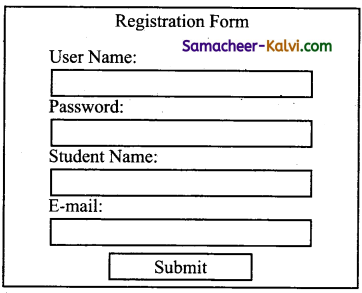
while ($row = mysql.i_fetch_array (Sresult) ) {
{
echo ‘ID:’ . $row[‘id’] . ‘<br>’;.
echo ‘Full Names:’ . $row[‘full_names’] . ‘<br>’;
echo ‘Gender:’ . $row[‘gender’] . ‘<br>’;
echo ‘Contact No:’ . $row[‘contact_no’] . ‘<br>’;
echo ‘Email:1 . $row[’email’] . ‘<br>’;
echo ‘City:’ . $row[‘city’] . ‘<br>’;
echo ‘Country:’ . $row[‘country’1 . ‘<br><br>’;
}
}
mysqli_close(Sconnection); //close the database connection
?>

Samacheer Kalvi TN State Board 12th Computer Applications Important Questions Chapter 9 Connecting PHP and MYSQL

Question 19.
What are the MySQLi function available PHP?
Answer:
PHP MySQLi functions are MySQli_query, MySQli_connect, MySQli_ fetch_array and MySQli_close.

Question 20.
What is MySQLi function?
Answer:
MySQLi function is a relational database driver used in the PHP scripting language to provide an interface with MySQL databases.

Question 21.
What are the types MySQLi function available PHP?
Answer:
The types of MySQLi Function in PHP are MySQli connect ( ) function, MySQlicIoseQ function, MySQliselectdb ( ) function, MySQli_affected_ rows( ) function, MySQIiconnecterror( ) function, MySQli_fetch_assoc( ) function etc.,

Samacheer Kalvi TN State Board 12th Computer Applications Important Questions Chapter 9 Connecting PHP and MYSQL

Question 22.
Difference between Connection and Close function.
Answer:

Connection

 Close

Before accessing MySQL database, connect to database server machine via PHP scripting language using MySQli_connect () functions.  MySQli_clos( ) function is used to close an existing opened database connection between PHP scripting and MySQL database server.
Syntax:  $conn = mysqli_connect($ servername, $username, $password, $DB_name);  Syntax: MySQli_close (“Connection Object”);

Question 23.
Give few examples of MySQLi Quries.
Answer:
MySQLi Quries are SELECT, SHOW, DESCRIBE, FROM, EXPLAIN, etc.,

Question 24.
What is Connection string?
Answer:

  1. In computing, a connection string is a string that specifies information about a data source and the means of connecting to it.
  2. It is passed in code to an underlying driver or provider in order to initiate the connection.

Samacheer Kalvi TN State Board 12th Computer Applications Important Questions Chapter 9 Connecting PHP and MYSQL

Question 25.
What is web Database?
Answer:

  1. A web database is a wide term for managing data online.
  2. A web database is a database application designed to be managed and accessed through the internet.

Question 26.
What is mysqli_fetch_assoc( ) Function?
Answer:
The mysqli_fetch_assoc( ) function fetches a result row as an associative array. .
Syntax: The mysqli_fetch_assoc (result) ;
where,
result – Required, specifies a result set identifier returned by mysqli_query( ).

Question 27.
Define mysqli_connect_error() Function.
Answer:

  • The mysqli_connect_error( ) function returns the error description from the last connection error.
  • Syntax: mysqli_connect_error ( ) ;
  • Return value – Returns a string that describes the error. NULL if no error occurred.

Samacheer Kalvi TN State Board 12th Computer Applications Important Questions Chapter 9 Connecting PHP and MYSQL

Question 28.
Define mysqli_affected_rows( ) Function.
Answer:
The mysqli_affected_rows( ) function returns the number of affected rows in the previous SELECT, INSERT, UPDATE, REPLACE, or DELETE query.
Syntax: mysqli_affected_rows (connection) ;
where,
connection – Requried. Specifies the MySQL connection to use.

Question 29.
Write the Syntax for MySQLi Queries.
Answer:

  • Syntax: mysqli_query (“Connection Object”, “SQL Query”) Where,
  • Connection Object – Required. Specifies the MySQL connection to use.
  • SQL Query – Required. Specifies the query string.

Question 30.
Write the purpose of MySQLi function available.
Answer:

  1. MySQLi function, returns an object to use with the mysqli_real_connect( ) function.
  2. MySQLi function asks to the server to kill MySQLi thread specified by the Processed Parameter.
  3. This function checks if there are more results from a multi query.
  4. It used to separate the queries with a semicolon against the database.

Samacheer Kalvi TN State Board 12th Computer Applications Important Questions Chapter 9 Connecting PHP and MYSQL

Question 31.
Differentiate mysqli_affected_rows( ) Function and mysqli_fetch_assoc( ) Function.
Answer:

mysqli_affected_rows( )

 mysqli_fetch_assoc( )

The mysqli_affected_rows( ) function returns the number of affected rows in the previous SELECT, INSERT, UPDATE, REPLACE or DELETE query.  The mysqli_fetch_assoc() function fetches a result rows as an associative array.
Return values: An integer greater than zero indicates the number of rows affected or retrieved.  Returns an associative array of strings representing fetched row.
-1 indicates that the query returned an error.  NULL if there are no more rows in result set.

Question 32.
Write MySQL Connection Syntax with example.
Answer:
The MySQL connection syntax:
mysqli_connect(“server Name”, “UserName”, “Password”, “DB Name”);
Where,
Server Name – Optional. Specifies a host name or an IP address.
User Name – Optional. Specifies the MySQL username.
Password Name – Optional. Specifies the MySQL password name. DB Name – Optional. Specifies the default database to be used.
Eg:
<?php –
Scon = mysqli_connect(“localhost”, “my_user”, “my-password”, “my-db”);
//check connection if (mysqli_connect_errno( ))
{
echo “Failed to connect to MySQL:”
Mysqli_connect_error ( ) ;
}
?>

Samacheer Kalvi TN State Board 12th Computer Applications Important Questions Chapter 9 Connecting PHP and MYSQL

Question 33.
Write a note PHP MySQL database connection.
Answer:
PHP MySQL database connection to connect database server machine.
To connect PHP MySQL database, steps are follows:

  1. Create database, Now return to the homepage of php myadmin.
  2. Create a folder in htdocs.
  3. Create a database connection File in PHP.
  4. Create new PHP file to check our database connection.
  5. Run it.
  6. Create Database connection.
  7. MySQLi procedural query.
  8. Connect MySQL database with PHP using PDO.

Question 34.
Discuss in detail about MySQL functions with example.
Answer:
MySQL has many built-in functions. It contains string, numeric, date, and some advanced functions in MySQL.

(i) Some MySQL string functions:

(a) ASCII – Returns the ASCII values for the specific character
Syntax: ASCII (character)
Eg:ASCII (Customer Name)

(b) Replace – Replace all occurences of a substring within a string, with a new substring.
Syntax: REPLACE (string, form_string, new_ string) ; Eg:select replace (“SQL NEW”, “SQL”, “HTML”);

(c) REVERSE – Reverse a string and returns the result.
Syntax: REVERSE (string) .
Eg: SELECT REVERSE (“RAMAN”);

(ii) MySQL numeric functions:

(a) AVG – Returns the average value of an expression.
Syntax: AVG (expression)
Eg: AVG (Price);

(b) COUNT – Returns the number of records returned by a selected query.
Syntax: COUNT (expression)
Eg: COUNT (Product ID) ;

(c) MOD – Returns the remainder of a number of divided by another number.
Syntax: MOD (x, y)
Eg: MOD (16, 4) ;

Samacheer Kalvi TN State Board 12th Computer Applications Important Questions Chapter 9 Connecting PHP and MYSQL

Question 35.
Explain the Database error handling and management process in PHP.
Answer:
Error handling is the process of catching errors raised by our program and then taking appropriate action. If we would handle errors properly then it may lead to many unforeseen consequences. Its very simple in PHP to handle errors.
Using die ( ) function:
While writing your PHP program you should check all possible error condition before going ahead and take appropriate action when required.
Eg:
<?php
if (!file_exists (“/tmp/test. txt”) )
{
die (“file not found”);
}
else{
$file=fopen (“/tmp/test. txt”, “r”) ;
Print “opend file successfully”;
)
?>

Samacheer Kalvi TN State Board 12th Computer Applications Important Questions Chapter 9 Connecting PHP and MYSQL

Question 36.
Defining custom error handling process.
Answer:
This function must be able to handle a minimum of two parameters (error level and error message) but can accept upto five parameters.
Syntax: error_function(error_level, error_message, error_file, error_line,error_context) ;

Error Report Levels:
These error report levels are the different types of error the user – defined error handler can be used for EWARNING, ENOTICE, EUSERERROR, E_USER WARNING, EUSERNOTICE, E_RECOVERABLE_ERROR,-E_ALL etc.,
Error Logging – By default, PHP sends an error log to the server’s logging system or a file.

Send an Error Message by E-mail: We will send an E-mail with an error message and end the script, if a specific errors occurs.

Question 37.
Explain in details types of MySQL connection method in PHP.
Answer:
PHP program, which will explain how to connect from your PHP to MYSQ1 database.

  • Connect using mysqli extension.
  • Connect using PDO.
  • Connect using traditional legacy MYSQl_functions.

(i) Connect from PHP using mysqli extension:
Cent os, php MySQli is already part of the php mysql package.
Create the following mysqli. php file under the Apache Document Root:
<?php
$conn = new mysqli (“localhost”, “root”, “DB pass”, “stuff”); .
mysqli – This function will initiate a new connection using MySQli extension. This function will take four arguments.
(a) hostname where the MySQl database is running.
(b) MySQl username to connect.
(c) Password for the MySQl user.
(d) MySQl database to connect.

(ii) Connect from PHP MySQL PDO extension:
PDO_MySQL drive implements the PDO interface provided by PHP to connect from your PHP program to MySQL database.
Create the following MySQl_pdo.php file under our Apache document Root:
<?php
$conn = new PDO (“mysql: host = localhost: dbname=stuff”, “root”, “DBPass”) ;
$conn set Attribute (PDO:: ATTR_ERRMODE, PDO:: ERRMODE_EXCEPTION);

• New PDO – This will create a new PDO object. The Three arguments are.
(a) MySQl connect string.
(b) MySQl username to connect.
(c) Password for the MySQl user.

(iii) Connect from PHP using legacy mysql_function:
Use this method only if we are using an older version of PHP and cannot upgrade it to the new version.
Create the following mysql legacy. php file under the Apache (isset($_POST [‘reg_user’]))

<?php
$Conn = mysql_connect (‘localhost’, ‘root’, ‘DB Pass’ ) ; mysql_select_db (“stuff”) ;
mysql_connect function takes three arguments.
(a) Hostname where the MySQL database is running.
(b) MySQl username to connect.
(c) Password for the MySQl user.

Samacheer Kalvi TN State Board 12th Computer Applications Important Questions Chapter 9 Connecting PHP and MYSQL

Question 38.
Explain MySQLi Queries with examples.
Answer:
mysqli_query( ) is the function that executes the MySQLi queries.
Squery is the SQL query to be executed. Slinkidentifier is optional, it can be used to pass in the server connection link.
MySQLi function can be used to execute the following query type:
• INSERT, SELECT, UPDATE, DELETE.
Syntax: <?php
mysqli_query(“Connection Object”, “Query”)
where,
Mysqli_query – is the function that executes the SQL queries.
Query – is the SQL query to be executed.
Connection object – used to pass in the server link.
Eg:
$con = mysqli_connect (“localhost”, “my_user”, “my_password”, “student_DB”) ;
$sql = “select student_name, student_age FROM .
student”; MySQli_query (Scon, $sql)

Question 39.
Create simple student Login Form to validate username and password using PHP and MySQL (Server side validation).
Answer:
Server, php
<?php
Session_start();
// initializing variables
Susername = ” “;
Serrors = Array();
//connect to the database
$db = mysqli_connect (‘localhost’, ‘root’, ‘ ‘registration’);
//Register user
if (isset ($_POST [‘reg_user’])}
{
//receive all input values from the form
$username = mysqli_real_escape_string($db, $POST[‘username’]);
$password_1 = mysqli_real_escape_string($db, $POST[‘password_1’]);
$password_2 = mysqli_real_escape_string($db, $POST[‘password_2’]);
//form validation
if(empty($username))
{array_push($errors, “username is required”);}
if(empty($password_1))
{array_push($errors, “password is required”);}
if ($password_1 = $password_2) ‘
{array_push ($errors, “The two passwords do not match”) ; }
//First check the database to make sure
$user_check_query = “SELECT*FROM users WHERE
username = ‘$username’ ;
$result = mysqli_query($db, $user_check_query);
$user = mysqli_fetch_assoc($result);
if ($user)
{
if($user)[‘user name’]=== $username)
{
{array_push($errors, “Username already exists”);
}
}
//Register user if there are no errors in the form
if (count ($errors)==0)
{
$password = md5($password_1);
$query = “INSERT INTO users (username, password) VALUES( ‘$username’, ‘$password’) “;
mysqli_query($db, $query);
$_SESSION[‘username’] = $username
$_SESSI0N[‘success’] = “we are now logged in”;
header(‘location:index.PhP’ ) ;
}
}
//. . .

Samacheer Kalvi TN State Board 12th Computer Applications Important Questions Chapter 9 Connecting PHP and MYSQL

Question 40.
Create simple student registration form to insert students details like Student Name, username and password etc. Using PHP and MySQL (Server side validation).
Answer:
//student Registration form code-server side program using php .
<?php
require(‘db.php’);
//Form submited Insert values
If(isset($_REQUEST[‘username’]))
{
$username = mysqli_real_escape_string($con, $username);
$email = stripslashes ($_REQUEST[’email’]);
$email = mysqli_real_escape_string($con, $email);
$password = stripslashes($_REQUEST[‘Password’]);
$password = mysqli_real_escape_string($con, $password);
$Dob = date(“y-m-d H:i:s”);
$query = insert into ‘student’ (username, password email, Dob)
Values (’$username’ , ‘” .md5 ($password) , ‘$email’, ($dob’)
Sresult = mysqli_query($con, $query); if($result)
{
echo “<div class form’>
<h3> you are registered successfully </h3>
<br/>click here to <a href = ‘login.php’> Login</a> </div>”;
}
}
else
{
?>
<div class = “form”>
<h1> Registration </h1>
<form name = “registration” action = ” ” method = “POST”>
<input type = “text” name = “username” placeholder = “Username” required/>
<input type> = “email” name = “email” placeholder = “Email” required/>
<input type = “password” name = “password” placeholder = “password” required/>
<input type = “DOB” name = “Date of Birth” Placeholder = “DOB” required/>
<input type = “submit” name = “submit” value = “Register”/>
</form>
</div>
<?php
}
?>
</body>
</html>

Samacheer Kalvi TN State Board 12th Computer Applications Important Questions Chapter 9 Connecting PHP and MYSQL

Choose the correct answer:

Question 1.
Which one of the following databases has PHP supported almost since the beginning?
(a) Oracle
(b) SQL
(c) SQL+
(d) MYSQL
Answer:
(d) MYSQL

Question 2.
If there is no error, then what will the error () method return?
(a) true
(b) false
(c) empty string
(d) zero
Answer:
(c) empty string

Question 3.
Which method returns the error code generated from the execution of the last MySQL function?
(a) ermo( )
(d) ermumber( )
(c) erromo( )
(d) erromumber( )
Answer:
(a) ermo( )

Samacheer Kalvi TN State Board 12th Computer Applications Important Questions Chapter 9 Connecting PHP and MYSQL

Question 4.
Which one of the following statements can be used to select the database?
(a) $mysqli = select db (‘databasename’);
(b) mysqli = select_db (‘databasename’);
(c) mysqli → select db (‘databasename’);
(d) $mysqli → select_db (‘databasename’);
Answer:
(d) $mysqli → select_db (‘databasename’);

Question 5.
Which one of the following methods can be used to diagnose and display information about a MySQL connection error?
(a) connect_error( )
(b) connect_ermo( )
(c) mysqli_connect_errono( )
(d) mysqli_connect_error( )
Answer:
(c) mysqli_connect_errono( )

Question 6.
Which method retrieves each row from the prepared statement result and . assigns the fields to the bound results?
(a) get_row( )
(b) fetch_row( )
(c) fetch( )
(d) row( )
Answer:
(c) fetch( )

Samacheer Kalvi TN State Board 12th Computer Applications Important Questions Chapter 9 Connecting PHP and MYSQL

Question 7.
Which one of the method is used to retrieve the number of rows affected by an INSERT, UPDATE, or DELETE query?
(a) num_rows( )
(b) affected_rows( )
(c) changed_rows( )
(d) new_row( )
Answer:
(b) affected_rows( )

Question 8.
Which of the methods are used to manage result sets using both associative and indexed arrays?
(a) get_array( ) and get_row( )
(b) get_array( ) and get_column( )
(c) fetch_array( ) and fetch_row( )
(d) fetch_array( ) and fetch_column( )
Answer:
(c) fetch_array( ) and fetch_row( )

Question 9.
Which one of the following methods recuperates any memory consumed by a result set?
(a) destroy( )
(b) remover( )
(c) alloc( )
(d) free( )
Answer:
(d) free( )

Samacheer Kalvi TN State Board 12th Computer Applications Important Questions Chapter 9 Connecting PHP and MYSQL

Question 10.
Which one of the following methods is responsible for sending the query to the database?
(a) query( )
(b) sendquery( )
(c) sendquery( )
(d) querysend( )
Answer:
(a) query( )

Question 11.
The updated MySQL extension released with PH5 is typically referred to as:
(a) MYSQL
(b) MYSQLe
(c) MYSQli
(d) MYSAly
Answer:
(c) MYSQli

Question 12.
Which one of the following lines need to be uncommented or added in the php.ini file so as to enable mysqli extension?
(a) extension = php_mysqli.dll
(b) extension = mysql.dll
(c) extension = php mysqli.dl
(d) extension = mysqli.dl
Answer:
(a) extension = php_mysqli.dll

Samacheer Kalvi TN State Board 12th Computer Applications Important Questions Chapter 9 Connecting PHP and MYSQL

Question 13.
In which version of PHP was MySQL Native Driver (mysqlnd) introduced?
(a) PHP 5.0
(b) PHP 5.1
(c) PHP 5.2
(d) PHP 5.3
Answer:
(d) PHP 5.3

Question 14.
Which one of the following statements should be used to include a file?
(a) #include ‘filename’;
(b) include ‘filename’;
(c) @include ‘filename’;
(d) include;
Answer:
(b) include ‘filename’;

Question 15.
Which version of MySQL introduced the prepared statements?
(a) MySQL 4.0
(b) MySQL 4.1
(c) MySQL 4.2
(d) MySQL 4.3
Answer:
(b) MySQL 4.1

Samacheer Kalvi TN State Board 12th Computer Applications Important Questions Chapter 9 Connecting PHP and MYSQL

Question 16.
Which of the following methods is used to execute the statement after the parameters have been bound?
(a) bind_param( )
(b) bind_result( )
(c) bound_param( )
(d) boundresult( )
Answer:
(a) bind_param( )

Question 17.
Which one of the following methods is used to recuperating prepared statements resources?
(a) end ( )
(b) finish( )
(c) final( )
(d) close ( )
Answer:
(d) close ( )

Question 18.
Which method rolls back the present transaction?
(a) commit( )
(b) undo( )
(c) back( )
(d) rollback( )
Answer:
(d) rollback( )

Samacheer Kalvi TN State Board 12th Computer Applications Important Questions Chapter 9 Connecting PHP and MYSQL

Question 19.
What will be the output of the following PHP code?
<?php
$on_e = 1;
$tw_o = 2;
$thre_e = 3;
$fou_r = 4;
echo $on_e/$tw_o + $thre_e/$fou_r;
?>
(a) 0.75
(b) 0.05
(c) 1.25
(d) Error
Answer:
(c) 1.25

Question 20.
What will be the output of the following PHP code?
<?php
echo $red;
?>
(a) 0
(b) No output
(c) red
(d) error
Answer:
(b) No output

Question 21.
What will be the output of the following PHP code?
<?php
$four4 = 4;
$three = 3;
$two = 2;
echo $four4 + $three3/$two2 -1;
?>
(a) 4.5
(b) 7
(c) 3.5
(d) Error
Answer:
(a) 4.5

Samacheer Kalvi TN State Board 12th Computer Applications Important Questions Chapter 9 Connecting PHP and MYSQL

Question 22.
Match the following:

(A) local host  (i) database name
(B) Sdbname  (ii) servername
(C) MySQli__query  (iii) web framework
(D) symphony  (iv) function

(a) (A) – (ii); (B) – (i); (C) – (iv); (D) – (iii)
(b) (A) – (ii); (B) – (iii); (C) – (iv); (D) – (i)
(c) (A) – (iii); (B) – (ii); (C) – (i); (D) – (iv)
(d) (A) – (iii); (B) – (i); (C) – (iv); (D) – (ii)
Answer:
(a) (A) – (ii); (B) – (i); (C) – (iv); (D) – (iii)

Question 23.
Choose the incorrect pair:
(a) MSSQLSERVER – ROMS
(b) DELETE – SQL
(c) MySQLi – PHP
(d) MySQL – Client side web
Answer:
(d) MySQL – Client side web

Question 24.
Choose the correct pair:
(a) HIPHOP’s – PHP Version
(b) HPHP’s – MySQL
(c) PRADO – function
(d) Cake PHP – website
Answer:
(a) HIPHOP’s – PHP Version

Samacheer Kalvi TN State Board 12th Computer Applications Important Questions Chapter 9 Connecting PHP and MYSQL

Question 25.
Choose the incorrect statement:
(a) SQL is a domain-specific language used in programming and design.
(b) MySQL is an open-source relational database management system.
(c) A database is an organized collection of software.
(d) A query is a request for data or information from a database table.
Answer:
(c) A database is an organized collection of software.

Question 26.
Choose the correct statement:
(a) PHP is open source and scripting language.
(b) PHP is a client-side scripting language.
(c) PHP cannot embed easily with HTML.
(d) Web servers cannot support PHP scripting language.
Answer:
(a) PHP is open source and scripting language.

Question 27.
Assertion (A):
The combination of PHP and MySQL has become very popular server side web scripting language in Internet.
Reason (R):
Seventy percentage of website has been built by PHP and MySQL.
(a) Both A and R are true, and R is the correct explanation for A.
(b) Both A and R are true, but R is not the correct explanation for A.
(c) A is true, But R is false.
(d) A is false, But R is true.
Answer:
(a) Both A and R are true, and R is the correct explanation for A.

Samacheer Kalvi TN State Board 12th Computer Applications Important Questions Chapter 9 Connecting PHP and MYSQL

Question 28.
Assertion (A):
Facebook technology stack consists of application written in many language, including PHP and many others.
Reason (R):
Facebook has manythings built in PHP, Actually its not the real PHP, Facebook have written alternative version of PHP that is HiPHOP’s HPHP’c which help to convert PHP code into C++.
(a) Both A and R are true, and R is the correct explanation for A
(b) Both A and R are true, but R is not the correct explanation for A.
(c) A is true, But R is false.
(d) A is false, But R is true.
Answer:
(a) Both A and R are true, and R is the correct explanation for A

Question 29.
Pick the odd one out.
(a) Facebook
(b) Twitter
(c) Linkedin
(d) CakePHP
Answer:
(d) CakePHP

Samacheer Kalvi TN State Board 12th Computer Applications Important Questions Chapter 9 Connecting PHP and MYSQL

Question 30.
Pick the odd one out.
(a) SQL
(b) MySQL
(c) Queries
(d) DB2
Answer:
(c) Queries

Question 31.
Which one of the following statements instantiates the mysqli class?
(a) mysqli = new mysqli( )
(b) Smysqli = new mysqli( )
(c) $mysqli->new.mysqli( )
(d) mysqli->new.mysqli( )
Answer:
(b) Smysqli = new mysqli( )

Question 32.
Which one is correct way, we can retrieve the data in the result set of MySQL using PHP?
(a) mysql_fetch_row
(b) mysql_fetch_array
(c) mysql_fetch_object
(d) All the above
Answer:
(d) All the above

Samacheer Kalvi TN State Board 12th Computer Applications Important Questions Chapter 9 Connecting PHP and MYSQL

Question 33.
How Can we Create a Database Using PHP and MySQL?
(a) mysqli_create_db(“Database Name”)
(b) mysqli_create_db(“Data”)
(c) create_db(“Database Name”)
(d) create_db(“Data”)
Answer:
(a) mysqli_create_db(“Database Name”)

Question 34.
Which is the correct function to execute the SQL queries in PHP ?
(a) mysqli_query(“Connection Object”, “SQL Query”)
(b) query(“Connection Object”, “SQL Query”)
(c) mysql_query(“Connection Object”, “SQL Query”)
(d) mysql_query(“SQL Query”)
Answer:
(a) mysqli_query(“Connection Object”, “SQL Query”)

Question 35.
Which is the correct function Closing Connection in PHP ?
(a) mysqli_close(“Connection Object”);
(b) close(“Connection Object”);
(c) mysql_close(“Connection Object”);
(d) mysqli_close(“Database Object”);
Answer:
(a) mysqli_close(“Connection Object”);

Samacheer Kalvi TN State Board 12th Computer Applications Important Questions Chapter 9 Connecting PHP and MYSQL

Question 36.
Which is the correct function to establish Connection in PHP?
(a) MySQli_connect(“ServerName”, “User Name”, “Password”, “DBName”);
(b) connect(“Server Name”, “User Name”, “Password”, “DB Name”);
(c) MySQl_connect(“Server Name”, “User Name”, “Password”, “DB Name”);
(d) mysqli connect (“Database Object”);
Answer:
(a) MySQli_connect(“ServerName”, “User Name”, “Password”, “DBName”);

Question 37.
Which is the not a correct MySQL Function in PHP ?
(a) MySQli_connect() Function
(b) MySQli_close() Function
(c) MySQli_select_data() Function
(d) MySQli_affected_rows() Function
Answer:
(c) MySQli_select_data() Function

Question 38.
How many parameter are required for MySQLi connect function in PHP?
(a) 2
(b) 3
(c) 4
(d) 5
Answer:
(c) 4

Samacheer Kalvi TN State Board 12th Computer Applications Important Questions Chapter 9 Connecting PHP and MYSQL

Question 39.
How many parameter are required for MySQLi query function in PHP?
(a) 2
(b) 3
(c) 4
(d) 5
Answer:
(a) 2

Question 40.
How many parameter are required for MySQLi Close function in PHP?
(a) 1
(b) 2
(c) 3
(d) 5
Answer:
(a) 1

Samacheer Kalvi TN State Board 12th Computer Applications Important Questions Chapter 9 Connecting PHP and MYSQL

Question 41.
Which version of PHP supports MySQLi factions ?
(a) Version 2.0
(b) Version 3.0
(c) Version 4.0
(d) Version 5.0
Answer:
(d) Version 5.0

TN Board 12th Computer Applications Important Questions

TN Board 12th Computer Applications Important Questions Chapter 11 Network Examples and Protocols

TN State Board 12th Computer Applications Important Questions Chapter 11 Network Examples and Protocols

Question 1.
Write the function of Internet Protocol (IP).
Answer:

  • The main function is to allows Internet working an boost up the internet.
  • Internet portocol will deliver packets from the source host and it will deliver to the destination host.

Question 2.
What is Network protocols?
Answer:
Network protocols is that the usual procedures, rules, formal standards and policies comprised of formats which allocates communication between more . than one device which connected to the network.

Question 3.
What is the unique aim of ARPA Net?
Answer:
ARPAC (Advanced Research Project Agency). The unique aim was to generate a network that would permit users of a research computer from one university to ‘talk to’ research computers on other universities.

Samacheer Kalvi TN State Board 12th Computer Applications Important Questions Chapter 11 Network Examples and Protocols

Question 4.
What is Internet?
Answer:
A network of networks, where the users at any one computer can, if they have permission get information from any other computer. The Internet is a network of global connections.

Question 5.
What do you understand about Internet?
Answer:
The Internet denotes to the global communication system, including infrastructure and hardware, whereas the web is one of the services interconnected over the Internet.

Question 6.
What is Extranet?
Answer:
Extranet is a private network that uses Internet technology and the public telecommunication system to securely share business’s information with suppliers, vendors, partners, customers, or other businesses.

Samacheer Kalvi TN State Board 12th Computer Applications Important Questions Chapter 11 Network Examples and Protocols

Question 7.
What is IoT?
Answer:
IoT (Internet of Things) is to the digital interconnection of everyday objects with the internet.
Eg: Home appliances, wearable devices, automobiles etc.,

Question 8.
What is refer ‘thing’ in IoT?
Answer:
The ‘thing’ in IoT refers to an objects that have been assigned an IP address and have the ability to collect and transfer data over a network without manual assistance or intervention.

Question 9.
What is called cells?
Answer:
A mobile network or cellular network as it is made up of a large number of signals areas called cells. These cells join to form a large coverage area.

Samacheer Kalvi TN State Board 12th Computer Applications Important Questions Chapter 11 Network Examples and Protocols

Question 10.
Define Mobile base station.
Answer:

  • A mobile device will connect to the nearest or least base station.
  • The base stations are connected to digital exchange where the communication is sent to other telephone or data networks.

Question 11.
What is SIM?
Answer:
SIM (Subscriber Identity Module) technology to authenticate a user for identification and billing purposes, and to encrypt the data to prevent listen without permission.

Question 12.
Expand the following.
(i) NMT
(ii) GSM
(iii) TMDA
(iv) CDMA
Answer:
(i) NMT – Nordic Mobile Telephone
(ii) GSM – Global System for Mobile
(iii) TMDA – Time Division Multiple Access
(iv) CDMA – Code Division Multiple Access

Samacheer Kalvi TN State Board 12th Computer Applications Important Questions Chapter 11 Network Examples and Protocols

Question 13.
What is GPRS?
Answer:
GPRS (General Packet Radio Service) is a data service which enables mobile devices to send and receive messages, picture messages, and e-mails.

Question 14.
What is Li-Fi?
Answer:
Li-Fi is a wireless technology which uses light-emitting diodes (LEDs) for data transmission.

Question 15.
What is Wi-Fi?
Answer:
Wi-Fi stands for wireless fidelity. It is wireless network technology that permits computers and alternative devices to be connected to every alternative into a local area network and to the net without wires and cables.

Question 16.
What technology use Wi-Fi?
Answer:
Wi-Fi uses radio frequencies for data transmission. And is additionally stated as wireless local area network.

Samacheer Kalvi TN State Board 12th Computer Applications Important Questions Chapter 11 Network Examples and Protocols

Question 17.
What is RFID?
Answer:
RFID (Radio Frequency Identification) used for radio waves to read and capture information stored on a tag attached to an object.

Question 18.
What is a RFID tag?
Answer:
RFID tag has silicon Mircochip attached to a small antenna and mounted on a substrate.

Question 19.
What is a reader in RFID?
Answer:
A reader has a scanner with antennas to transmit and receive signals, used for communication.

Question 20.
What is a controller in RFID?
Answer:
A controller is the host computer with a microprocessor which receives the reader input and process the data.

Samacheer Kalvi TN State Board 12th Computer Applications Important Questions Chapter 11 Network Examples and Protocols

Question 21.
What is Transmission Control Protocol (TCP)?
Answer:
The Transmission control protocol is accountable for guaranteeing the trustworthy transmission of data.

Question 22.
What are important and Frequent TCP/IP protocols?
Answer:
The important and Frequent TCP/IP protocols are HTTP, HTTPs and FTP.

Question 23.
What is Network Layer?
Answer:
Network Layer is the layer where data is addressed, packaged, and routed among networks.

Question 24.
What is User Datagram Protocol (UDP)?
Answer:
User Datagram protocol provides connectionless, unreliable, one-to-one (or) one-to-many delivery.

Samacheer Kalvi TN State Board 12th Computer Applications Important Questions Chapter 11 Network Examples and Protocols

Question 25.
What is DNS?
Answer:
DNS (Domain Name System) refer to- other host computers by using names rather than numbers.

Question 26.
What is a MAC Addresses?
Answer:
MAC (Medium Access Control) address is a hardware identification number that uniquely identifies each device on a network.

Question 27.
Write the broad types of Networking protocols.
Answer:
The bread types of Networking protocols are network communication protocols, Network security protocols and Network management protocols.
(i) Network communication protocols is that the basic data communication protocols which specific as HTTP and TCP/IP.
(ii) Network security protocols is that which implement security over network communications and include HTTP, SFTP and SSL.
(iii) Network management protocols will provide network governance and maintenance and include ICMP and SNMP.

Samacheer Kalvi TN State Board 12th Computer Applications Important Questions Chapter 11 Network Examples and Protocols

Question 28.
List out generations of mobile networks.
Answer:

  1. First generation (1G) – 1981 – NMT launch
  2. Second generation (2G) – 1991 – GSM launch
  3. Third generation (3G) – 2003 – UK 3G launch
  4. Second to third generation bridge (2.5) – 2000 – GPRS launch
  5. Fourth generation (4G) – 2007
  6. Fifth generation (5G) – 2019 +

Question 29.
Write short notes on RFID.
Answer:

  1. RFID – Radio Frequency Identification
  2. RFID uses RF wireless technology to identify.
  3. RFID used for radio waves to reaad and capture information stored on a tag attached to an object.
  4. Tag can be read from several feet away and does not need to be in direct- line-of-sight of the reader to be tracked.
  5. RFID has been made up of two parts a reader and a tag or a label.
  6. RFID tags are installed with a transmitter and receiver.

Samacheer Kalvi TN State Board 12th Computer Applications Important Questions Chapter 11 Network Examples and Protocols

Question 30.
Write short notes on RFID component.
Answer:

  1. RFID component on the tags has two parts, they are microchip and the Antenna.
  2. A microchip which stores nad processes the information.
  3. The antenna to receive and transmit a signal
  4. The tag replies the information from its memory bank.
  5. The reader will transmit to read the result to RFID computer program.

Question 31.
Write the Frequent TCP/IP protocols.
Answer:
The Frequent TCP/IP protocols are HTTP, HTTPs, FTP.
Frequent TCP/IP protocols:
(i) HTTP (Hyper Text Transfer Protocol) is used between a web client and web server and it guarantees non-secure data transmissions.
(ii) HTTPS (Hyper Text Transfer Protocol Secure) is used between a web client and a web server ensures secure data transmissions.
(iii) FTP (File Transfer Protocol) is used between computers for sending and receiving file.

Samacheer Kalvi TN State Board 12th Computer Applications Important Questions Chapter 11 Network Examples and Protocols

Question 32.
What do you know about domain names and TCP/IP addresses?
Answer:

  1. TCP/IP is a set of protocols which governs communications among all computers on the Internet.
  2. The address for any website is not as easy as to remember, domain name are used instead.
    For example, 216.58.216.164 is one of the IP address for google and google.com is the domain name.

Question 33.
Explain about Network Interface layer.
Answer:

  1. Network interface layer is the bottom most level layer.
  2. It is comparable to that of the open system interconnection physical and data link layers.
  3. Different TCP/IP protocols are being used at this layer, Ethernet and – Token Ring for local area networks and protocols such as X.25 , Frame Relay, and ATM for Wide Area Networks.
  4. It is assumed to be an unreliable layer.

Question 34.
Explain the important internet protocols that operate at the network layer.
Answer:
The important internet protocols that operate at the Network layer are.

  1. Internet protocol (IP): Routable protocol which uses IP addresses to deliver packets.
  2. It is an unreliable protocol, does not guarantee delivery of information.
  3. ARP (Address Resolution Protocol) resolves IP addresses to MAC (Medium Access Control) addresses.
  4. ICMP (Internet Control Message Protocol) used by network devices to send error messages and operational information.
  5. IGMP (Internet Group Management Protocol) is a communication protocol used by hosts and routers to send multicast messages to multiple IP addresses at once.

Samacheer Kalvi TN State Board 12th Computer Applications Important Questions Chapter 11 Network Examples and Protocols

Question 35.
Explain the Transport Layer.
Answer:
The sessions are recognised and data packets are swapped between hosts in this layer.
The two main protocols established at this layer are

  1. TCP (Transmission Control Protocol) provides reliable connection oriented transmission between two hosts. It ensures delivery of packets between the hosts.
  2. UDP (User Datagram Protocol) provides connectionsless, unreliable, one-to-one or one-to-many delivery.

Question 36.
Explain the most popular Application layer protocols.
Answer:
The most popular application layer protocols are

  1. HTTP (Hyper Text Transfer Protocol) is core protocol of the World Wide Web.
  2. FTP (File Transfer Protocol) is that enables a client to send and receive complete files from a server.
  3. Telnet is connect to another computer on the internet. ‘
  4. SMTP (Simple Mail Transfer Protocol) is provide e-mail services.
  5. DNS (Domain Name System) is refer to other host computers by using names rather than numbers.

Samacheer Kalvi TN State Board 12th Computer Applications Important Questions Chapter 11 Network Examples and Protocols

Question 37.
Expand the following.
(i) EDGE
(ii) LED
(iii) Li-Fi
(iv) Wi-Fi
(v) UMTS
(vi) MPLS
Answer:
(i) EDGE – Enhanced Data rates for Global Evolution
(ii) LED – Light Emitting Diode
(iii) Li-Fi – Light Fidelity
(iv) Wi-Fi – Wireless Fidelity
(v) UMTS – Universal Mobile Telecommunication Systems
(vi) MPLS – Multiprotocol Label Switching.

Question 38.
List out the Application of Internet.
Answer:

  1. Download programs and files
  2. Social media
  3. E-mail
  4. E-Banking
  5. Audio and video conferencing
  6.  E – Commerce
  7. File sharing
  8. E – Governance
  9. Information browsing
  10. Search the web addresses for access through search engine.
  11. Chatting and etc.,

Samacheer Kalvi TN State Board 12th Computer Applications Important Questions Chapter 11 Network Examples and Protocols

Question 39.
List out the Applications of Intranet.
Answer:

  1. Sharing of company policies/rules and regulations.
  2. Access employee database.
  3. Distribution of Circulars/office orders. .
  4. Access product and customer data.
  5. Sharing of information of common interest.
  6. Launching of personal/departmental home pages.
  7. Submission of reports.
  8. Corporate telephone directories.

Question 40.
List out the Applications of Extranet.
Answer:

  1. Customer communications
  2. Online education/training
  3. Account status enquiry
  4. Inventory enquiry
  5. Online discussion
  6. Supply-chain management
  7. Order status enquiry
  8. Warranty registration
  9. Claims
  10. Distributor promotions.

Samacheer Kalvi TN State Board 12th Computer Applications Important Questions Chapter 11 Network Examples and Protocols

Question 41.
Explain the generations of mobile Networks.
Answer:
(i) First Generation (1G) – 1981 – NMT Launch:
During the initial periods the mobile systems were based on analog transmission. Here NMT (Nordic Mobile Telephone) communication is used, It very poor voice quality, and they used unsure and unencrypted transmission, which leads to the spoofing of its identifies.

(ii) Second Generation (2G) – 1991 – GSM launch:
GSM (Global System Mobile communication) was most popular standard which is used second generation.
GSM mobile system grown digital transmission using SIM. SIM stands for subscriber identity module technoloty to authenticate a user for identification and billing purposes, and to encrypt the data to prevent listen without permission.

(iii) Third Generation (3G) – 2003 – 3G Launch:
In this generation of . mobile systems merges different mobile technology standards, and uses higher frequency bands for transmission and code division mutiple access to delivery data rates. MMS, Voice, Video and data are supported in this generation.

(iv) Fourth Generation (4G) – 2007:
4G was based on an adhoc networking model where there was no need for a fixed infrastructure operation. ADHOC networking requires global mobility feature and connectivity to a global IPV6 network to support an IP address for each mobile device.

(v) Fifth Generation (5G) – 2019+:
5G targets to performance the high data rate, reduced latency, energy saving, cost reduction, higher system, capacity and massive device connectivity.

5G new radio can access at lower frequencies from 600 MHz to 6 GHz.

Samacheer Kalvi TN State Board 12th Computer Applications Important Questions Chapter 11 Network Examples and Protocols

Question 42.
Explain working of passive and Active RFID system.
Answer:
(i) A passive RFID system using induction coupling method.
The RFID tag gets power from the reader through the inductive coupling method.

TN State Board 12th Computer Applications Important Questions Chapter 11 Network Examples and Protocols 1

(ii) A passive RFID system using EM wave propagation method:
The reader antenna transmits the electromagnetic waves that are received by the antenna.

TN State Board 12th Computer Applications Important Questions Chapter 11 Network Examples and Protocols 2

(iii) Working of Active RFID system:
The reader sends signal to the tag using an antenna.

TN State Board 12th Computer Applications Important Questions Chapter 11 Network Examples and Protocols 3

Samacheer Kalvi TN State Board 12th Computer Applications Important Questions Chapter 11 Network Examples and Protocols

Question 43.
Expand of the following.
(i) IoT
(ii) ATM
(iii) WLANS
(iv) OSI
(v) SMTP
(vi) ICMP
(vii) IGMP
(viii) ARP
(ix) UDP
(x) ITU
Answer:
(i) IoT – Internet of Things
(ii) ATM – Asynchronous Transfer Mode/Automatic Teller Machine (in) WLANS – Wireless Local Area Network System
(iv) OSI – Open System Interconnection
(v) SMTP – Simple Mail Transfer Protocol
(vi) ICMP – Internet control Message Protocol
(vii) IGMP – Internet Group Management Protocol
(viii) ARP – Address Resolution Protocol
(ix) UDP – User Datagram Protocol
(x) ITU – International Telecommunication Union.

Samacheer Kalvi TN State Board 12th Computer Applications Important Questions Chapter 11 Network Examples and Protocols

Question 44.
Explain all other network protocols other that TCP/IP and OSI model.
Answer:
Except TCP/IP and OSI are called other network protocols.
(i) HTTP (Hyper Text Transfer Protocol):
A protocol used between a web client and a Webserver protects non-secure data transmissions.

(ii) HTTPS (Hyper Text Transfer Protocol Secure):
A protocol used between a web client and a Webserver permits secure data transmissions.

(iii) FTP (File Transfer Protocol):
Used between computers for sending and receiving data.

(iv) IP(Internet Protocol):
It routable Protocol which uses IP addresses to deliver packets.

(v) ARP (Address Resolution Protocol):
Resolves IP addresses to MAC (Medium Access Control) Addresses.

(vi) ICMP (Internet Control Message Protocol):
Used by network devices to send error messages and operational information.

(vii) SMTP (Simple Mail Transfer Protocol):
Provides e-mail services.

Samacheer Kalvi TN State Board 12th Computer Applications Important Questions Chapter 11 Network Examples and Protocols

Question 45.
Define Intranet.
Answer:
Intranet is a private network within an enterprise to share company data and computing resources between the employees. It may consists of many interlinked local area networks.

Question 46.
What is the uses of mobile networks?
Answer:

  1. Mobile networking assign to the technology that can support data/voice, network connectivity using via radio transmission solution, wireless.
  2. Mobile networks are being used in diverse areas such as travel, education, stock trading, military, package delivery, disaster recovery, and medical emergencycare etc.,

Question 47.
List out the benefits of WiFi.
Answer:

  1. It povides mobility.
  2. It provides connection to Internet.
  3. Flexibility of LAN
  4. Ensures connectivity
  5. It allows places that are remote to benefit from connectivity.
  6. Low cost, high benefits.

Samacheer Kalvi TN State Board 12th Computer Applications Important Questions Chapter 11 Network Examples and Protocols

Question 48.
How many types of RFID system available and what are they?
Answer:
Two types of RFID tags were active RFID system and passive RFID systems.
(i) Active RFID system:
The tag has its own power source. The systems used for larger distance and to track value goods like vehicles.

(ii) Passive RFID system:
The tag gets power through power from a reader antenna to the tag antenna. They are used or shorter range transmission.

Question 49.
Expand HTTP, HTTPS, FTP.
Answer:
HTTP – Hyper Text Transfer Protocol ,
HTTPS – Hyper Text Transfer Protocol Secure
FTP – File Transfer Protocol

Question 50.
Complete Internet, Intranet and Extranet.
Answer:

TN State Board 12th Computer Applications Important Questions Chapter 11 Network Examples and Protocols 4

Samacheer Kalvi TN State Board 12th Computer Applications Important Questions Chapter 11 Network Examples and Protocols

Question 51.
List out the components of a RFID system.
Answer:
The components of a RFID system follows.

(i) A RFID tag:
It has silicon microchip attached to a small antenna and mounted on a substrate.

(ii) A Reader:
It has a scanner with antenna to transmit and receive signals, used for communication.

(iii) A Controller:
It is the host computer with a microprocessor which receives the reader input and process the data.

Question 52.
Write short notes on HTTP, HTTPS, FTP.
Answer:
HTTP (Hyper Text Transfer Protocol):
It used between a web client and web server protects non-secure data transmission. The core protocol of the World Wide Web.

HTTPS (Hyper Text Transfer Protocol Secure):
It used between a web client and a web server permits secure data transmissions.

FTP (File Transfer Protocol):
It used between computers for sending and receiving data. Enables a client to send and receive complete files from a server.

Samacheer Kalvi TN State Board 12th Computer Applications Important Questions Chapter 11 Network Examples and Protocols

Question 53.
What are the layers available in TCP/IP?
Answer:
There are four layers available in TCP/IP Protocol. They are

  1. Network Access Layer – Concerned with building packets.
  2. Internet Layer – Describes how packets are to be delivered.
  3. Transport Layer – Ensure the proper tmasmission of data.
  4. Application Layer – Application network processes. These processes include FTP, HTTP, and SMTP.

Question 54.
Expand ARP, ICMP, SMTP and DNS.
Answer:
ARP – Address Resolution Protocol
ICMP – Internet Control Message Protocol
SMTP – Simple Mail Transfer Protocol
DNS – Domain Name System

Samacheer Kalvi TN State Board 12th Computer Applications Important Questions Chapter 11 Network Examples and Protocols

Question 55.
Explain about Internet, Intranet and Extranet.
Answer:
INTERNET:
(i) The Internet, “the Net” is a world wide system of computer networks.
(ii) A network of networks where the users at any one computer can, if they have permission, get information from any other computer.
(iii) The internet is a network of global connections – Comprising private, public, business academic and government networks – linked by guided, wireless and fibre-optic technologies.
(iv) It was perceived by the advanced research projects agency (ARPA) of the US government in 1969 and was first recognized as the ARPANET.

INTRANET:
(i) Intranet is a private network within an enterprise to share company data and computing resources between the employees.
(ii) It may consist of many interlinked local area networks.
(iii) It includes connections through one or more gateway computers to outside internet.

EXTRANET:
Extranet is a private network that uses Internet technology and the public Telecommunication system to securely share business’s information with suppliers, vendors, partners, customers, or other business.

Samacheer Kalvi TN State Board 12th Computer Applications Important Questions Chapter 11 Network Examples and Protocols

Question 56.
Discuss about OSI model with its layers.
Answer:
OSI (Open System Interconnection) model was found in the year 1934, general framework that enables network protocols along with software and systems to be developed based on general set of guidelines. It describes the standards for the inter-computer communication.

OSI Layers:
(i) Physical Layer:
This is the Is* layer, it defines the electrical and physical specifications for devices.

(ii) Data Link Layer:
It is the 2nd layer and it guarantees that the data transmitted are free of errors. This layer has simple protocols like “802.3 for Ethernet” and “802.11 for Wi-Fi”.

(iii) Network layer:
It is the 3rd layer determining the path of the data packets.
At this layer, routing of data packets is found using IP Addressing.

(iv) Transport Layer:
It is the 4th layer that guarantees the transportation/ sending of data is successful. It includes the error checking operation.

(v) Session Layer:
It is the 5th layer, identifies the established system session between different network entities. It controls dialogues between computers.

(vi) Presentation on Layer:
It is the 6th layer that does the translation of data to the next layer. Encryption and decryption protocols occur in this layer.

(vii) Application Layer:
It is the 7th layer, which acts as the user interface platform comprising of software within the system.

Samacheer Kalvi TN State Board 12th Computer Applications Important Questions Chapter 11 Network Examples and Protocols

Question 57.
Difference between TCP/IP and OSI model.
Answer:

TCP/IP Model

OSI Model

TCP/IP is standard protocol used for every network including internet. OSI is not a protocol but a reference model used for understanding and designing the system architecture.
TCP/IP is a four layered model. OSI has seven layered model.
TCP/IP is used for establishing a connection and communicating through the network. OSI is a conceptual model which is not practically used for communication.
TCP/IP protocol tells how information should be packaged, sent, and received, as well as how to get to its destination. OSI model that enables network protocols along with software and systems to be developed based on general set of guidelines.
TCP/IP is a combination of two protocols, transmission control protocol (TCP) and internet protcol (IP). It describes the standards for the inter – computer communication.
ProtocoTdependent standard.  Protocol independent standard.

Question 58.
Explain about the development, merits and demerits in Mobile networks.
Answer:
Merits:

  1. Mobile Network provides voice/data services even while roaming.
  2. It is used in areas where cables cannot be laid out due to its wireless nature.
  3. It is easy to maintain and to upgrade the equipments.
  4. The mobile is connected immediately with mobile network.
  5. The quality and flexibility of services that offer the customers.
  6. Greater access to modem apps and services and improved networking capabilities.

Demerits:

  1. Mobile Network offers less data rate compare to wired networks.
    Eg: Fibre optics.
  2. The wireless communication is influenced by climatic conditions and interference from other wireless devices.
  3. The installation of antennas for mobile network require space, foundation tower, time and effort.
  4. There are different wireless standards used in mobile networks such as GSM, CDMA, LTE etc.,
  5. Work place distractions as the range of technologies and devices increases.
  6. Increased IT security needs-portable devices are vulnerable to security risks.

Samacheer Kalvi TN State Board 12th Computer Applications Important Questions Chapter 11 Network Examples and Protocols

• List out some web address with http and https.

Question 59.
Find some of the http web addresses.
Answer:

  1. http: // www.worldbank.org
  2. http: // www.ox.ac.uk
  3. http: // www.ucla.edu
  4. http: // www.mit.edu
  5. http: // www.fortune.com

Question 60.
Give some example for https.
Answer:

  1. https: // www.time.com
  2. https: // www.dailymail.co.uk
  3. https: // www.un.org
  4. https: // www.redcross.org
  5. https: // www.hilton.com

Question 61.
Can you know difference between http and https.
Answer:

http

 https

URL begins with “http://”  URL starts with “https://”
User port number 80 for comimunication  User port number 443 for communication
It is considered to be unsecured  It is considered to be secure
Encryption is absent  Encryption is present
ft does not require any certificates  It needs SSL certifications

Samacheer Kalvi TN State Board 12th Computer Applications Important Questions Chapter 11 Network Examples and Protocols

Choose the correct answer:

Question 1.
Which is the principal of the cpmmunication protocol and working with boostup the internet?
(a) Internet Protocol (IP)
(b) Simple Mail Transfer Protocol (SMTP)
(c) File Transfer Protocol (FTP)
(d) User Datagram Protocol (UDP)
Answer:
(a) Internet Protocol (IP)

Question 2.
Which is a network of global connections?
(a) Extranet
(b) Intranet
(c) Internet
(d) Networks
Answer:
(c) Internet

Question 3.
Which is a private network within an enterprise to share company data?
(a) Extranet
(b) Intranet
(c) Internet
(d) Networks
Answer:
(b) Intranet

Samacheer Kalvi TN State Board 12th Computer Applications Important Questions Chapter 11 Network Examples and Protocols

Question 4.
Which is refers to the.digital interconnection of everyday objects with the internet?
(a) Extranet
(b) Intranet
(c) Networks
(d) Internet of Things (IoT)
Answer:
(d) Internet of Things (IoT)

Question 5.
Which type is used you to send e-mail to your friend?
(a) Extranet
(b) Intranet
(c) Internet
(d) IoT
Answer:
(c) Internet

Question 6.
Which type is used to accessing your record in the employee personnel file?
(a) Extranet
(b) Intranet
(c) Internet
(d) IoT
Answer:
(b) Intranet

Samacheer Kalvi TN State Board 12th Computer Applications Important Questions Chapter 11 Network Examples and Protocols

Question 7.
Which type is used for checking availability of inventory from an outside ‘ supplier?
(a) Extranet
(b) Intranet
(c) Internet
(d) IoT
Answer:
(a) Extranet

Question 8.
Which network is madeup of large number of signals areas called cells?
(a) Mobile Network
(b) Local Area Network
(c) Wide Area Network
(d) Metropolitan Network
Answer:
(a) Mobile Network

Question 9.
Which Transmission launched in First generation of mobiles?
(a) NMT Launch
(b) GSM Launch
(c) GPRS Launch
(d) 2G Launch
Answer:
(a) NMT Launch

Samacheer Kalvi TN State Board 12th Computer Applications Important Questions Chapter 11 Network Examples and Protocols

Question 10.
Which Transmission launched in second generation on mobiles?
(a) NMT Launch
(b) GSM Launch
(c) GPRS Launch
(d) 2G Launch
Answer:
(b) GSM Launch

Question 11.
SIM stands for:
(a) Standard Identified Mobile
(c) Subscriber Identified Mobile
(b) Standard Individual Mobile
(d) Subscriber Identity Module
Answer:
(d) Subscriber Identity Module

Question 12.
Which mobile systems grown digital transmission using SIM?
(a) NMT
(b) GPRS
(c) GSM
(d) 2G
Answer:
(c) GSM

Samacheer Kalvi TN State Board 12th Computer Applications Important Questions Chapter 11 Network Examples and Protocols

Question 13.
GPRS stands for:
(a) General Packet Radio Service
(b) Government Program Radio Service
(c) General Program Radio Service
(d) Government Program Rare Service
Answer:
(a) General Packet Radio Service

Question 14.
Which data service is to send and receive picture message and e-mails in mobiles?
(a) GSM
(b) NMT
(c) GPRS
(d) 2G
Answer:
(c) GPRS

Question 15.
Which is a wireless technology uses light-emitting diodes (LEDs) for data transmission?
(a) Li-Fi
(b) Wi-Fi
(c) GSM
(d) GPRS
Answer:
(a) Li-Fi

Samacheer Kalvi TN State Board 12th Computer Applications Important Questions Chapter 11 Network Examples and Protocols

Question 16.
Which is used radio frequencies for data transmission?
(a) Li-Fi
(b) Wi-Fi
(c) GSM
(d) GPRS
Answer:
(b) Wi-Fi

Question 17.
Li-Fi short form:
(a) Light Fidelity
(b) Light Fiction
(c) Light Finite
(d) Limit Fidelity
Answer:
(a) Light Fidelity

Question 18.
Which one of the following is not a application of Internet?
(a) Social media
(b) E-Mail
(c) E-banking
(d) claims
Answer:
(d) claims

Samacheer Kalvi TN State Board 12th Computer Applications Important Questions Chapter 11 Network Examples and Protocols

Question 19.
The term Li-Fi was first used by:
(a) Harald Haas
(b) Steven H.Walker
(c) D. Eisenhower
(d) John Murphy
Answer:
(a) Harald Haas

Question 20.
WCDMA stands for:
(a) Wide computer Division Multiple Access
(b) Wideband Code Division Multiple Access
(c) Wideband Compile Direct Multiple Access
(d) Wide Connect Direct Multiple Access
Answer:
(b) Wideband Code Division Multiple Access

Question 21.
Which generation is an adhoc networking model where there was no need for a fixed infrastructure operation?
(a) 2G
(b) 3G
(c) 4G
(d) 5G
Answer:
(c) 4G

Samacheer Kalvi TN State Board 12th Computer Applications Important Questions Chapter 11 Network Examples and Protocols

Question 22.
Which is used for radio waves to read and capture information stored on a tag attached to an object?
(a) GPRS
(b) EDGE
(c) UMTS
(d) RFID
Answer:
(d) RFID

Question 23.
How many parts types are madeup of RFID?
(a) 2
(b) 3
(b) 4
(d) 5
Answer:
(a) 2

Question 24.
How many component are there in RFID?
(a) 2
(b) 3
(c) 4
(d) 5
Answer:
(a) 2

Samacheer Kalvi TN State Board 12th Computer Applications Important Questions Chapter 11 Network Examples and Protocols

Question 25.
Which year was found open system interconnection (OSI)?
(a) 1952
(b) 1950
(c) 1932
(d) 1934
Answer:
(d) 1934

Question 26.
Which OSI layer defines the electrical and physical specifications for devices?
(a) Physical
(b) Data Link
(c) Network
(d) Transport
Answer:
(a) Physical

Question 27.
Which OSI layer is guarantees that transmitted are free of error?
(a) Physical
(b) Data Link
(c) Network
(d) Transport
Answer:
(b) Data Link

Samacheer Kalvi TN State Board 12th Computer Applications Important Questions Chapter 11 Network Examples and Protocols

Question 28.
Which OSI layer is determining path and route of the data packets?
(a) Physical
(b) Data link
(c) Network
(d) Transport
Answer:
(c) Network

Question 29.
Which OSI Layer that guarantees the sending of data is successful?
(a) Physical
(b) Data Link
(c) Network
(d) Transport
Answer:
(d) Transport

Question 30.
Which OSI layer that controls dialogues between computers?
(a) Transport
(b) Session
(c) Presentation
(d) Application
Answer:
(b) Session

Samacheer Kalvi TN State Board 12th Computer Applications Important Questions Chapter 11 Network Examples and Protocols

Question 31.
Which OSI Layer that occurs Encryption and decryption protocols?
(a) Transport
(b) Session
(c) Presentation
(d) Application
Answer:
(c) Presentation

Question 32.
Which OSI layer act as the user interface perform comprising of software within the system?
(a) Transport
(b) Session
(c) Presentation
(d) Application
Answer:
(d) Application

Question 33.
Which is a set of protocols that governs communications among all computers on the Internet? .
(a) HTTP
(b) TCP/IP
(c) HTTPS
(d) FTP
Answer:
(b) TCP/IP

Samacheer Kalvi TN State Board 12th Computer Applications Important Questions Chapter 11 Network Examples and Protocols

Question 34.
Which protocol specifies the logistics of the packets that are sent out over networks?
(a) IP
(b) HTTP
(c) HTTPS
(d) FTP
Answer:
(a) IP

Question 35.
Which protocol is accountable for guaranteeing the trustworthy transmission of data?
(a) TCP
(b) IP
(c) FTP
(d) HTTP
Answer:
(a) TCP

Question 36.
Which protocol is used between a web client and web server and it guarantees non-secure data transmission?
(a) HTTP
(b) HTTPS
(c) FTP
(d) TCP
Answer:
(a) HTTP

Samacheer Kalvi TN State Board 12th Computer Applications Important Questions Chapter 11 Network Examples and Protocols

Question 37.
Which protocol is used between a web client and a web server ensures secure data transmission?
(a) HTTP
(b) HTTPS
(c) FTP
(d) TCP
Answer:
(b) HTTPS

Question 38.
Which protocol is used between computers for sending and receiving file?
(a) HTTP
(b) HTTPS
(c) FTP
(d) TCP
Answer:
(c) FTP

Question 39.
Which is the bottom most level layer?
(a) Network Interface
(b) Physical
(c) Transport
(d) Application
Answer:
(a) Network Interface

Samacheer Kalvi TN State Board 12th Computer Applications Important Questions Chapter 11 Network Examples and Protocols

Question 40.
Which layer is used where data is addressed, packaged40. Which layer is used where data is addressed, packaged, and routed among networks?
(a) Network Interface
(b) Network
(c) Transport
(d) Physical
Answer:
(b) Network

Question 41.
Which is address that gives hardware identification number?
(a) MAC
(b) ICMP
(c) IGMP
(d) SMTP
Answer:
(a) MAC

Question 42.
Which Protocol used by network devices to send error messages and operational information?
(a) MAC
(b) ICMP
(c) IGMP
(d) SMTP
Answer:
(b) ICMP

Samacheer Kalvi TN State Board 12th Computer Applications Important Questions Chapter 11 Network Examples and Protocols

Question 43.
Which Protocol used by hosts and routers to send multicast messages to multiple IP addresses at once?
(a) MAC
(b) ICMP
(c) IGMP
(d) SMTP
Answer:
(c) IGMP

Question 44.
Which protocol provides connectionless, unreliable, one-to-one or one-to- . many delivery?
(a) IP
(b) TCP
(c) FTP
(d) UDP
Answer:
(d) UDP

Question 45.
Which is connect to another computer on the Internet?
(a) DNS
(b) SMTP
(c) Telnet
(d) FTP
Answer:
(c) Telnet

Samacheer Kalvi TN State Board 12th Computer Applications Important Questions Chapter 11 Network Examples and Protocols

Question 46.
Which year was launched first generations of mobile networks?
(a) 1981
(b) 1989
(c) 1991
(d) 2000
Answer:
(c) 1991

Question 47.
Which has silicon microship attached to a small antenna in RFID system?
(a) RFID tag
(b) A reader
(c) A controller
(d) None of these
Answer:
(a) RFID tag

Question 48.
Which has a scanner with antennas to transmit and receive signals in RFID system?
(a) RFID tag
(b) A reader
(c) A controller
(d) None of these
Answer:
(b) A reader

Samacheer Kalvi TN State Board 12th Computer Applications Important Questions Chapter 11 Network Examples and Protocols

Question 49.
Which is the host computer with a microprocessor that receives the reader input and process the data?
(a) RFID tag
(b) A reader
(c) A controller
(d) None of these
Answer:
(c) A controller

Question 50.
Match the following.

(A) Internet  (i) Enterprise
(B) Intranet  (ii) Global
(C) Extranet  (iii) Objects
(D) Internet of things  (iv) Telecommunication

(a) (A) – (iii); (B) – (ii); (C) – (iv); (D) – (i)
(b) (A) – (iii); (B) – (iv); (C) – (i); (D) – (ii)
(c) (A) – (ii); (B) – (i); (C) – (iv); (D) – (iii)
(d) (A) – (ii); (B) – (iii); (C) – (iv); (D) – (i)
Answer:
(c) (A) – (ii); (B) – (i); (C) – (iv); (D) – (iii)

Question 51.
Match the following.

(A) 1G  (i) Adhoc
(B) 2G  (ii) MMS
(C) 3G  iii) NMT
(D) 4G  (iv) GSM

(a) (A) – (iii); (B) – (iv); (C) – (ii); (D) – (i)
(b) (A) – (iii); (B) – (ii); (C) – (i); (D) – (iv)
(c) (A) – (ii); (B) – (i); (C) – (iv); (D) – (iii)
(d) (A) – (ii); (B) – (iii); (C) – (iv); (D) – (i)
Answer:
(a) (A) – (iii); (B) – (iv); (C) – (ii); (D) – (i)

Samacheer Kalvi TN State Board 12th Computer Applications Important Questions Chapter 11 Network Examples and Protocols

Question 52.
Match the following.

(A) Physical Layer  (i) Sending data
(B) Data Link Layer  (ii) Path of data
(C) Network Layer  (iii) Free errors
(D) Transport Layer  (iv) Electrical

(a) (A) – (iii); (B) – (ii); (C) – (iv); (D) – (i)
(b) (A) – (iii); (B) – (iv); (C) – (i); (D) – (ii)
(c) (A) – (iv); (B) – (iii); (C) – (ii); (D) – (i)
(d) (A) – (iv); (B) – (ii); (C) – (i); (D) -( iii)
Answer:
(c) (A) – (iv); (B) – (iii); (C) – (ii); (D) – (i)

Question 53.
Match the following.

(A) HTTP  (i) Secure data
(B) HTTPs  (ii) Non secure data
(C)FTP  (iii) Logistics of packets
(D) IP  (iv) File transaction

(a) (A) – (ii); (B) – (iii); (C) – (iv); (D) – (i)
(b) (A) – (ii); (B) – (i); (C) – (iv); (D) – (iii)
(c) (A) – (iii); (B) – (iv); (C) – (i); (D) – (ii)
(d) (A) – (iii); (B) – (i); (C) – (ii); (D) – (iv)
Answer:
(b) (A) – (ii); (B) – (i); (C) – (iv); (D) – (iii)

Question 54.
Match the following.

(A) Application Layer  (i) TCP
(B) Transport Layer  (ii) Ethernet
(C) Network Layer  (iii) HTTP
(D) Network Interface Layer  (iv) IP

(a) (A) – (iii); (B) – (i); (C) – (iv); (D) – (ii)
(b) (A) – (iii); (B) – (ii); (C) – (iv); (D) – (i)
(c) (A) – (iv); (B) – (iii); (C) – (i); (D) – (ii)
(d) (A) – (iv); (B) – (i); (C) – (ii); (D) – (iii)
Answer:
(a) (A) – (iii); (B) – (i); (C) – (iv); (D) – (ii)

Samacheer Kalvi TN State Board 12th Computer Applications Important Questions Chapter 11 Network Examples and Protocols

Question 55.
Choose the incorrect pair.
(a) Internet – AREA
(b) Intranet – Private
(c) Extranet – Global
(d) IoT – Object
Answer:
(c) Extranet – Global

Question 56.
Choose the incorrect pair.
(a) 1G – 1981
(b) 2G – 1994
(c) 3G – 2003
(d) 4G – 2010
Answer:
(d) 4G – 2010

Question 57.
Choose the incorrect pair.
(a) Application layer – MPEG
(b) Presentation layer – TSL
(c) Session layer – SAP
(d) Transport layer – TCP
Answer:
(a) Application layer – MPEG

Samacheer Kalvi TN State Board 12th Computer Applications Important Questions Chapter 11 Network Examples and Protocols

Question 58.
Choose the correct pair.
(a) HTTP – Secure data
(b) HTTPs – Non-secure data
(c) DP – logistics
(d) TCP – Data processing
Answer:
(c) DP – logistics

Question 59.
Choose the correct pair.
(a) SMTP – e-mail service
(b) DNS – using numbers
(c) ICMP – hardware Identification
(d) MAC – error message
Answer:
(a) SMTP – e-mail service

Question 60.
Choose the incorrect statement.
(a) The main function is to allows internet working and boostup the internet.
(b) Internet protocol (IP) will deliver packets from the source host.
(c) Network protocols have to do ene-to-end process of secure on time and manage data or network communication.
(d) Network communication protocols is that the Basic data communication protocols which specific as SMTP and SNMP.
Answer:
(d) Network communication protocols is that the Basic data communication protocols which specific as SMTP and SNMP.

Samacheer Kalvi TN State Board 12th Computer Applications Important Questions Chapter 11 Network Examples and Protocols

Question 61.
Choose the incorrect statement.
(a) The internet “The Net” is a world wide system of computer networks.
(b) The internet is a network of global conections
(c) Intranet is a private network that uses internet technology and the public telecommunication.
(d) Extranet is a private network that to securly share business’s information.
Answer:
(c) Intranet is a private network that uses internet technology and the public telecommunication.

Question 62.
Choose the incorrect statement.
(a) Internet of things (IoT) refers to the digital interconnection of everyday objects with the Internet.
(b) The ‘Thing’ in IoT refers to an objects that have been assigned an IP address.
(c) Wi-Fi uses microwaves for data transmission.
(d) Li-Fi is a wireless technology which uses light-emitting diodes for data transmission.
Answer:
(c) Wi-Fi uses microwaves for data transmission.

Question 63.
Choose the incorrect statement.
(a) Wi-Fi stands for wireless Fidelity.
(b) 5G target to performance the high data rate, reduced latency, energy saving, cost reduction, higher system, capacity, and massive device connectivity.
(c) RFID – Rare Frequency Identified.
(d) Wi-Fi is additionally stated as wireless local area network that stands for wireless local area network.
Answer:
(c) RFID – Rare Frequency Identified.

Samacheer Kalvi TN State Board 12th Computer Applications Important Questions Chapter 11 Network Examples and Protocols

Question 64.
Choose the incorrect statement.
(a) RFID component on the tags has four parts.
(b) A microship which stores and process the information, and the antenna to receive and transmit a signal.
(c) A RFID tag has silicon microchip attached to a small antenna.
(d) A reader has a scanner with antennas to transmit and receive signals.
Answer:
(a) RFID component on the tags has four parts.

Question 65.
Choose the correct statement.
(a) Open System Interconnection (OSI) model was found in the year 1948.
(b) The physical layer defines that the data transmitted are free of errors.
(c) Data link layer defines that electrical specifications for devices.
(d) Network layer is determining the path of the data packets.
Answer:
(d) Network layer is determining the path of the data packets.

Question 66.
Choose the correct statement.
(a) Session layer that guarantees the sending of data is successful.
(b) Transport layer that controls dialogues between computers.
(c) Presentation layer does encryption and decryption protocols occurs.
(d) Application layer does the translation of data to the next layer.
Answer:
(c) Presentation layer does encryption and decryption protocols occurs.

Samacheer Kalvi TN State Board 12th Computer Applications Important Questions Chapter 11 Network Examples and Protocols

Question 67.
Choose the correct statement.
(a) TCP/IP is a combination of two protocols.
(b) Internet Protocol (IP) is accountable for guaranteeing the trust worthy transmission of data.
(c) The Transmission Control Protocol (TCP) specifies logistics of the packets that are sent out over networks.
(d) FTP is used between a web client and a web server and it guarantees non- secure data transmissions.
Answer:
(a) TCP/IP is a combination of two protocols.

Question 68.
Choose the correct statement.
(a) Network protocols otherthan OSI and TCP/IP were simply known as other network protocols.
(b) HTTPS positions for Hypertext transmitted protocol service.
(c) HTTP in address bar mainly deals with scientific applications.
(d) TCP/IP has six layers.
Answer:
(a) Network protocols otherthan OSI and TCP/IP were simply known as other network protocols.

Question 69.
Choose the correct statement.
(a) IGMP is a network devices to send error messages and operational information.
(b) Network Interface layer is the bottommost level layer.
(c) Network layer is a communication used by hosts and routers to send multicast messages.
(d) DNS (Domain Name System) that refer to other host computers by using numbers rather than names.
Answer:
(b) Network Interface layer is the bottommost level layer.

Samacheer Kalvi TN State Board 12th Computer Applications Important Questions Chapter 11 Network Examples and Protocols

Question 70.
Assertion (A):
The Internet “the Net”, is a world wide system of computer networks.
Reason (R):
The internet is a network of global connections linked by guided, wireless and Fiberoptic technologies.
(a) Both A and R are true, and R is the correct explanation for A.
(b) Both A and R are true, but R is not the correct explanation for A.
(c) A is true, But R is false.
(d) A is false, But R is true.
Answer:
(a) Both A and R are true, and R is the correct explanation for A.

Question 71.
Assertion (A):
A mobile network or cellular network as it is made up a large number of signals area called cells.
Reason (R):
Cells will often be smaller in size in large towns, as the number of users in the area is more.
(a) Both A and R are true, and R is the correct explanation for A.
(b) Both A and R are true, but R is not the correct explanation for A.
(c) A is true, But R is false.
(d) A is false, But R is true.
Answer:
(b) Both A and R are true, but R is not the correct explanation for A.

Question 72.
Assertion (A):
GPRS is a data service which enables mobile devices to send and receive picture messages and e-mails.
Reason (R):
GPRS was introduced between 2G and 3G for period of mobile networking development.
(a) Both A and R are true, and R is the correct explanation for A.
(b) Both A and R are true, but R is not the correct explanation for A.
(c) A is true, But R is false.
(d) A is false, But R is true.
Answer:
(c) A is true, But R is false.

Samacheer Kalvi TN State Board 12th Computer Applications Important Questions Chapter 11 Network Examples and Protocols

Question 73.
Assertion (A):
Wi-Fi stands for Wired Fidelity.
Reason (R):
Wi-Fi provides connection to Internet.
(a) Both A and R are true, and R is the correct explanation for A.
(b) Both A and R are true, but R is not the correct explanation for A.
(c) A is true, But R is false.
(d) A is false, But R is true.
Answer:
(d) A is false, But R is true.

Question 74.
Assertion (A):
RFID component on the tag a microchip which receive and • transmit a signal.
Reason (R):
RFID component on Antenna which stores and process the information.
(a) Both A and R are true.
(b) Both A and R are false.
(c) A is true, But R is false.
(d) A is false, But R is true.
Answer:
(b) Both A and R are false.

Question 75.
Pick the odd one out.
(a) Internet
(b) APRANet
(c) Intranet
(d) Extranet
Answer:
(b) APRANet

Samacheer Kalvi TN State Board 12th Computer Applications Important Questions Chapter 11 Network Examples and Protocols

Question 76.
Pick the odd one out.
(a) NMT
(b) GSM
(c) GPRS
(d) HTTP
Answer:
(d) HTTP

Question 77.
Pick the odd one out.
(a) Li-Fi
(b) Wi-Fi
(c) WiMAX
(d) DNS
Answer:
(d) DNS

Question 78.
The ………….., “the Net,” is a worldwide system of computer networks.
(a) internet
(b) mobile
(c) communication
(d) protocol
Answer:
(a) internet

Samacheer Kalvi TN State Board 12th Computer Applications Important Questions Chapter 11 Network Examples and Protocols

Question 79.
Which one of the following will be easy the way to uses Internet technology and the public telecommunication system to securely share business’s information with suppliers, vendors, partners and customers?
(a) Extranet
(b) Intranet
(c) Arpanet
(d) Arcnet
Answer:
(a) Extranet

Question 80.
Match the following and choose the correct answer:
(i) HTTP -The core protocol of the World Wide Web.
(ii) FTP- enables a client to send and receive complete files from a server.
(iii) SMTP – Provide e-mail services.
(iv) DNS- Refer to other host computers by using names rather than numbers.
(a) (i), (ii), (iii), (iv)
(b) (ii), (iii), (iv), (i)
(c) (iii), (iv), (i), (ii)
(d) (iv), (iii), (ii), (i)
Answer:
(a) (i), (ii), (iii), (iv)

Question 81.
Communication over ……………….. is be made up of voice, data, images and text messages.
(a) social media
(b) mobile network
(c) whatsapp
(d) software
Answer:
(b) mobile network

Samacheer Kalvi TN State Board 12th Computer Applications Important Questions Chapter 11 Network Examples and Protocols

Question 82.
Wi-Fi stands for:
(a) Wireless Fidelity
(b) Wired Fidelity
(c) Wired optic Fibre
(d) Wireless optic Fibre
Answer:
(a) Wireless Fidelity

Question 83.
A TCP/IP network with access restricted to members of an organization:
(a) LAN
(b) MAN
(c) WAN
(d) Intranet
Answer:
(d) Intranet

Question 84.
RFID stands for:
(a) Radio Free Identification
(b) Real Frequency Identity
(c) Radio Frequency Indicators
(d) Radio Frequency Identification
Answer:
(d) Radio Frequency Identification

Samacheer Kalvi TN State Board 12th Computer Applications Important Questions Chapter 11 Network Examples and Protocols

Question 85.
It guarantees the sending of data is successful and which checks error on operation at OSI layer is:
(a) Application Layer
(b) Network Layer
(c) Transport Layer
(d) Physical Layer
Answer:
(c) Transport Layer

Question 86.
Which orie of the following will secure data on transmissions?
(a) HTTPS
(b) HTTP
(c) FTP
(d) SMTP
Answer:
(a) HTTPS

Question 87.
…………. provfdes e-mail service.
(a) DNS
(b) TCP
(c) FTP
(d) SMTP
Answer:
(d) SMTP

Samacheer Kalvi TN State Board 12th Computer Applications Important Questions Chapter 11 Network Examples and Protocols

Question 88.
……………. refer to other host computers by using names rather than numbers.
(a) DNS
(b) TCP
(c) FTP
(d) SMTP
Answer:
(a) DNS

Question 89.
TCP/IP is a combination of two protocols:
(i) Transmission Control Protocol (TCP)
(ii) Internet Protocol (IP)
(iii) Selection Protocol (SP)
(iv) Captiai Protocol (CP)
(a) (i), (ii)
(b) (i), (iii)
(c) (iii), (iv)
(d) (ii), (iii)
Answer:
(a) (i), (ii)

TN Board 12th Computer Applications Important Questions